|


| |
|
|
Process Control/Chau: Web Support |
|
|
We provide here hints to features in newer versions of MATLAB that cannot be covered
in the MATLAB Sessions of the text. We shall keep the explanations brief, and
in a way the pointers here serve as a a bridge to the MATLAB on-line help, which
is excellently and thoroughly written. Maybe too thorough for a beginner; so we
keep things simple here. Once you get going, the MATLAB on-line help is what you
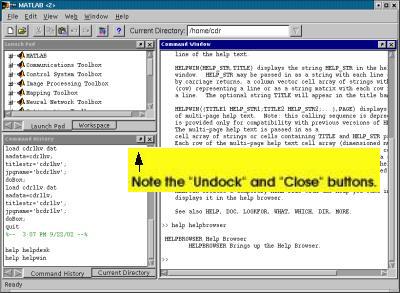
should rely on. User Interface (the MATLAB Desktop) To the untrained eye, it can look busy and intimidating. A tiny version is shown here: Q: Can I make the look less cluttered? Help! All under the Help pull-down menu. The key is to choose the MATLAB Help entry. (It launches the help browser, really with the helpbrowser command. This new command replaces the helpwin and helpdesk commands in older versions.) Keep the browser open all the time while you are learning MATLAB. This HTML-based Help Browser is extremely nice. You may immediately see the "MATLAB Desktop" link. Click on that and you should get a big image (unlike our tiny one above) with lots of arrows and legends.M-file Editor (for Unix/Linux) Release 12.1 ported the nice color-coded Windows editor to Unix/Linux too, but one word of caution: on Unix/Linux, the keystroke equivalent commands (for cut/copy/paste etc.) are totally different from what we consider as the "norm." So we either have to memorize a new set of commands or have to put up with point-and-click all the time. |
Top of Page / Back to Contents |
|
© Cambridge University Press 2003. Privacy policy |
|