Chapter Outline
0. You Choose
1. What Is a Motion Picture?
2. What Is an Instructional Video?
3. What Is the Role of Instructional Video in Education and Training?
4. Are Instructional Videos Effective?
5. How Can We Design Effective Instructional Videos?
6. Should We Focus on Instructional Media or Instructional Methods?
7. Conclusion
You Choose
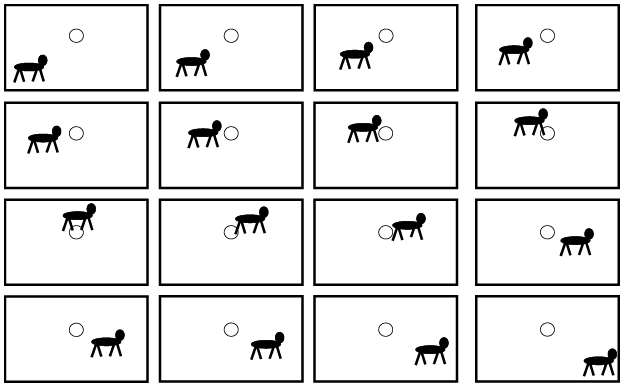
Suppose I make a series of drawings so that each one shows a slight change from the previous one, such as the sixteen drawings in Figure 1.1. We begin with a cow on the left on the ground and a moon in the middle in the sky above. I gradually draw the cow slightly upward and to the right on each successive frame until it is above the moon, and then I gradually draw the cow to the right and downward on each successive frame until the last frame shows the cow back down on the ground on the right of the frame. What will happen if I cut out the sixteen frames and stack them in order, with the first frame on the bottom and the last frame on top? I staple them together at the very top of the frames, creating what is called a flipbook. I lay the flipbook on a table or desk and rapidly flip through them so I first see the first frame and so on up to the last frame. What will I see and why?
1. You will see a series of sixteen still drawings, because that is what is in the flipbook.
2. You will see a blur, because our eyes cannot interpret the rapidly presented series of still drawings.
3. You will see motion in which the cow appears to be moving up and over the moon and back down from left to right, because our visual system creates the illusion of motion from a series of static images.
Sixteen still drawings for a flipbook on a cow jumping over the moon.
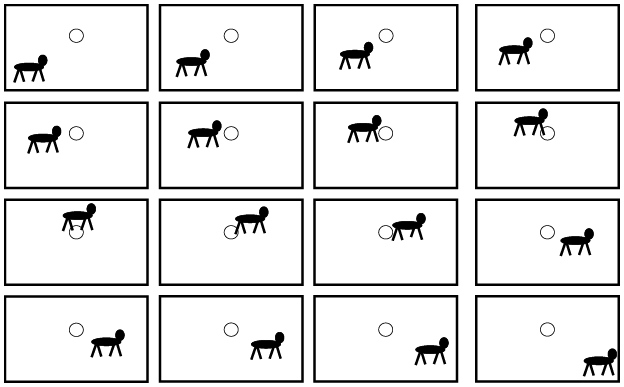
I can see why you might want to select option 1 or 2 because they seem to make sense, but sometimes common sense is not quite right. If you create and operate a flipbook appropriately, you should see motion – that is, a motion picture. That is why I hope you chose option 3.
A flipbook is an early demonstration of a motion picture dating back centuries. In 1868, John Barnes Linnett patented a version of a flipbook that he called the Kineograph – literally moving picture. Later, in 1894, Herman Caskler invented the Mutoscope, in which he put a series of still pictures in a rotating cylinder. This became the basis for coin-operated machines in penny arcades and amusement parks in the early 1900s that could show a short motion picture based on rapidly rotating the cylinder as the viewer focused on one spot through a peephole. As you will learn in Chapter 2, “Historical Foundations of Instructional Video,” the technology for creating motion pictures has advanced since the time of flipbooks, with movies becoming popular in the early 1900s, followed in succession by television, video recorders, and computer-based digital videos.
What Is a Motion Picture?
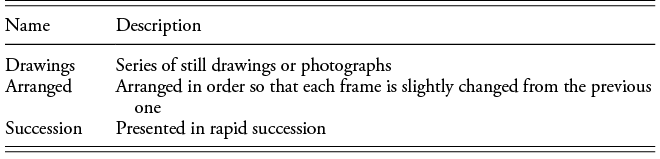
As you can see from the example in Figure 1.1, a flipbook is simply a series of still drawings (or photos), each slightly changed from the previous one, presented in rapid succession, thereby creating the illusion of continuous motion. Table 1.1 lists the three elements needed to create the illusion of continuous motion – that is, a motion picture. In short, a motion picture is a series of gradually changed still images presented in rapid succession. There is actually no motion presented to your eyes – just a rapid series of carefully arranged still images – but your visual system fills in the motion from one image to the next, creating the illusion of motion. Thus, the motion in motion pictures is created in your visual system. In an early textbook on visual instruction, Dorris (Reference Dorris1928, p. 182) succinctly explained how the motion in movies works: “The motion picture as it is seen on the screen is an optical illusion, that is, there really is no action within any picture itself. What really is seen is a series of still pictures projected on the screen in rapid succession, at a rate of sixteen pictures per second.”
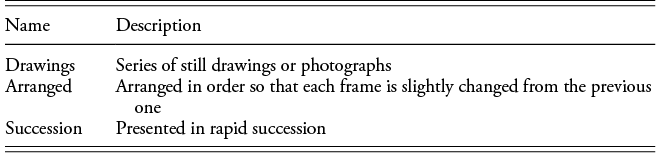
Table 1.1 Long description
Table with two columns titled Name and Description presents three fundamental components of animation or film. Structure contains three data rows. Row 1 lists Drawings with the description Series of still drawings or photographs. Row 2 lists Arranged with the description Arranged in order so that each frame is slightly changed from the previous one. Row 3 lists Succession with the description Presented in rapid succession.
As shown in Table 1.2, the same principle for creating motion pictures that applies to flipbooks that are stored on paper also applies to movies that are stored on film, video cam recordings stored on video tape, and digital videos stored as computer-based data. In all of these media formats, motion pictures are created the same way – by rapidly presenting a series of static images that are arranged to gradually change from frame to frame.
| Media format | Input | Storage | Output |
|---|---|---|---|
| Flipbook | Static drawings | Paper | Flipping through the deck |
| Movie | Still photos | Celluloid film | Projecting on a screen |
| Video tape | Video recorder | Video tape | Video playback |
| Digital video | Digital camera | Computer memory | Data download |
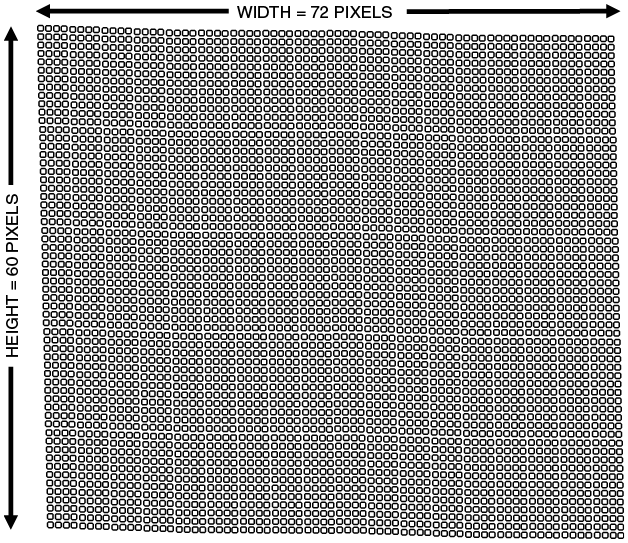
Let’s take a closer look at the fourth line in Table 1.2, involving the digital videos that you might watch on platforms such as YouTube or the video lectures you might watch on platforms such as Khan Academy or Coursera. A digital video consists of a series of static images, called frames. Each frame consists of many small portions of the screen called pixels, such as shown in Figure 1.2 for the example of 72 × 60 pixels. We describe the frame in terms of the width and height of the screen, with standard definition having a width of 720 pixels and a height of 480 pixels. Think of the screen as a cake that you slice into 720 equally spaced vertical cuts and 480 equally spaced horizontal cuts, yielding a lot of small portions called pixels.
How pixels fill the screen (72 × 60 pixel example).
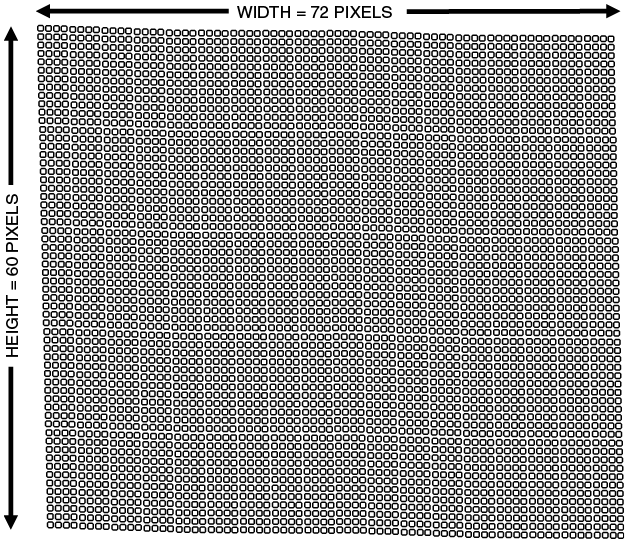
A computer stores data on each pixel. For high definition (HD), each frame is sliced into smaller portions (called pixels) – with a width of 1,280 pixels and a height of 720 pixels. Going even further, full HD cuts each frame into even smaller portions (or pixels) – with a width of 1,920 and a height of 1,080. As you can imagine, as the number of pixels increases, the amount of information that needs to be stored increases, placing greater demands on the computer processors while the motion picture becomes more vivid.
Once we have all the frames stored as data about each pixel, the next step is to present the frames in rapid succession – usually at a rate of twenty-four frames per second (as is typical in movies). For smoother presentations or high action presentations such as live sports or gaming, the presentation rate can increase to sixty frames per second or even 120 frames per second. As you can imagine, the faster the presentation rate, the higher the demands on the computer processors to handle more data, while the action looks smoother.
Video cameras convert images captured through the lens into a series of frames, with each frame divided into pixels that are stored as digital data. The data file recreates each image for playback at a rapid rate. As you can see, like all technologies for motion pictures, computer-based digital video involves a series of still frames that are presented on a screen at a rapid rate.
What Is an Instructional Video?
An educational motion picture (also known as instructional video) is simply a motion picture with words that is intended to teach something to a viewer. In the remainder of this book, I tend to use the term instructional video because it is more up to date than the equivalent classic term, educational motion picture.
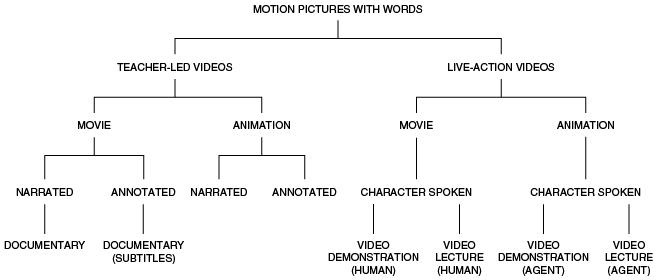
As depicted in Figure 1.3, instructional videos can be instructor-led (in which the words come from the instructor) or live action (in which the words come from the on-screen characters). Next, the frames in an instructional video can either be based on photography (e.g., as in a movie) or drawings (e.g., as in an animation). Next, the words in an instructional video can either be printed on the screen (i.e., annotated) or spoken through speakers (i.e., narrated). The bottom column shows some special types of instructional video under each category – documentaries (with spoken words), documentaries (with printed subtitles), video lectures (with humans), video demonstrations (with humans), video lectures (with agents), and video demonstrations (with agents).
Types of instructional video.
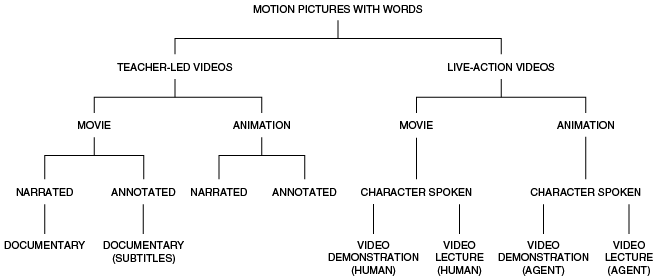
Figure 1.3 Long description
There are two primary kinds of instructional videos: teacher-led videos and live-action videos. Teacher-led videos can include either a movie or an animation, which may be narrated or annotated. Types of movies included in teacher-led videos are documentaries and documentaries with subtitles. The other type of instructional video, live-action videos, can also include either a character spoken movie (including human video demonstrations or video lectures) or character spoken animation (including agent video demonstrations or video lectures)
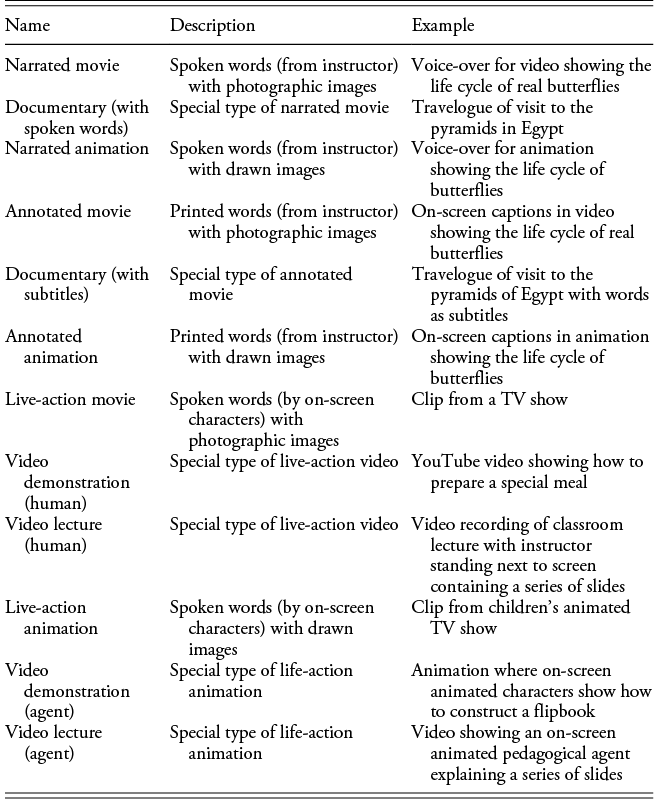
Table 1.3 describes the six major types of instructional videos that I examine in this book – narrated movie, narrated animation, annotated movie, annotated animation, live-action movie, and live-action animation – along with subtypes. As you can see, I use the term instructional video to include all the types of presentations in Table 1.3, including both movies and animations.
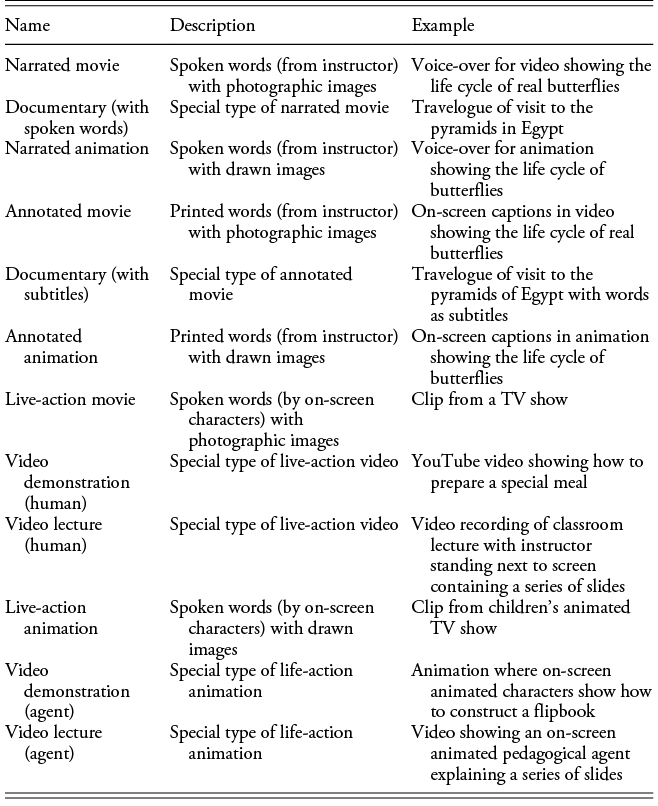
Table 1.3 Long description
Table with three columns titled Name, Description, and Example and organized into four clusters. Cluster one lists Narrated Movies using photographic visuals such as a butterfly life cycle video and Narrated Animations using drawn visuals. Cluster two lists Annotated Movies and Documentaries with subtitles, illustrated by travelogues and life cycle videos. Cluster three lists Live action movies shown as TV clips, Video demonstrations such as cooking tutorials, and Video lectures with an instructor standing beside slides. Cluster four lists Live action animations such as children’s shows and Video lectures delivered by an animated pedagogical agent.
An instructional video is a type of multimedia instructional message because it contains both words and graphics (i.e., it is therefore multimedia) and it is intended to help people learn something (i.e., it is therefore an instructional message). How do we know how well someone has learned the content in an instructional video? As described in Chapter 3, “Research Methods for Studying Teaching with Instructional Video,” I focus on learning outcome tests, which often include open-ended essay questions, multiple-choice items, or even performance instruments. We want to know what the learner knows – that is, the learning outcome from the instructional video lesson.
What Is the Role of Instructional Video in Education and Training?
As described in Chapter 2, many of the early attempts to incorporate instructional video into schools were not strongly successful. For example, instructional movies in the 1920s, 1930s, and 1940s, educational television in the 1950s and 1960s, and videotaped lessons in the 1970s and 1980s were each introduced with much excitement for revolutionizing education, but they met with less than overwhelming successes (Cuban, Reference Cuban1986; Saettler, Reference Saettler1990/2004).
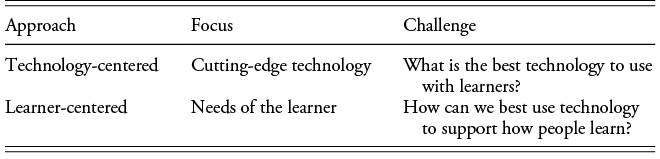
Why do you think that movies, TV clips, and videotaped lessons didn’t have the expected impact on schools? Consider two approaches to educational technology (Mayer, Reference Mayer2021a) – a technology-centered approach in which we ask teachers and students to adapt to new cutting-edge technology (as shown in the top portion of Table 1.4) and a learner-centered approach in which we adapt technology to support the learning of students and the teaching of teachers (as shown in the bottom portion of Table 1.4). My take is that educational motion pictures did not have the anticipated effects on education because too many school administrators took a technology-centered approach – flooding the schools with cutting edge technology – rather than a learner-centered approach – looking for ways to incorporate technology into the current school framework as a support to teaching and learning. My hope is that this lesson about early attempts to incorporate educational films in schools is in our minds as we ponder the role of instructional video in today’s schools and training venues. In short, we need to use instructional video as an aid to how students learn and how teachers teach.
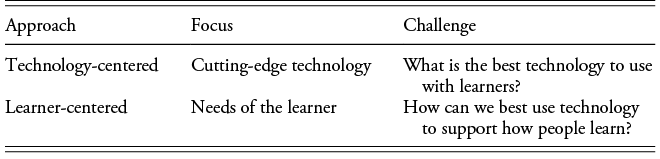
Table 1.4 Long description
Table compares two educational approaches using three columns titled Approach, Focus, and Challenge. Two rows are presented. Technology centered approach lists focus as cutting edge technology and challenge as identifying the best technology to use with learners. Learner centered approach lists focus as needs of the learner and challenge as determining how technology can best support how people learn. Additional explanation clarifies that the technology centered approach prioritizes acquiring and implementing the latest tools, while the learner centered approach treats technology as a supporting resource used to enhance learners’ cognitive processes and learning needs.
Are Instructional Videos Effective?
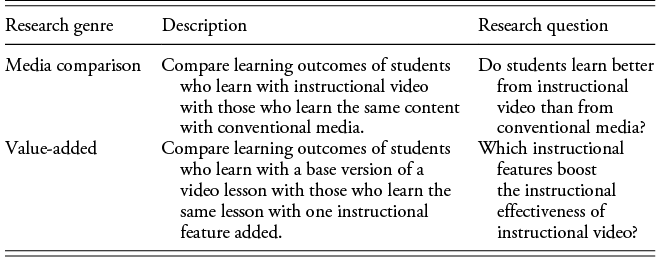
You may be wondering about a key question concerning instructional videos: Are instructional videos effective? In short, should we use instructional videos in education and training? As shown in the top portion of Table 1.5, this question suggests a type of experiment in which we compare the learning outcomes (e.g., test scores) of people who are taught with instructional video with those who are taught the same content with conventional media. For example, we could give some students a lesson on a statistical procedure via an instructional video whereas other students learn the same material by reading a textbook. This is called media comparison research because we want to know which medium works best for teaching a particular lesson.
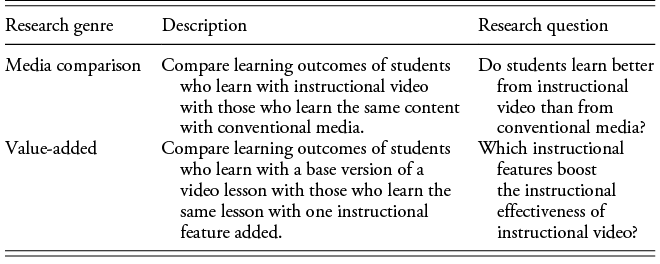
Table 1.5 Long description
Table presents two research genres for instructional video studies using three columns labeled Research genre, Description, and Primary research question. First row is Media comparison, describing studies that compare student learning from instructional video with learning from conventional media for the same content, and asking whether students learn better from instructional video than from conventional media. Second row is Value added, describing studies that compare a base version of a video lesson with a version containing one additional instructional feature, and asking which instructional features increase the instructional effectiveness of video lessons.
When I look at the experimental research on video-based learning, I can classify most experiments into one of two categories: media comparison research or value-added research. Concerning media comparison research, a growing body of research encourages the idea that instructional video can be more effective than some other media, as indicated by an eclectic collection of recent research reviews (Alkahtani et al., Reference AlKahtani, Alnufaiy, Albaijan, Alnafaiy, Elfakhri and Aljudaibi2025; Dipon & Rio, Reference Dipon and Dio2024; Feeley et al., Reference Feeley, Keller and Kayler2023; Lin & Yu, Reference Lin and Yu2024; Morgado et al., Reference Morgado, Botelho, Machado, Mendes, Adesope and Proença2024; Noetel et al., Reference Noetel, Griffith, Delaney, Sanders, Parker, del Pozo Cruz and Lonsdale2021; Srinvasa et al., Reference Srinivasa, Chen and Henning2020). However, as discussed in Chapter 3, there are some potential methodological challenges with media comparison research. Specifically, it is difficult to make sure the lessons are equivalent in content, length, and the instructional method used in the lesson. Fortunately, I avoid these problems by not focusing on media comparison research in this book. Instead, as examined in the next section, I focus on a slightly different question.
How Can We Design Effective Instructional Videos?
A second question you might have about instructional video is: How can we design effective instructional videos? This is the question that motivates this book. As shown in the bottom portion of Table 1.5, our second question suggests a type of experiment in which we compare the learning outcomes (e.g., test scores) of people who learn with the base version of a video lesson versus those who learn from the same video lesson but with one instructional feature added. For example, we might compare learning from a video lesson in which you see a series slides and hear the instructor explain each one versus the same lesson except you also see the instructor on the screen standing next to the slide. I call this value-added research because we want to know if adding the instructional feature (e.g., instructor presence) adds any value – that is, whether it improves your learning outcome.
Concerning value-added research, a growing body of research is aimed at pinpointing which features improve the effectiveness of instructional video, as indicated by an eclectic collection of recent research reviews, some focusing on the effectiveness of adding one particular feature (Alemdag, Reference Alemdag2022, Reference Alemdag2023; Beege et al., Reference Beege, Schroeder, Heidig, Rey and Schneider2023; Henderson & Schroeder, Reference Henderson and Schroeder2021) and some examining multiple design features (Fyfield et al., Reference Fyfield, Henderson and Phillips2022; Mayer, Reference Mayer2021b; Mayer et al., Reference Mayer, Fiorella and Stull2020; Navarrete et al., Reference Navarrete, Nehring, Schanze, Ewerth and Hoppe2025; Van der Meij & van der Meij, Reference Van der Meij and van der Meij2013; Van der Meij & Hopfner, Reference Van der Meij and Hopfner2022). The array of value-added research can seem confusing with so many different lists of effective (and ineffective) instructional features. The goal of this book is to systematize this research base involving a broad range of instructional features that have been added to video lessons, so you can see how each fits within an organized theoretical framework and the conditions under which each can be effective.
Should We Focus on Instructional Media or Instructional Methods?
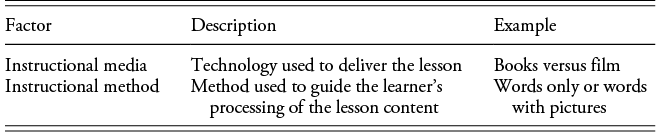
With all my discussion about instructional video you might get the idea that learning is caused by the instructional medium we use, with high-tech media such as video supposedly being more effective in fostering learning than low-tech media such as books. This view that instructional media causes learning is reflected in the top portion of Table 1.6 (and is tested with media comparison research described in the top portion of Table 1.5).
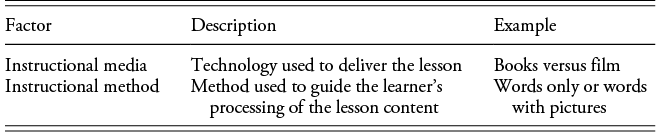
Table 1.6 Long description
Table with three columns titled Factor, Description, and Example and two data rows. First row lists Instructional media, described as technology used to deliver the lesson, with example books versus film. Second row lists Instructional method, described as method used to guide the learner’s processing of lesson content, with example words only or words with pictures.
I have a problem with the instructional media view (as does Clark, Reference Clark2001). The problem is that research shows that learning is not necessarily caused by instructional media but rather by the instructional method that is used within the medium. Books can be designed with effective or ineffective instructional methods and videos can be designed with effective or ineffective methods, so it is the method that causes student learning rather than the medium that is used to deliver the lesson. This is also why I do not focus on media comparison research in this book. Even when research studies show instructional video is more effective than conventional media, the reason could be that a more effective instructional method is used with the instructional video group and a less effective instructional method is used with the conventional media group. In short, it may be that instructional video affords – that is, makes available – better instructional methods. When we are able to use the same methods for video and conventional groups, there may be no difference in learning outcomes between the two media.
As shown in the bottom portion of Table 1.6, instructional methods can guide the learner’s processing of the lesson and thereby cause the learning outcome. That is why my focus in this book is on the instructional methods we can use with instructional video to foster student learning. Instructional video has some unique characteristics that allow us to implement instructional methods that are more difficult or impossible to convey with conventional media, such as portraying motion, offering a positive tone of voice, and showing synchrony between what the instructor is saying and what is highlighted on the screen. In short, my focus in this book is on which instructional methods are most helpful in improving learning with instructional video.
Conclusion
Now that we have explored some foundational concepts about instructional video, the other three chapters in this introductory section of the book explore the historical foundations of teaching with instructional video, the methodical foundations of teaching with instructional video, and the theoretical foundations of teaching with instructional video. Then, we explore eighteen theory-grounded and evidence-based principles for designing effective instructional videos.