

In 2019, Google Maps had a “business problem” (Lee 2018). Rob Copeland and Katherine Bindley (Reference Copeland and Bindley2019) of The Wall Street Journal reported millions of “fake businesses” appearing on Google Maps and filtering into local searches. According to their exposé, Google Maps users were being duped when enlisting the services of fraudulent businesses appearing on the map. Moreover, Google Maps was in part to blame since it had effectively brokered these scams. These businesses appeared real by virtue of being on the map, a map that, according to Copeland and Bindley “shapes what’s real and what isn't for more than two billion monthly users” (Copeland & Bindley Reference Copeland and Bindley2019).
Google’s promise to organize the world’s information and make it universally understandable and accessible (Google nd.a, 2022), a promise that includes spatial information through Google Maps (Graham and Dittus Reference Graham and Dittus2022) has been challenged by one of its main selling points: a democratic map where individuals can be part of mapping processes (McQuire Reference McQuire2019). Google Maps has long allowed for crowdsourced contributions to its maps from systems like the now-defunct MapMaker, to GoogleMyBusiness, to Google MyMaps, to its most recent crowdsourcing endeavor, the Local Guides Platform. Not only did Google Maps know where you were, placing you always at the center of its global map (that blue pulsing orb of location awareness), but it also allowed for you to annotate its information, suggesting places to add, making sure your business profile was visible on the map, giving you a chance to create your own personalized map, and prompting you to rate places and add reviews to the map. Through these features, Google Maps presents as a democratic intervention into age old practices of cartography, but who was vetting all this information being added to the map?
Soon after the Wall Street Journal’s reporting gained traction, Google responded with a declaration of its commitment to “fighting fake business profiles and fraudsters on the map” (Russell 2019) shared through their official blog The Keyword. Here Google outlined their processes of content moderation on the mapping platform. As is now standard in social media platform moderation, Google’s approach to fighting “fake business profiles and fraudsters on the map” includes a combination of machine learning and human monitoring practices. Machine learning by way of a filtering software is what Ian Leader (2022), Google’s Project Manager for User Content calls, “the first line of defense.” Then, overseeing and augmenting the technical side of the monitoring platform are manual moderation practices that draw on both “skilled” and “voluntary” human labor.
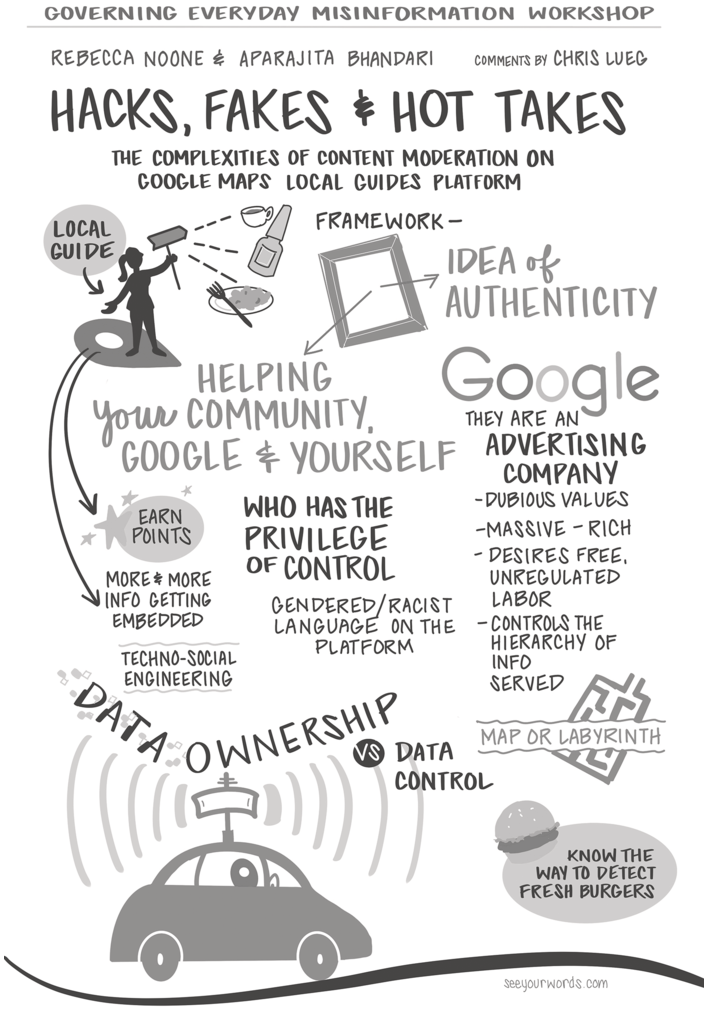
Visual themes from hacks, fakes, and hot takes: moderating “bad actors” on Google Maps Local Guides Platform.
Google Maps’ manual process has two tiers. First, there are the “highly skilled human moderators” who, according to Leader, work “around the clock” to check for policy violators. Scholars like Sarah T. Roberts (Reference Roberts2019) and Mary Gray and Siddharth Suri (2019) have shown that the working conditions of these content moderators are often precarious, under-supported, and reliant on the global economy of low-wage outsourcing. Second, Google Maps enlists contributors from their Local Guides Platform to help with the content monitoring processes. Through the Local Guides Platform, Google calls upon a volunteer group of “local experts” that moderate maps content including checking business information, adding missing places to the map, and monitoring reviews.Footnote 1 This chapter focuses on the second tier – the complicated process of monitoring crowdsourced content through crowdsourced moderation.
Google’s platformization of mapping, as noted by Scott McQuire (Reference McQuire2019), is a process by which Google Maps becomes “embedded” as the “foundational resource” for spatial information in a digital context. Powerful mapping platforms like Google Maps enact participatory protocols of locating and reporting misinformation to protect their claims to “authentic and reliable” information (wording from Leader 2022). In this chapter we present the results of a critical discourse analysis (Fairclough Reference Fairclough2013) into the platform’s product information, promotional materials, interface design, and corporate development strategies used by the Local Guide’s Platform. We argue that this volunteer labor plays an important role beyond monitoring and managing mapped information – Local Guides Platform produces and enforces a narrative that misinformation on the map is the result of outsiders or “bad actors” who infiltrate an otherwise congenial “information ecosystem” of helpful place-based information (Kuo and Marwick Reference Kuo and Marwick2021), thereby exonerating Google and Google Maps from their own mapping errors.
Local Guides: The Watchful Eyes of Google Maps
Participatory forms of content moderation have long been part of online communities such as reddit groups (Squirrell Reference Squirrell2019), tumblr discourse communities (Tiidenberg, Hendry and Abidin, Reference Tiidenberg, Hendry and Abidin2021), and more recently Discord (Kiene et al. Reference Kiene, Jiang and Hill2019). Local Guides presents an interesting case study for content moderation due to its design and the function it serves as an appendaged community for the Google Maps Platform. This community not only regulates each other, and the place-based content Local Guides upload and share, but also regulates Google Maps content broadly – information that has become entwined in everyday navigation.
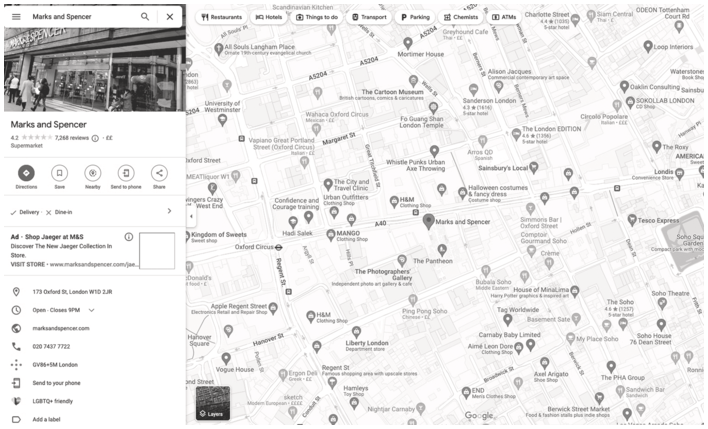
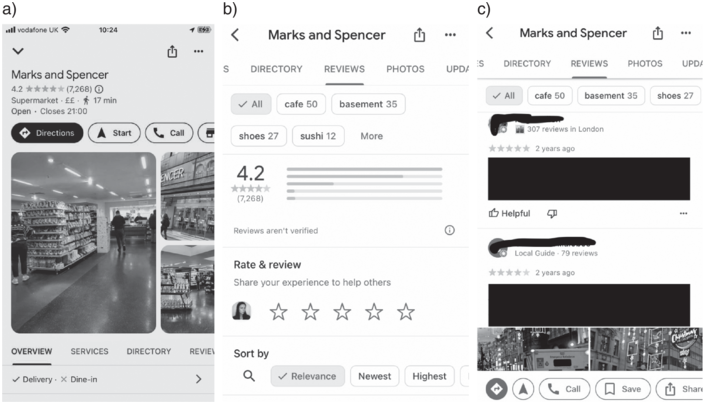
You may have come across Local Guides when using Google Maps. Their reviews are embedded in the sidebar of information that pops up when looking up a restaurant or a store (see Figure 6.2). You’ll see their username and profile picture beside a rating, out of five stars, and their 200-word reviews (see Figure 6.3). Local Guides is a participatory program run through the Google Maps Platform. The Local Guides Platform enables users to interact with Google Maps through actions such as adding and editing reviews. Users are content producers and content moderators. While the Local Guides Platform can be accessed on Google Maps directly, to both read and add content, Local Guides also functions as a separate application or webpage where Local Guides users can add information to their personal Local Guides profiles and connect with other Local Guides through “following” them and reading their reviews.
A screenshot of Google Maps desktop with a focus on the UK-based department store Marks & Spencer.
*See the average rating after five stars under the Marks & Spencer title in the left-hand column and the hyperlink to click on the 1258 reviews.
Three mobile screen shots of Local Guides Platform.
*From left to right, the main review interface with the average rating (4.2 out of 5) and the number of reviews (7,268), then scrolling down there is the types of topics covered by reviews (cafe, basement sushi), then the invitation to leave a review, then there are specific reviews by Local Guides and contributors.
Local Guides is a platform through which Google Maps users can engage with and annotate the location-based information they find on Google Maps. While Local Guides represent between only 5 and 10 percent of Google Maps users – as of 2021 there were 150 million Local Guides in 24,000 cities, and collectively – they have contributed approximately 70 percent of reviews, photos, and other types of user-generated content on Google Maps (Reece Reference Reece2021). Not all reviews on the map come from official Local Guides (presumably the other 30 percent of reviews); the platform provides the basis of review infrastructure, where even without an account, people can leave reviews of local places which are then visible on the maps.
Google promotes the Local Guides platform as an arena of conviviality where Local Guides play a supportive role on and off the map for their community (Bhandari and Noone, Reference Bhandari and Noone2023) while at the same time monitoring and maintaining that which is happening locally. According to Google, Local Guide reviews “are a treasure trove of local knowledge that can point you to the places and businesses you’ll enjoy most – whether it’s a bakery with the best gluten-free cupcake or a nearby restaurant with live music” (Leader Reference Leader2022). In this role, Local Guides are positioned as on the inside, proximate to Google Maps’ grand vision of making the whole world mappable, or what Scott McQuire (Reference McQuire2019) muses as “one map to rule them all.” (For more on Google’s mapping ambitions see Graham and Dittus Reference Graham and Dittus2022; McQuire Reference McQuire2019; Noone Reference Noone2024; Plantin Reference Plantin2018; Wilkin Reference Wilken2019.) Google Maps, as such, is committed to adding more and more data to its maps through processes of data extraction, data processing, and crowdsourced data creation (McQuire Reference McQuire2019). Local Guides Platform thus enacts both a performative and a structural role in Google’s spatial information database as maintainers of the map while setting the parameters of who is part of the Google Maps community and who is on the outside (Plantin Reference Plantin2018). Mapping is itself a power-laden process (Massey Reference Massey1994) amplified through the Google Maps lens of what is important about space and what can be left out (Luque-Ayala and Neves Maia Reference Luque-Ayala and Flávia Neves2019).
We investigate the role crowdsourcing platforms such as Local Guides play in managing everyday online misinformation as it appears on Google Maps, while also playing a role in conditioning what misinformation on Google Maps looks like. Platforms like Google Maps also often leverage its crowdsourcing infrastructures – the systems through which users can add, share, modify, and comment on content – as testimony to its democratic form of information sharing. The hallmark of this online democracy is that “everyone” has a voice. But this supposed openness of the platform is not without its challenges, namely its vulnerability to misinformation that can be added by anyone wanting to do so (remember the fake businesses?). As a result of these challenges, platforms develop a content moderation system to weed out misinformation. Bringing these platform logic together – open crowdsourcing, bad faith actors, and moderation of content – this chapter calls attention to how popular conceptions of “misinformation” are shaped by this platform dynamic which ultimately serve to insulate “misinformation” from the structural question of whose misinformation?
Importantly, some of the most pervasive forms of errors on Google Maps are not the product of crowdsourcing but from Google’s own top-down interpretation of spatial data. For example, Google Maps has been accused of leaving out and erasing local information often at the expense of marginalized communities. For example, the residents of the Fruit Belt Neighborhood in Buffalo, New York – a redlined neighborhood with a predominantly racialized population – has been fighting Google since 2008 because of the erasure of their neighborhood name on Google Maps, replaced by the name of the proximate The Medical Park development project in Buffalo (Dewey Reference Dewey2019; Noone Reference Noone2024). Similarly, Google Maps removed the place names of Rincon Hill and South Beach in tech-industry dominated San Francisco, CA, replacing them with The East Cut, effectively erasing a historically low-income area from the map in favor of wealthy property development (Nicas Reference Nicas2018). The erasure of The Fruit Belt, Rincon Hill, and South Beach illustrates the larger structural dynamics of power perpetuated by Google’s mapping apparatus and illustrates Google Maps priorities of commercial spaces and investment (Luque-Ayala and Neves Maia Reference Luque-Ayala and Flávia Neves2019). Moreover, when we zoom out on Google Maps, we see how the platform unevenly distributes the effects of errors, often targeting low-income and racialized populations like the Fruit Belt or Rincon Hill residents as erasable, and middle-class white suburban people who have mistakenly hired a fraudulent plumber (such as in the Wall Street Journal reporting), as the target population that needs protecting. These distinctive stakes of misinformation on Google Maps illustrate the importance and urgency of parsing what misinformation means in an online context in order to avoid perpetuating a status quo understanding of an information commons.
We argue that Google Maps situates misinformation as a glitch (building on the work of Benjamin Reference Benjamin2019; Kuo and Marwick Reference Kuo and Marwick2021; Nakamura Reference Nakamura2013) or a technical problem that can be fixed with a mix of software and manual information coding. As such, Google tasks everyday users with the role of keeping “the information on Google relevant and accurate” and “keeping reviews authentic and reliable” (Leader Reference Leader2022). The threat of misinformation is always framed through the lens of external bad actors while the Local Guide insiders keep this misinformation out. A global mapping project like Google Maps which leverages “objectivity” and “truth” must contend with the fact that forms of representation and knowledge production are always political (e.g., Graham and Dittus Reference Graham and Dittus2022; Massey Reference Massey1994). Google’s conception of misinformation on the map perpetuates a division of “with us or against us” in the process of map-making that prioritizes the commercial and the commoditizable (Noble Reference Noble2018; Plantin Reference Plantin2018; Wilken Reference Wilken2019).
Platform Governance, Content Moderation, and Misinformation
Our case study of Local Guides brings together literature on content moderation (Gerrard and Thornham Reference Gerrard and Thornham2020; Gillespie Reference Gillespie2018; Roberts Reference Roberts2019; Squirrel Reference Squirrell2019) and literature on critical misinformation studies (Kuo and Marwick Reference Kuo and Marwick2021; Nakamura Reference Nakamura2013) to think about how constructions of insider authenticity vs. outsider bad actors are made and remade, enforced and reinforced through participatory efforts of content moderation. Then we considered the role misinformation plays in the construction of online places. Through an analysis of the governance documents, both regarding platform governance and community governance, we look at how Google Maps not only frames work and participation but also how they frame misinformation and accurate portrayals of place.
Beyond the digital, Rianka Singh (Reference Singh2018) reminds us that platforms have always been political technologies that negotiate spatial relationships to power, surfacing and elevating the views of some over the views of others, which continues into the digital context (Gillespie Reference Gillespie2018). Critical analysis of social platform moderation processes has focused on biases of both the software-driven moderation practices, sometimes called machine learning solutions (Gerrard and Thornham Reference Gerrard and Thornham2020) as well as the moderations practices that rely on human labor (Carmi Reference Carmi2019), often operating in poor working conditions behind the scenes (Roberts Reference Roberts2019).
Platforms like Google Maps, and by extension Local Guides Platform, are an assemblage of governance tactics including laws, industry priorities, and the “owners’ vision” of the purpose this platform serves. The structures and practices of platform governance help to shape what, how, and why certain types of information are included and supported by a particular platform while other forms are not (Gerrard and Thornham Reference Gerrard and Thornham2020). Processes of platform governance are not static but are iterative processes (Bucher Reference Bucher2018), often adapting to changing norms, new standards, and new contexts online (Gillespie Reference Gillespie2015, Reference Gillespie2018). Platform governance can be the terms and conditions which regulate the rules of the platform (Gillespie Reference Gillespie, Burgess, Poell and Marwick2017; Gorwa Reference Gorwa2019). Drawing from Katrin Tiidenberg, Natalie Ann Hendry, and Crystal Abidin’s (Reference Tiidenberg, Hendry and Abidin2021), platform governance takes place through terms of service and explicit rules, but also through the design and functionality of the platform. These include the default settings of a platform, the functionality of interface, and the onboarding and registering processes (Bucher Reference Bucher2018; Tiidenberg, Hendry, and Abidin Reference Tiidenberg, Hendry and Abidin2021). Therefore, platform governance is multifaceted – more than the formalized rules, platforms guide and condition participation implicitly and explicitly.
Applying the Governing Knowledge Commons Framework (Frischmann, Madison, and Strandburg Reference Frischmann, Madison and Strandburg2014), we consider how platform governance structures come to be constructed and we question whose interests they may serve. Online platforms such as Google Maps coopt the language of the commons based on its facilitation of a network of community management and governance. And while a commons may emerge because of the construction of community, there is still a pull of top-down governance structure that serves the interests of the platform, in this case Google Maps broadly. This is in stark contrast to a governing structure grounded in the commons that serves the interests of the community, however fairly or unfairly that is distributed (Frischmann, Madison, and Strandburg Reference Frischmann, Madison and Strandburg2014).
Gerrard and Thornham (Reference Gerrard and Thornham2020) suggest Community Guidelines are an effective starting place to understand the platform’s priorities since these are the public-facing and community-centered rules that structure participation and engagement. These are differentiated from the terms and conditions which are often crafted through legalese and more often set conditions on the platform’s liability and positions their ownership. Community Guidelines, as Gerrard and Thornham identify, “lay out a given platforms’ codes of conduct and nod to the political, economic, and social considerations of a given social media company” (pp. 1268). Moreover, community guidelines are more explicit than the platform’s default settings of the platform or the interface designs that are often normalized through use. Community Guidelines in the context of use-based moderation practices (Squirrell Reference Squirrell2019) provide a place of reference for users to turn to when looking to flag content.
But more than simply acting as a guide, Community Guidelines reveal the biases, politics, and normativities (Gerrard and Thornham Reference Gerrard and Thornham2020; Gillespie Reference Gillespie, Burgess, Poell and Marwick2017) of the platforms. For example, what is classified as misinformation to begin with, what passes review as truth and what is flagged as false is based on dominant paradigms of knowledge production. Roberts (Reference Roberts2019) argues that such guidelines regarding content moderation are developed “in the specific and rarefied sociocultural context of educated, economically elite, politically libertarian, and racially monochromatic Silicon Valley, USA” (93–94). Therefore, these values influence what passes review and what gets flagged but can often work abstrusely for users especially if these values are not clearly indicated in the guidelines (Gillespie Reference Gillespie, Burgess, Poell and Marwick2017). Furthermore, research has shown that these opaque systems result in a type of “folk theories” of platform moderation in action to give personal meaning to how moderation decisions are made and acted on (Myers-West 2018). In other words, these are the reasons users give to why and how their content is removed from a platform, often blaming human intervention, like “a friend got mad at me” or the fear of “being targeted” (Myers-West Reference Kaplan and Vallis2018).
Platforms like Local Guides fit into the conception of a knowledge commons, as they actively draw from its collective sensibility but ultimately enforce terms and conditions that are not communal or democratic – using imaginaries of the knowledge commons for their own benefit. For example, Duguay, Burgess, and Suzor (Reference Duguay, Burgess and Suzor2020) have examined the “patchwork platform governance” that is unevenly deployed in the context of queer content. Often this results in informal care and moderation practices in relation to people on social media platforms who are targeted and harassed, disproportionately affecting racialized and trans users (Schoenebeck, Haimson, and Nakamura Reference Schoenebeck, Haimson and Nakamura2021). A previous study on Local Guide reviews in Toronto found that racialized workers of chain stores are disproportionately named, targeted, and vilified in Local Guides reviews (Bhandari and Noone forthcoming), finding that challenge Local Guide’s claims on communities (are these workers not part of the community?). Thus, the community guidelines and their implicit value systems construct a polarity of insiders and outsiders based on what and who is protected by platform regulation and who is not.
Methodology
While participatory processes online, including community forums, have always been moderated (see Gerrard and Thornham Reference Gerrard and Thornham2020), some platform governance practices like Local Guides structure what counts as “community” while drawing on the affective labor of users in the name of caring for the platform (Tarr and Alvarez León Reference Tarr and Alvarez León2019). Rather than neutral processes, we look at how Google applies the language of “authenticity,” “reliability,” and “accuracy” as core values, while simultaneously calling on Local Guides to participate in maintaining these values. As such, we approach authenticity, reliability, and accuracy not as stable concepts but take a social constructivist approach to thinking how Google’s language shapes these concepts and as such the role of Local Guides. This chapter offers a critical discourse analysis (Fairclough Reference Fairclough2013) of these registers of Google Maps’ promises as they relate to the contributions of Google Maps. We examine the formal and informal governance structures of the platform including the terms of use, the community terms of service, the press releases about the platform, and the content shared through the Local Guides connect platform. Using Kuo and Marwick’s (Reference Kuo and Marwick2021) critique of the dominant disinformation discourses – as upholding systems of dominant knowledge – we consider how operationalizing location and place as that which can be knowable, consumable, transactional, and claimable already determines what relationships to space are possible and forecloses other relations to space. We apply Kuo and Marwick’s intervention to the disinformation discourse to our analysis of Google Maps and Local Guides Platforms to identify how dominant misinformation paradigms do not serve everyday users of the platform but rather serve to maintain a platform’s authority. The findings are presented as a conceptual analysis of Local Guides grounded in a critical evaluation of the platform’s discourse.
Additionally, Plantin’s political economic analysis of Google Maps’ crowdsourcing infrastructures sheds light on the seemingly contradictory simultaneous processes of decentralization and recentralization on the Google Maps platform. Plantin argues that the information collected through Google Maps’ process of decentralization (in this case through crowdsourcing place-based information through Local Guides) are designed to service Google’s market interest of dominating the highly competitive geospatial market. Therefore, Google’s very construction of a Google Maps’ common through the Local Guides platform recentralizes crowdsourced geospatial information in the name of serving Google’s interests and not the commons (Plantin Reference Plantin2018). We identify through this recentralization process that Google Maps’ platform regulates entry into the Local Guides community through a construction of “insider” vs. “outsider” knowledge (Kuo and Marwick Reference Kuo and Marwick2021; McMillan Cottom Reference McMillan Cottom2020; Nakamura Reference Nakamura2013; Washington and Kuo Reference Washington and Kuo2020). While the platform is an assemblage of users, the community guidelines enforce enclosures (Plantin Reference Plantin2018) that set limits on participation within the platform. Echoing Kate McDowell’s chapter on Storytelling as Misinformation, we see how such enclosures are not insulated from the world but actively work to maintain the status quo.
Framing our analysis through this critique of the dominant misinformation paradigm – one championed by Kuo and Marwick (Reference Kuo and Marwick2021), McMillan Cottom (Reference McMillan Cottom2020), Schoenebeck, Haimson, and Nakamura (Reference Schoenebeck, Haimson and Nakamura2021), and Nakamura (Reference Nakamura2013), among others, who all in their work have shown how the dominant framework of misinformation is often framed on hegemonic ideals of truth and authenticity in systems designed to serve patriarchal and imperial systems – we argue that review and moderation practices on Local Guides further standardize constructions of misinformation as the product of a small group of outliers or “bad actors” in an otherwise convivial information ecosystem. Instead, the platform’s governance of crowdsourced moderation, paired with the Google Maps’ project of creating “one map to rule them all” (McQuire Reference McQuire2019) help to homogenize narratives that all territory is neutral and unpolitical (Massey Reference Massey1994) that then reify the limited scope of Google’s misinformation paradigm. Consequently, as Google Maps commoditizes relations to space (see Graham and Dittus Reference Graham and Dittus2022; McQuire Reference McQuire2019), it also forecloses what is considered trustworthy and useful content for the imagined Google Maps users, set against the fake or fraudulent information that deceives people. Thus, the question of misinformation is a question of not just strategies of keeping out information, but also a question of who gets to decide what misinformation about place is and how is this not only managed through the platform but becomes how we participate in knowledge creation on the platform.
Local Guides as Demarcations of “The Insider”
Google Maps’ promotional material reveals a deliberate creation of a “community” on Google Maps through the Local Guides Platform that emphasizes sharing information about one’s local space for the benefit of Google Maps users. This space is highly scaffolded and governed by the design of the platform evidenced through how the platform appears on Google Maps, the Community Policy about input, the onboarding processes of becoming a Local Guide, the incentive structure to maintain Local Guide participation, and the networking of review through the message board. These elements of design and communication effectively enclose what participation looks like on the platform (Plantin Reference Plantin2018) and condition participation as always in relation to Google Maps’ project of platforming space (Graham and Dittus Reference Graham and Dittus2022). The platform thus structures what community membership looks like and what a Google Maps “insider” is – someone who participates in this convivial space of sharing location-based information.
Design and Guidelines
Local Guides Platform’s Community Policy discursively frames the role Local Guides serves for Google Maps. Rather than punitive, this policy defines the function of Local Guides through celebratory language, praising the Local Guides platform as an online space that “brings Google Maps to life” where Local Guides “make it easier, tastier, and more fun to navigate the world” and “toward a better understanding of the places around them” (Google ndb, 2022). The Local Guides image is one of a user fastidiously “gathering facts” to bring their “on-the-ground expertise and a commitment to sharing everyday experiences that inform real-time decisions across the globe.” To achieve this vision of what Local Guides is imagined to be, the policy recommends Local Guides generate “consistent contributions that express these values” and to respect a “community that takes the mission seriously.” The Community Guidelines project a convivial online community who are there to both help the map and to help the map user.
Onboarding and Retention
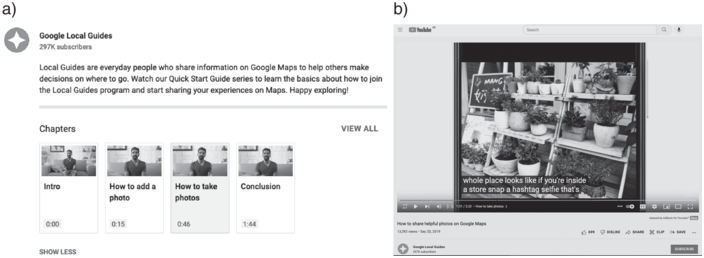
During the onboarding process of joining Local Guides, which includes registration with the platform and links to relevant resources, Google shares the skills associated with reviewing places including photography skills, writing skills, and what to flag and edit. These are in the name of helping Local Guides produce “authentic” content. This includes instructions on how to take a photo of food to show it off in the best light, to how to write a review, to how to select a place to review, and how to take a “shelfie” of a store’s interiors. These are offered in a YouTube video series titled “Quick Start Guide,” the instructions embedded in the platform itself, the blog posts by Google staff members found in The Keyword, and crowdsourced information sharing on Local Guides Connect. While engaging with these resources is not a mandatory part of engaging with the platform, nonetheless these didactic elements of participation are woven through the onboarding process of joining Local Guides (Figure 6.4).
Screenshots of Local Guides YouTube channel, with the video* how to add a photo.
* Chapters of this instructive video include “how to add a photo” and “how to take a photo” and provide specific advice such as include the “hashtag shelfie.”
In one such blog post titled Seven kinds of Local Guides You “might spot on Google Maps,” Local Guides Team members Max Kaplan and Alex Vallis (Reference Kaplan and Vallis2018), break down this Local Guides skillset into seven Local Guides archetypes that typify “specific passions and ways of sharing” and signal the type of content that Google wants for its map. It begins with the prompt “what kind [of Local Guide] are you?” The seven specialist skills they spot are the “visualist” who adds photos, the “fact hunter” who edits reviews, the “trailblazer” who adds new places to the map, “the sage” who recommends the best places to go by way of 5-star reviews, the “multimedia guru” who adds video to the map, the “connector” who hosts meet-ups for Local Guides, and “the advocate” who adds information about accessibility (Kaplan and Vallis Reference Kaplan and Vallis2018). The archetypes include tips for the fact hunter such as “uncover missing info to see which places near you need expertise” and for the trailblazer, “check out restaurants and local shops opening this year so you can add their first photos and get those views” (Kaplan and Vallis Reference Kaplan and Vallis2018). These classifications prioritize skills including technical savvy with photo and video and delineate claims to specialized knowledge embedded in the act of adding new places.
The categories are revealing of the type of information they want in the map – the pictorial, the latest, and compliance with (as they frame it) wheelchair accessibility, and designate roles to members of the community with a description, their “loves,” and a “tip” on how to become such an expert. So while one of the expert types of knowledge is the “advocate” who is part of marking which places do and don’t have stair access (and how this is verified remains unclear), access to space and claims on space are imagined as an experience of the “hottest restaurant,” “where to find an ATM,” or can help you “choose where to stay by the sea.” The Local Guide’s access to cultural capital (Bourdieu Reference Bourdieu and Richardson1986), or cultural knowledge that awards Local Guides social status as “local expert” or “discerning food critic,” is explicit, and uploading location-based information based on this cultural capital is a foundational part of what Local Guides “share.” This cultural capital enables access to the Local Guides community.
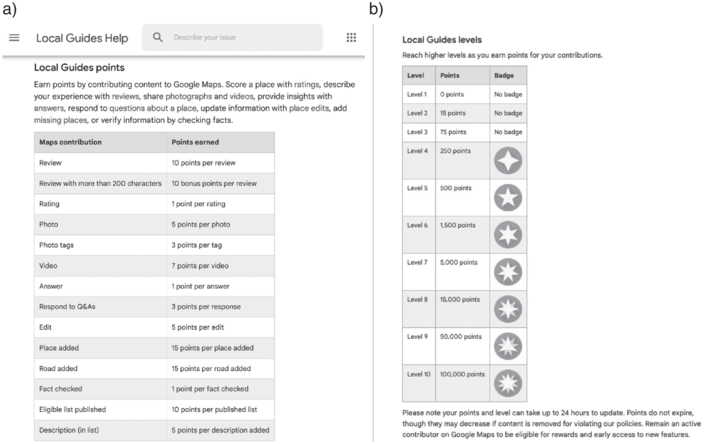
As much as they are part of the Google Maps information infrastructure, Local Guides are not paid. Instead, their participation is incentivized through a points-based system that then allows them to access badges or levels. This system maintains platform membership after the onboarding process. There are ten levels or badges in total; the top level requires 100,000 points (see Figure 6.5). A review of 200 words receives 10 points. Rating a restaurant is 1 point. Adding a new place to the map is 15 points and fact checking and answering questions is 1 point (Google ndc, 2022). Upon reaching Level 4, Local Guides unlock their first “badge” (Google ndd, 2022), but when Local Guides was first developing, Level 4 Local Guides were rewarded 1 TB of Google storage (McCormick Reference McCormack2015). This has since been removed and replaced by a seemingly mercurial rewards system that is the subject of much speculation and information sharing among Local Guides on the Local Guides Connect Message Board (AriMar Reference AriMar2022). Local Guides Level 3 and above are encouraged to organize their own Local Guides meetup (Google nde, 2022). Top ranking Local Guides can become a Local Guides Connect moderator based on their contributions to the Local Guides connect platform (TraciC Reference TraciC2016). However, this proximity to Google is managed by Google. Community membership is measured through Local Guide’s incentive program.
Google’s official points system (a) and Local Guides levels (b).
Networking and Connecting
Local Guides is also Google Maps’ social infrastructure where users and Local Guides can follow each other, seeing all the places they have posted about around the world. In this sense, Local Guides combine locative media with social media logic. They have profiles, followers, follow other Local Guides, and upload content. Each profile contains a small blurb about the guide and lists the places they have reviewed and how many followers they have. Local Guides are a public persona – they can be followed and follow other Local Guides like the networking structures of other social media platforms. Like these platforms, Local Guides share how many people engage with the platform including how many people have viewed the post (Wells Reference Wells2019). Therefore, the Local Guides Platform transforms Google Maps into a social media-style networking site where the content is location-based and funneled through the language of personal experiences but focused on leisure and mobility.
The feature to “follow” Local Guides launched in 2019 demonstrates an increased socialization of the platform (Wells Reference Wells2019). These affordances offer visibility not just to those who use the map but also offer visibility and proximity to Google itself. Here we turn to a post by Scott Francis (Reference Francis2019) in DigitalMaas, a Local Marketing Platform that helps businesses manage their location information on sites such as Google, Facebook, and Apple, titled Become a Google Local Guide in 2020.
Ever wanted to work for Google? It’s the dream job for a lot of people. Sadly, for mere mortals like many of us, it’s out of reach, generally reserved only for those with a special IQ and the ability to innovate and code up some life-changing tech. But there is a way to put that big G on your resume. Enter the Local Guide program. They’re always hiring, and you’re guaranteed to get the job! (Francis Reference Francis2019)
Of course, this is just a single blog post, but this introduces us to the possibility of what else is going on in Google’s often opaque infrastructure of information expertise. Google Maps extracts the labor of “authenticity” and realness and compensates in what Brooke Erin Duffy (Reference Duffy2017) terms the “future reward system from present day productive activities” (7). Here the reward is proximity to Google achieved through community membership to Local Guides and visibility to Google through being a productive member of the Local Guides Platform. While this study did not cover the ways that Local Guides receive benefits from the places they review, previous work on Yelp (Luca and Zervas Reference Luca and Zervas2016) has shown that reviewers can be given special service, pay, or freebies, for their review. Moreover, business owners, and their family and friends can set up profiles that give the business glowing reviews. As such, we see how the internet review infrastructure is a fallible system that can be “gamed” or bribed.
One active part of this Local Guides community is their online message board, Local Guides Connect. This is an officially sanctioned message board designed by Google for Local reviewers, launched in 2016. Since then, Google reports that over 1 million Local Guides use Connect, collectively making hundreds of thousands of visits every month, making over 1.1 million comments, 5.6 million likes, and 22,000 comments marked as “solutions.” Some Local Guides have risen the ranks to become message board moderators. While sharing similar conventions, Connect is different from other unofficial spaces such as the Local Guides Subreddit where Local Guides will seek guidance outside the Local Guides Connect page (albeit likely monitored by Google) and where redditors can use a different avatar when posing their questions. Here they ask questions about the reviewing process in the search of answers and responses that are not directly moderated by official Google Moderators and therefore not subject to Google’s terms of service. For example, a Local Guide might ask why their review is not visible on Google Maps, or where their Local Guides tote bag is, the promised reward for reaching a certain level. Local Guides Connect on the other hand is intended to be a space to be seen by Google, to make one’s work visible to the people who work at Google, in the hopes of being featured in Google press releases or invited to the annual Local Guides Connect conference at the Google Maps Headquarters in Mountain View California (Reece Reference Reece2021).
In celebration of Local Guides Connect’s five-year anniversary in July 2022, Google Moderators shared why Connect is important for them (TraciC Reference TraciC2022). Googler TraciC’s post to the message board reflecting on the five-year history of Connect prompted other Local Guides to share their “favorite Connect memories.” These included responses from Local Guides about how appreciative they are of the community, with comments such as: “for me, Connect is like a melting pot. It’s not just improving Google Maps or contributing to the community, it’s like making family away from your family. Connect helped me learn and improve myself in many ways and I made a wonderful family out here who are more than just friends to me.” This Connect Moderator calls attention to ideas of family whilst doing the work of “improving Google Maps.” Another moderator comments that this is a group that is “passionate about using and improving Maps” as well as a “colorful and vibrant community of friendly, helpful Local Guides from all over the globe.” These moderators asked Local Guides “what’s one of your favorite Connect moments since you joined?” garnering responses such as “connecting to Connect and help billions of people” noting again the idea of forging a team to help the world with place-based information. This idea of “connecting” with people all over the world, “helping” people all over the world, and making Google Maps “better and better” is repeated throughout the comments. They share that this is the “agora” or the “public space” for Local Guides.
Google Moderators suggest topics for discussion such as “easy tips for rating venues and writing structure reviews” as it relates to experience, ambience, cost, and tips. These Moderators also initiate campaigns for the types of content Google Maps wants to see on the map. For example, since 2020, we have tracked campaigns to support Women-Led Businesses and Asian-owned businesses where Local Guides are told to add these places to the map along with a badge that indicates these labels (Bhandari and Noone forthcoming; Reece Reference Reece2021). Interestingly, Google Moderators on the platform are not available for direct messages asking for help from Local Guides “due the volume of private messages Google Moderators receive, I do not read or respond to private messages. Please post publicly so others may benefit from your discussion. If you require urgent assistance, please tag a Google Moderator. Thank you!” (TraciC Reference TraciC2016, Reference TraciC2022). Instead, Local Guides are asked to join contributor conversations and help other Local Guides with questions or share how they make helpful material. Indeed, those Local Guides who respond to these questions and help maintain an “active maps community” in this way are celebrated. This is another possible incentive for Local Guides.
Local Guides contribute Google Maps data both in ways that are visible and ways that are less easy to detect: they add business information such as hours, addresses, and phone numbers. They moderate other reviews and importantly report fake businesses. They also add place listings to the map that are otherwise missing. They refine, clean up, and build – maintaining Google Maps information and user experiences of that information, but also their place-based and location-based affordance of the map. We echo critical geographers Alexander Tarr and Luis F. Alvarez León (Reference Tarr and Alvarez León2019)’s description of Local Guides work called “digital piecework appealing to a sense of community” (92). Local Guides organizes their distributed network of local expertise through the logic of “insiders” and “community.” This work of “watching the map” is driven by the platform’s imperative to make maps “better,” to protect the map from wrong information, maintain a general positive engagement within the platform, and to support “their local” communities off the map. Local Guide contributions, however motivated, are fed into Google’s recentralized map providing more and more place-based information for Google to draw from. This is content moderation and database management where ordinary people are treated as Google “insiders” tasked with adding information but also upholding Google Maps’ mission, authority, and values. But how does (so-called) misinformation filter into the map in the first place?
Outsiders as Sources of Misinformation
Alongside the construction of altruistic local experts who “help their communities” (Slabin Reference Slabin2017) and “share information on Google Maps to help others” (Kaplan and Vallis Reference Kaplan and Vallis2018), we noted both implicit and explicit positioning of misinformation on Google Maps as the product of outsiders (Leader Reference Leader2022). In reviewing Google’s literature about Local Guides found on the Google Maps official website as well as their official blog, The Keyword, where members of Google’s management team share information about Google products, we tracked four types of classifications of misinformation that Local Guides are to look out for: The misinformation that is the result of unskilled contributors, the content vandal, the easily bribed, and the bad actor galvanized by political events. Threaded through these conceits is the assumption that “the outsider” is central to Google’s characterization of misinformation on the map rather than produced by Google directly in their mapping project.
According to the Local Guides Platform, this “bad” information on Google Maps can sometimes be blurry photos or duplicate reviews. Blurry photos or uploading something twice does not meet the standards the platform establishes in its Community Guidelines. While not framed as malicious content but nevertheless unhelpful, blurry, or improperly rotated photos (i.e., on their side) are flagged by a Local Guides and removed by the moderators. The implicit reading of this form of content moderation is that no Local Guide would knowingly upload this content. Instead, this is outsider information since it does not reflect the skillsets of the Local Guides who are poised through careful onboarding processes to upload “clear and accurate” information.
Within these guidelines the community of Local Guides is expected to possess both digital literacy skills and technological savvy to take and upload a high-quality photo with optimal lighting, framing, and size. Local Guides must be able to make their profiles seem authentic and enticing, which demands proficiency not just with the platform but with auxiliary tools like cameras, and a clear and succinct writing style. Moreover, Local Guides are expected to be proficient in a language that makes place desirable through photographic, video, and text-based content. Therefore, the outsider who uploads this so-called unhelpful information is not proximate to the same cultural capital and platform know-how that the Local Guides insiders possess. While there are efforts to help people through discussion forums on Connect, this type of moderation and training becomes the responsibility of the “community” and a means to bring well-intentioned outsiders into the fold of the Local Guides Platform’s community of insiders.
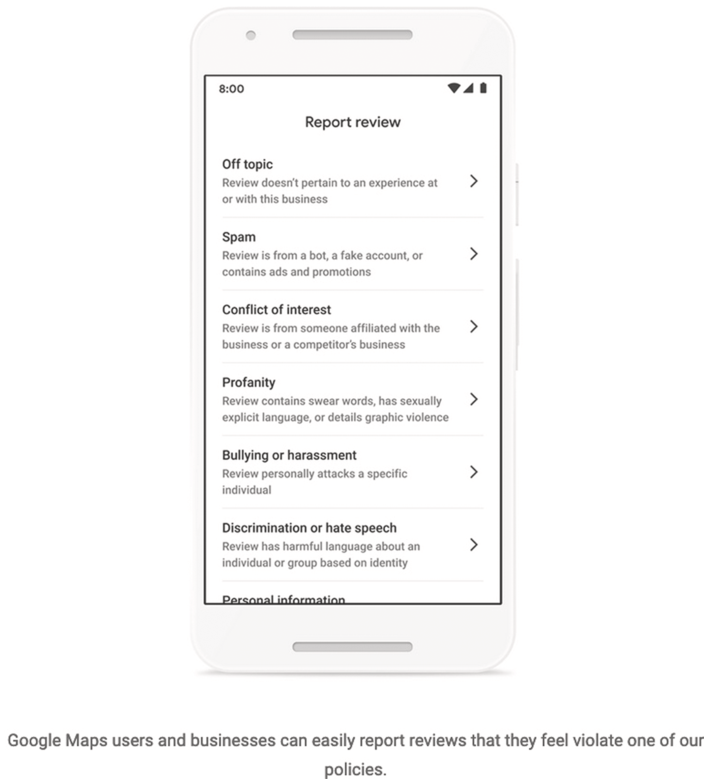
Beyond misinformation as “mistake,” we also found that the platform frames misinformation on the map as the result of deliberate attacks on Google coming from outside Google Maps itself. Google marks this work as the product of “content vandals” who have infiltrated the crowdsourcing service with the intention to misinform (Pritchett Reference Pritchett2021). According to Dan Pritchett, principal software engineer at Google Maps, these content vandals post “fake reviews” as well as “deliberately faked edits, copied or stolen photos, off-topic answers, defamatory language, personal attacks, and unnecessary or incorrect edits all in violation of our policy.” Google frames this work as vandalism from the outside that marks the maps’ pristine information environment (see Figure 6.6 for Local Guides’ process on “How to Report a Review”).
Screenshot of Google’s guidance on how to report a review.
*The list of reasons why a report might be necessary including “off topic,” “spam,” “conflict of interest,” “bullying,” and “discrimination.”
To further distance their map from this threat of misinformation, Google makes a clear distinction between the Local Guides adopting the language of public service like “help their community” and the content vandals who are, according to Google, “ultimately motivated by money.” For Google Maps, these are bad actors who are “gaming the system” because they “try to trick people with scams like fake reviews to attract customers” or “fake listings to generate business leads” (Pritchett Reference Pritchett2021). But here the Local Guides’ role to “support local business” by putting the business on the map and attracting customers becomes difficult to distinguish from some of the work of content vandals. How do Local Guides moderators distinguish between the two types of mapping content in Google’s polarizing framing? Moreover, what are the subtexts of a fake review that mark it as fake, not from the well-intentioned Local Guide who wants to help a local business. Here the limits of the role of community as a system designed to read space through commercial transactions becomes apparent. The Local Guides Platform’s framing of content moderation is based on/perpetuates the framing of misinformation as an exterior threat that is infiltrating an otherwise healthy information system of Google (Kuo and Marwick Reference Kuo and Marwick2021) and fails to account for how Google Maps’ commercial priorities ultimately shape the types of participation that take place on the map, for better or worse (Plantin Reference Plantin2018). Therefore, we see how the knowledge commons is an action arena that is not available for all but only accessible to a few.
To situate misinformation, Google Maps frames misinformation as event based in which content vandals are “motivated by social and political events” or leave their mark online. So while content vandals and gamers of the system are often random and difficult to track, Google also marks misinformation as outside the system. Google states that “These patterns can be anything from a group of people leaving reviews on the same cluster of Business Profiles to a business or place receiving an unusually high number of 1- or 5-star reviews over a short period of time” (Leader Reference Leader2022). Google’s response to these issues is preemptive. These are restricted reviews for certain places where Google reports to have seen “higher rates of policy-violating content.” Such places include schools in the US where teachers, students, and staff are targeted or polling stations in America during elections where misinformation about processes often take place (Leader Reference Leader2022). Google’s response is to preempt and modify their algorithm “to block racist reviews when we observed anti-Chinese xenophobia associated with COVID-19.” And “To avoid the spread of election-related misinformation, we limited the ability for people to edit the phone numbers, addresses and other information for places like voting sites” (Pritchett Reference Pritchett2021).
In this framing, Google Maps calls attention to its predictive capabilities. It is ready for the “content vandals” and “bad actors” and can anticipate where they will act. In consequence, anything that does filter through into the map appears like a glitch in the system (Nakamura Reference Nakamura2013). Moreover, the glitch could be the fault of the Local Guides who did not act fast enough in reporting the misinformation. The glitch in this case works to isolate misinformation as one-off events and an anomaly through the antagonism of outsiders. However, as Kuo and Marwick (Reference Kuo and Marwick2021) note, “when the content of disinformation is ignored and treated as a mysterious and externally created pollutant, we cannot understand why it resonates, where it comes from, or how it spreads” (Kuo and Marwick drawing from del Vicario et al. Reference Del Vicario, Bessi and Quattrociocchi2016; Vosoughi et al. Reference Vosoughi, Roy and Aral2018). Moreover, since Google is the one in charge of the terms and conditions, it is clear that the interests these serve are Google’s.
Discussion: Local Guides as a Project of Misinformation
Google’s construction of insider and outsider knowledge frames how and when “misinformation” plays out on Google Maps. The Local Guides Platform plays a central role in constructing insider knowledge and Google Maps, by extension, as a supportive place to foster online communities. Google leverages Local Guides as benevolent citizens within the Google Maps ecosystem. Reflecting on the processes of constructing insiders, the question then becomes: Who has access to this citizenship? As evidenced in our finding, digital literacy, access to hardware, and social capital are all implicit requirements of gaining entry to Local Guides citizenship. While not within the scope of this case study, these currencies of Local Guides citizenship have been shown to be historical barriers to online access (Gibson and Martin Reference Gibson and Martin2019) as well as differential impacts of disinformation (Noble Reference Noble2018) and extended definitions of misinformation. Such limitations already foreclose the question of “misinformation” when thinking about spatial information. Such normative constructions of misinformation fundamentally limit not only how tech companies look to fight misinformation but also who they are ultimately working for and whose ideals they uphold.
Through this case study, we illustrate the limitations of a misinformation conceit and that dominant framings of misinformation are in place to protect platforms and not people. Framing misinformation on the Local Guides platform through insider vs. outsider or bad vs. good actor binaries helps absolve Google Maps of responsibility for misinformation on the map (Kuo and Marwick Reference Kuo and Marwick2021). This was evident in 2016 with the erasure of the names “Gaza” and “The West Bank” from Google Maps’ representation of Palestine (Agha Reference Agha2020; Graham and Dittus Reference Graham and Dittus2022) echoing the erasure of neighborhoods like The Fruit Belt, Rincon Hill, and South Beach from the Google Maps interface. Even if their names are “put back” on the map, the knowledge that their existence is precarious is shown through The Fruit Belt’s ongoing campaign to preserve their name (Dewey Reference Dewey2019) or the ongoing petition campaign with over a million signatories for better mapping of Palestine (Graham and Dittus Reference Graham and Dittus2022). Google’s processes of “adding information to the map” and “crowdsourcing information” illustrates the larger structural dynamics of power perpetuated by Google’s mapping apparatus, which the Local Guides Platform is a distraction from.
Moreover, the Local Guides platform is designed to normalize commoditized relations to space (see Graham and Dittus Reference Graham and Dittus2022; McQuire Reference McQuire2019) while foreclosing what trustworthy and useful content is, through contrast to fake or fraudulent information. Kuo and Marwick (Reference Kuo and Marwick2021) note that characterizing disinformation in this way assumes an otherwise “shared, healthy information ecosystem, which ignores historical and ongoing ideological and political inequalities that center white viewpoints” (pp. 2). They call for the reframing of “disinformation” from a problem of information pollution to a form of knowledge that is often purposefully propagated and circulated to uphold existing structures of power (Bivens and Haimson 2020).
Local Guides platform is not simply representing space but actively shaping what counts as accurate spatial knowledge, who imparts this information, and what types of information get to inform everyday location-based decision-making processes. Reviews are made part of the map, not only in that they are visible when using Google Maps platform, but also in ways that are disassociated from the Local Guide reviewer and aggregated with other reviews. One user’s rating becomes calculated into an “average rating” of place. For example, opening Google Maps and searching for “coffee,” one will find an icon of a coffee cup to signal the location of a cafe along with the cafe’s rating out of five immediately visible. Local Guides reviews feed how a place is seen on the map, based on the potential of how one consumes a place. We see how this opens a possible new line of map dynamics where businesses rely on the inputted comments of Local Guides to be seen through the map. Thus, localized and contextually dependent place-based knowledge becomes stripped from its local context, aggregated, and subsumed into Google’s map.
Taking together the construction of the benevolent insider Local Guide watchguard alongside the framing of misinformation as an always external threat from outside the system, it becomes apparent that the Local Guides platform constructs enclosures of authenticity that run counter to the projection of a “global community” that is “for everyone” (Reece Reference Reece2021). In the words of Plantin (Reference Plantin2018), “it can decide what needs to be included or excluded from the cartographic representation, who determines society’s spatial representation, and what form and shape public participation will take”. These enclosures presume a relationship to space based on the assumption that all space can be known through review and these reviews are helpful for everyone without considering how review opens the door to online harassment which is often missed in normative models of misinformation (Del Vicario et. al. Reference Del Vicario, Bessi and Quattrociocchi2016). Returning where we started, misinformation on the map is more than simply the fraudulent businesses preying upon innocent Google Maps users. Furthermore, misinformation is not a glitch but a feature of Google Maps’ project to create and protect its total map of the world that prioritizes commercial and transactional orderings of space. Local Guides provides an enclosed participatory infrastructure for Google Maps that presents as open, community-driven and for the people. Yet, through this case study of the platform we see how the Local Guides platform is founded on a fantasy of a benevolent insider, insulated from the politics of mapping, and keeping out the menacing outsider ready to infiltrate the map with their hacks, fakes, and hot takes.


 Open access