





Plain language summary
This article introduces a feature in a web archiving software that can be used to track which parts of an archived collection have been consulted during a research process. This is a feature often seen in other information retrieval systems, such as library systems or archival databases; however, it has not been present in web archive systems before implemented here. The purpose of the navigation tracker is to make it possible for users of the web archiving software to save their exploration pathways through a collection and be able to document how they have navigated a collection of archived websites. In general, web archiving software has previously been developed with curators of collections in mind. The feature presented in this article has been developed through a user test where historians used the software for exploring sources related to their research. By letting historians test the functionality, the article ensures that the feature developed has a use case in humanities research. The article and the feature that it presents make it possible to document and store how a user has navigated a web archive collection. This feature can be used for multiple purposes. First, it provides researchers with the possibility of taking up their research where they left off earlier, as it can be hard to re-find sources if the archive does not provide them with a way of tracking which parts of the archive they have investigated. Furthermore, the feature provides a “paper trail” of which parts of an archive have been consulted as part of the research process. Having knowledge of which parts of an archive have been consulted as part of a research process is vital for future historians wanting to conduct related research. The feature implemented here provides a way to capture that information so that it can be saved for future reference. Either by the researchers themselves or by future colleagues interested in related topics.
Introduction
This article presents a navigation tracking feature in the Open-Source web archiving software SolrWayback (Egense et al. Reference Egense, Eskildsen, Lauridsen, O’Brien, Jackson, Bellony, Thøgersen and Johnston2026). The extension presented provides users with the ability to extract how they have navigated an archive and which parts of the archive they have consulted. This makes it easier to incorporate sources from the archived web in research, as a clear description of how sources have been discovered makes it possible to reproduce and replicate the findings from an otherwise fragmented archive. Transparency in what parts of an archive have been consulted as part of a historical investigation is usually done and it should be the same way for this type of source.
When working with traditional analog archives historians are often good at describing their pathways in the archive, leading to the sources interpreted as part of their research. This is traditionally done through references of sources and consulted archival boxes. However, when historians use a digitized or born digital archive they almost never describe their methods used to discover the source material (Putnam Reference Putnam2016). When working with web archives, no tools have previously made it possible to reflect on the pathways users have followed. The navigation tracker introduced in this article changes this. It provides a tool that makes it possible for historians and other users of web archives to document and remember how they found an interesting source. It also makes it possible to store the navigation history for later use as research is almost never done in one session. With the amount of material available in web archives, it is difficult to get back to where the research process ended last time the archive was consulted. The tracker makes is possible to pick up where one left off. When working with a vast amount of sources from the archived web, it is also possible that you discover a source one day which you then need to revisit a week later. With the navigation tracker provided here, that specific source can easily be found when needed.
SolrWayback is a tool for querying and viewing resources from the archived web. The software provides full text search in WARC files. Most development of the software has been made by archival institutions, such as the Royal Danish Library, Bibliothèque nationale de France, and the British Library. This article argues that the software has been developed primarily for practitioners, such as librarians and web archivists, who are mainly interested in preserving the collections within their web archive. To make the archived web more accessible for humanities research in general and contemporary historians specifically the software needs to have capabilities for documenting search and discovery. When exploring archival collections, it is important that the exploration is done in a transparent way (Jensen Reference Jensen2021). The feature presented here makes it easier for researchers to document how they have explored a collection of archived websites. By introducing the navigation tracker, it becomes easier to remember and describe discovery paths and redo searches. This was not a possibility before the introduction of the navigation tracker.
Context
The introduction of digital archives has made the methodologies behind doing work in the humanities inherently digital. However, many scholars do not acknowledge that their practices have changed with digitally available collections (Milligan Reference Milligan2022). Schriver and Jensen call for more empirical studies of how access to digital archives and their searchability shapes the construction of knowledge (Jensen and Schriver Reference Jensen and Schriver2022). When doing analysis with sources from the archived web, the availability of the navigation tracker presented in this article provides a transparent gateway to how the construction of knowledge is shaped by search.
When one works with digital sources, it is important to take the digitality of the sources at hand into account. This is also true when working with the archived web. The archived web is what Niels Brügger defines as reborn-digital-material. This means that material from the archived web contains all the features that the World Wide Web had when it was “live” and accessible before being captured in a web archive (Brügger Reference Brügger2018). It also signals that sources from the archived web have been reborn in the sense that when an archived web page is replayed it is reconstructed as close to the original as possible, but this replayed version does not guarantee to equal the once live version (Brügger Reference Brügger2018; Teszelszky Reference Teszelszky2019). Furthermore, replay of archived websites prioritizes a visually complete replay instead of temporal coherence. A consequence of this is that an image or embedded text on a replayed site might have been harvested at a different point in time and therefore have a different temporal context than the one the researcher intended to interact with in the first place. The navigation tracker introduced here solves one part of this problem, which is related to the fragmentation of the web, by providing a way for scholars to document how they have navigated a collection before finding an interesting source. The output from the navigation tracker pinpoints these shifts in temporality by including harvest dates for all clicked results.
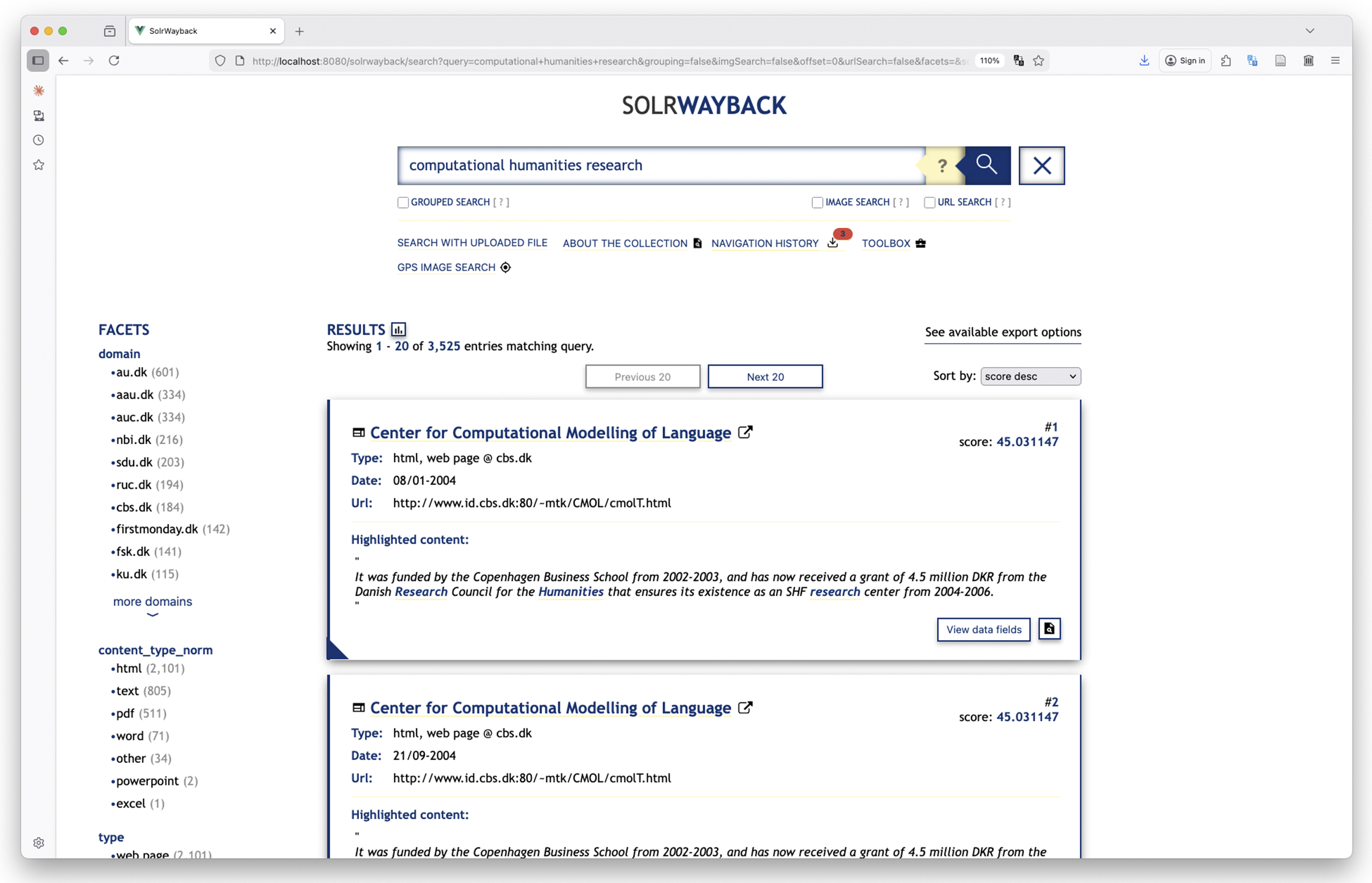
SolrWayback is a search and discovery tool for exploring material from web archive collections. The software provides free-text search in all archived resources, that is, all HTML files, PDFs, URLs, and metadata for other non-text-based files. The software comes with some build-in visualization tools and also provides export functionalities for exporting search results in multiple formats. Technically, the software consists of a Solr search index and engine, a Java backend, and a Vue frontend (Egense et al. Reference Egense, Eskildsen, Lauridsen, O’Brien, Jackson, Bellony, Thøgersen and Johnston2026). In SolrWayback, the modus operandi for exploring an archived collection is search and interaction based. Figure 1 provides an example of how the search interface of the software looks, when a search has been performed. The navigation feature presented in this article is found just below the search field in the horizontal menu.
A query for “computational humanities research” in SolrWayback. Results are shown centrally on screen, while further faceting possibilities are available in the menu to the left. The navigation history introduced in this article is found in the menu below the search bar.
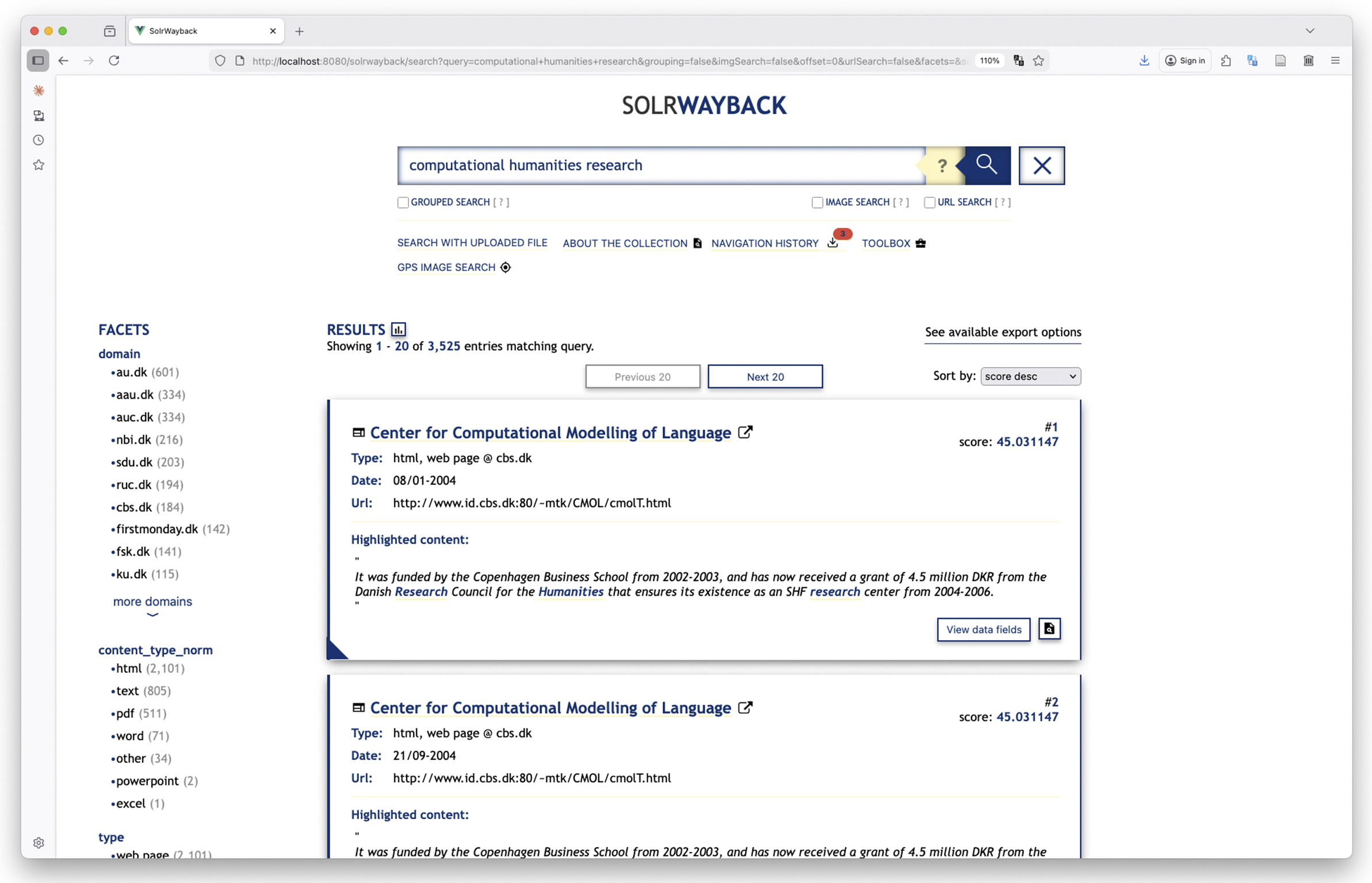
When an archive can be explored by full text and facet search, it is important to make it possible for users to document how they have come across a source. Being able to discover and reference a source in a digital archive is central for how the archive functions. This also includes being able to document how one has found the sources of interest (Jensen Reference Jensen2021). The software presented in this article extends the current functionality of SolrWayback by making it possible for users to download their navigation history from the current session. Multiple users can be connected to the same SolrWayback server at once but the navigation history is stored in each user’s individual session, which makes it possible for multiple users to work on the same archive, while keeping their own navigation history.
The navigation history contains three different types of entries. Each type of entry has its own value in a controlled vocabulary. The values are as follows:
-
• QUERY;
-
• SEARCH RESULT CLICKED;
-
• PLAYBACK LINK CLICKED.
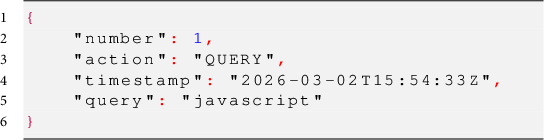
The first of these entries is search history. When a user searches the archive with a query, this gets logged in the navigation history. Every following change to the query gets logged as a new entry in the history, these includes when a query term is added, changed, or removed or when a filter is added, changed, or removed. For instance, if one wants to query the archive broadly for material where the word javascript has been mentioned an entry for that specific query is logged in the history as the following JSON object:
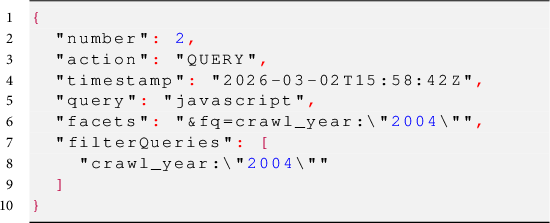
From here, a user might want to filter on resources in the archive from 2004. Applying this filter adds another entry to the history, including the full query with both query term and filter term. This extended JSON object contains two new keys: facets and filterQueries. Facets contain all facets that have been appended to the search URL as a decoded URL string, whereas filterQueries contain each filter that have been added to the query through the GUI in a human readable way. These entries in the object are related, as all filterQueries are always present in the facet entry as well. The filters are presented in a list as this resembles how users have clicked on filters in the GUI. A query with a filter applied would have the following JSON entry:
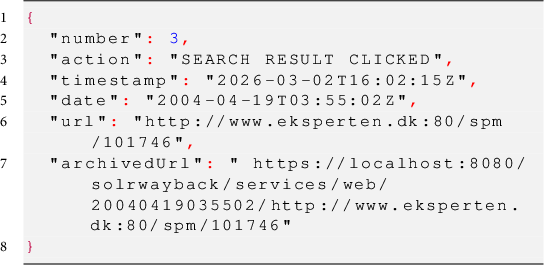
The second and third types of entries are both related to when users navigate the archive through clicking. Where the first type of entry was related to search, the second type is added to the history file when a user clicks on a search result, and the third is related to when a user clicks on a link inside an archived website. The second type of entry is added to the navigation history when a result is clicked from the search result page. This type of entry contains information on the URL that was clicked, and when the source was added to the archive. The number and action keys from the entries above are still present, but instead of keys related to search, this entry contains keys related to the archived webpage, specifically date and url. The key date contains the harvesting date for the link that was pressed by the user. The url key contains the URL for the resource as it was, on the live web and the key archivedUrl contains the link to the resource in the archive. An object looks like this:
The third and last type of navigation history entry contains information on links that have been followed during playback of an archived website. This type of entry is important as playback of the archived web resembles the functionality of the live web more than it resembles the functionality of other types of archives (Brügger Reference Brügger2018). One of the challenges of this behavior is that playback of an archived site prioritizes working links instead of temporal likeliness. In other words, when one follows a link on a page archived in 2000, the linked resource might not have been archived at the same time, therefore, a link might change the temporal context without the user recognizing the change as resolving an outgoing link could lead the user to a resource from 2004 or further away from the linking page. This third type of entry contains the URL, archival date, and archived URL of the resource that have been clicked on in the playback view. The keys are the same as the entry directly above. However, the action is now changed, and a full entry can look like this:
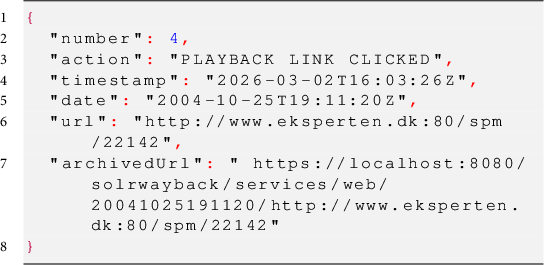
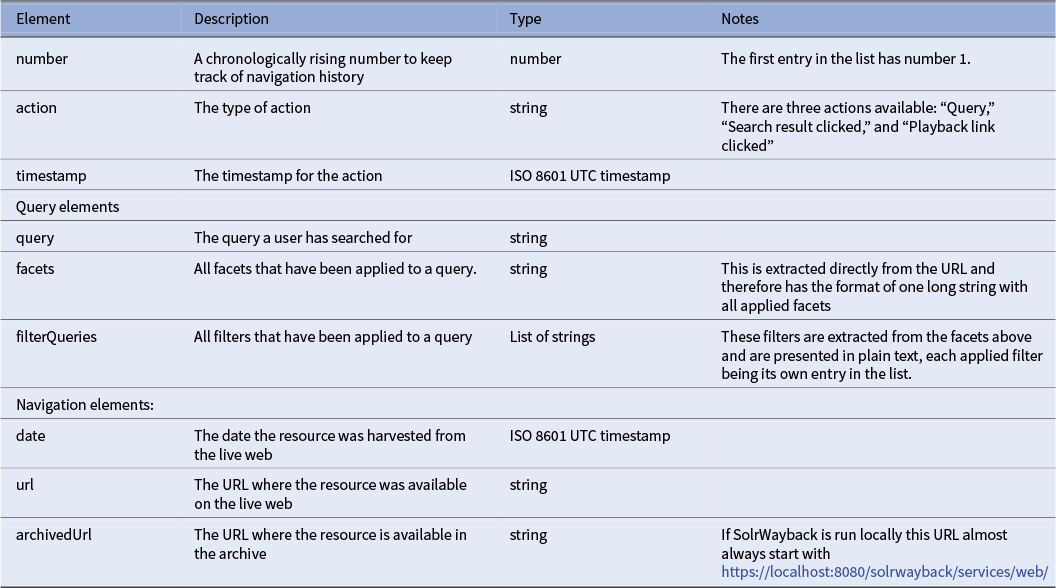
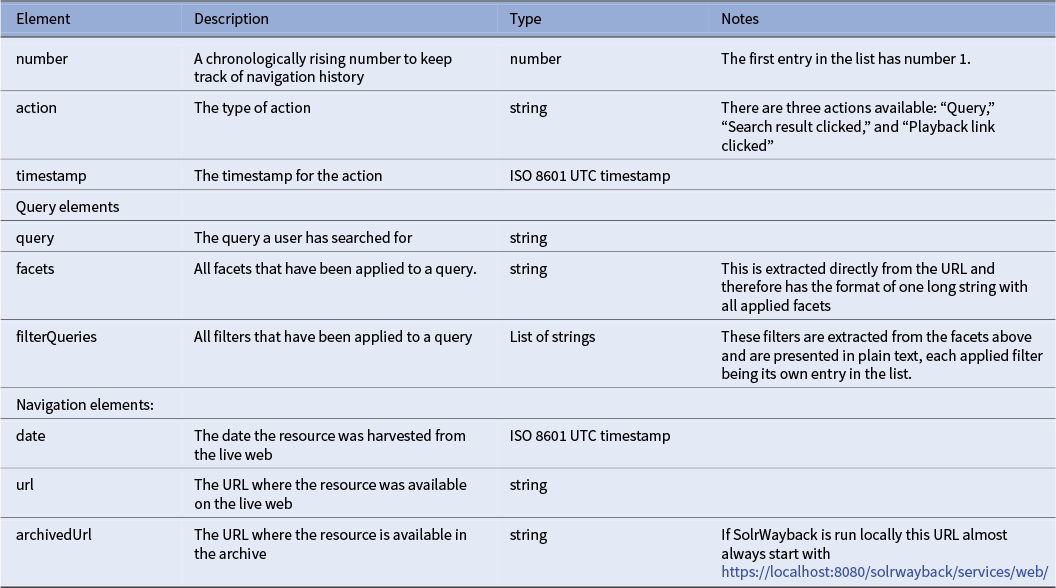
Even though the above entries contain different information, some fields are general. All entries have the keys number, action, and timestamp. While only the query-related entries have the keys query, facets, and filterQueries, both types of entries related to clicking navigation in the GUI have the keys date and url. A detailed description of each available element in the JSON structure is presented in Table 1.
Data structure
Users searching behavior is open-ended, dynamic, and multi-faceted in nature, and it is important to be able to document how such an exploration has been done. In a web archive, users apply an information foraging strategy, where they move between patches of information, while scavenging the information they find relevant (Pirolli and Card Reference Pirolli and Card1999; Savolainen Reference Savolainen2018). The availability of the navigation history helps users understand how they navigate between patches of interesting knowledge in the archive. The navigation history file is available as JSON, and each entry has a chronological entry number which makes it possible to document how one has navigated through the archive. By capturing the chronological order of interactions in the archive, users are presented with a method of documenting how they have foraged the archive to end up with the sources they find relevant for their research. Tracking navigation in the archive makes research with the archival records reproducible and transparent.
Related software
A traditional web archive workflow consists of three steps: collecting, storing, and replaying sources (Hegarty Reference Hegarty2022). SolrWayback, which the software presented in this article is an addition to, is traditionally used as part of the third step: replaying sources. However, SolrWayback not only provides replay of archived sites it also provides full text search, which none of the other web archive playback solutions do. Historically, there have been two other alternatives for playback of archived websites: OpenWayback and pywb (Python Wayback). Today most web archives are using pywb as their playback engine as this software visually provides the best playback (Posthumus Reference Posthumus2022). In the current software landscape, SolrWayback provides a unique entry point for exploring a collection of archived web material as it provides a broader search functionality for these often huge collections. Looking toward other information retrieval systems such as library databases, it is often possible to save queries, but these systems do not provide functionality to track how a query through the system has changed through the users exploration of the database.Footnote 1 Systems, such as Scopus, also provide the possibility of saving search history. In general, information retrieval systems for other types of sources, for example, books and articles, do have a functionality for tracking and storing searches. The feature presented here brings that functionality to web archive software.
The feature presented here provides users of the software with a reliable way of documenting their exploration of the archive which is seldomly done enough when researchers explore digital archives (Jensen Reference Jensen2021; Jensen and Schriver Reference Jensen and Schriver2022; Putnam Reference Putnam2016).
In terms of documenting exploration of web archive collections, there are no existing tools which provide a method for extracting how individual sources have been found in the archives. Looking at related software such as pywb, the need for automatic documentation of navigation might not have been needed as exploration of a web archive through pywb requires the user to know the URL of the domains they are looking for (Hartelius Reference Hartelius2020). In this context, the search-related half of the navigation problem does not exist as searching is not a possibility. In pywb, however, users are still navigating from playback URL to playback URL and this process is undocumented. In SolrWayback, the feature is needed even more. This is due to the search capabilities mentioned above. In SolrWayback, users can explore the collection through text search across the full collection which includes the content from the archived websites and all of the metadata created when a site was harvested. When searching and navigating a web archive collection through SolrWayback, users often get lost, meaning that they end up looking at an interesting, archived source, but cannot remember how they got there as they have performed multiple searches and clicked through a lot of links. This resembles how the live web functions, but it is not adequate as a research practice. The navigation tracker presented here expands the scientific usability of SolrWayback, by providing a method to capture and understand how a user of the software has found their sources.
Development methodology
The software has been developed and verified through technical code reviews and users testing of the feature with a group of historians. Development of the extension has drawn upon the postphenomenological concept of multistability. The term refers to the multiple available uses of a technology. A classic example when explaining multistability is Robert Rosenbergers example of public benches: A public bench is primarily designed to sit on, maybe when waiting for a bus. This is the primary stability of a public bench. However, public benches can also be used as a place to sleep for people without housing. This is another stability, which Rosenberger terms as a bench-as-bed stability (Rosenberger Reference Rosenberger2014, Reference Rosenberger2023). Technologies are often produced with one use case in mind but are often used in multiple ways or by people with different needs. Studies of multistability often investigate how non-primary stabilities are controlled or even discouraged. Think, for instance, of public benches with an armrest in the middle, which makes it impossible to make use of the bench as a bed (Rosenberger Reference Rosenberger2023). The development of the navigation tracker for SolrWayback has been influenced by the notion of multistability as the software as a technology primarily have been developed for web archival practitioners, not for researchers. The primary stability of the software is as a curatorial tool for practitioners.Footnote 2 The implementation of the navigation tracker aids the non-primary stability of the tool as a transparent researcher tool.
During development of the feature further two methodological approaches have been important: code reviews and user tests. The development process started with a strong need from colleagues in a research group working with the archived web as a historical source. They required a feature that could be used to document how they have found their sources in the archive. From here, we defined an overall user story and setup an acceptance requirement for the feature. In other words, the development process has been user and test driven (Homès Reference Homès2024). The user story driving the development was: As a researcher, I need to document how I have explored the web archive, and how I found the sources that I end up using in my research. In combination with this user story, we set up the following acceptance criteria for the feature:
-
1. The feature must track all types of navigation in the archive.
-
2. It must be possible to track each individual type of interaction.
-
3. The order of interactions should be clearly defined.
-
4. Multiple users should be able to use the software without having their navigation history interwoven.
With the user story and the acceptance criteria settled, the first iteration of development started. When the functionality was implemented, the code was sent to the Research Software Engineer on the team for a thorough code review. The feature was also deployed on our local SolrWayback server, which holds almost 500 million records. At this point, we conducted a user test with two historians using the archived web as a source for research on contemporary history to make sure that the feature aligned with the needs of the users.
The test users both had prior experience working with sources from the archived web in SolrWayback. The test took place over two days, with approximately a week between testing days in an office setting, where the test users and the developer of the feature (who is also a historian) sat down to investigate their corpus, looking for sources with relevance for their research project. On the first day, users performed multiple queries, clicked results, and followed playback links to their liking resulting in a navigation history file with 125 entries. On the second day of testing, the group came together and started by examining their previous findings. From there, the group directly revisited some of the sources that they had found during the first day of testing.
From the first day of testing, it became clear that the navigation entries related to clicking events needed to also include the URL of the resource in the archive. This has been implemented as archivedUrl in the JSON output (see Table 1) and made returning to previous visited sources easier on the second day of testing.
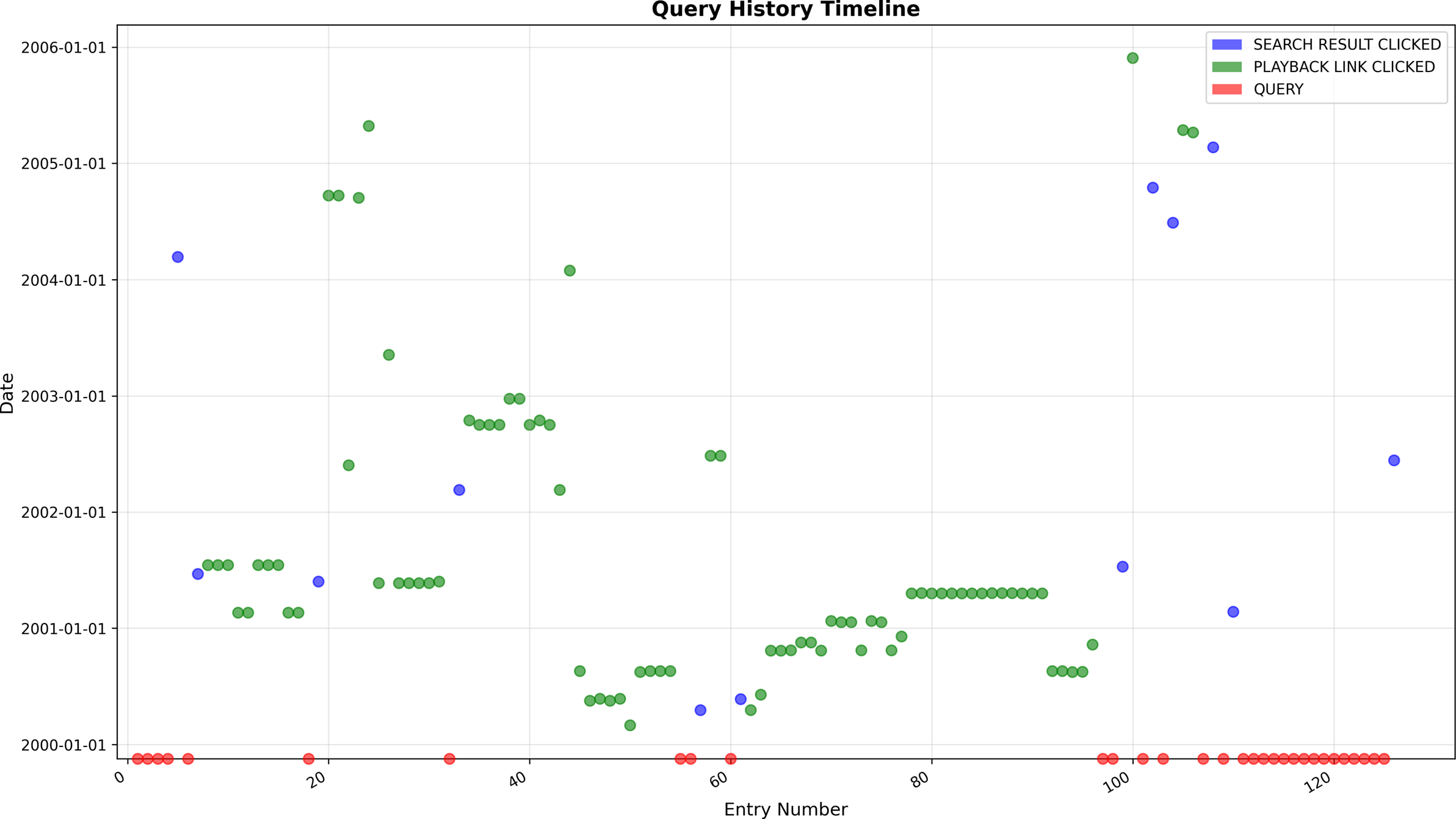
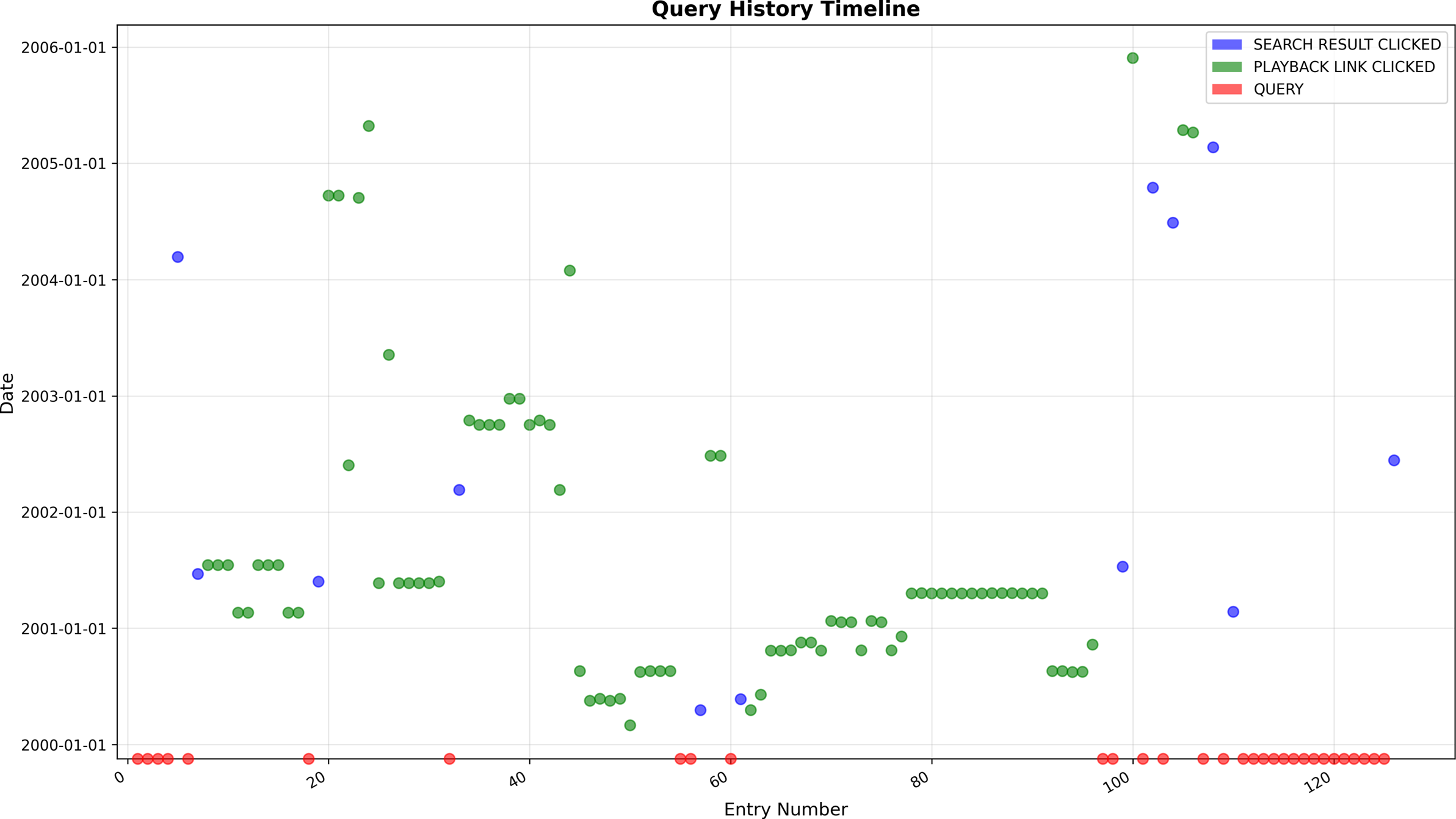
Another result of the test was that the test users did not have strong experience with reading raw JSON directly. This was first overcome by reading the output as a group. A future feature of the navigation functionality would be to visualize the history in a meaningful manner. The test users were generally interested in how they shift through different temporal settings, when they navigate the archive as these leaps in time could have great impact when understanding historical developments in the materials. These shifts in temporality can be visualized through the navigation history and such a visualization could be one future enhancement of the feature. An example of how these temporal changes could be visualized is presented in Figure 2, where entries in the history file are laid out on the X-axis and the archival date are present on the Y-axis. The entries are colored by their type of action.
Example of how temporal changes could be visualized in a future extension of the feature.
Besides the user tests, the feature also includes unit test coverage on all java methods implemented as part of the feature for a more robust contribution to the Open-Source ecosystem (Parsons Reference Parsons and Parsons2020).
With the modification needed after the user test, the feature provided a solution for all needs described in the user story. At this point, the feature was production ready in the team consisting of the two historians who tested the software, the main developer of the feature who is also a historian and another senior software developer. The feature has been developed by the author of this article. All code was reviewed by the other software developer employed in the team. To contribute to the Open-Source community, a pull request was opened on the official SolrWayback github repository, where the main maintainer of the project also provided a code review before the feature was upstreamed. The process of contributing to the Open-Source community around SolrWayback is highly trust based. All contributions to the software are highly regarded. The developer of this feature has contributed to the software previously and is therefore known in the community. Because of this, no prior discussion of the feature happened as the main developer was confident that the maintainer of SolrWayback would approve of the addition. However, if one wants to contribute to the software, it is always a good idea to propose the feature to the maintainers of the Github repository beforehand.
Audience
The feature presented in this article is intended as an extension of the Open-Source software SolrWayback which already has a small but strong community of users. However, as shown above, most users of the software are institutions with responsibility for archiving and preserving the World Wide Web in national contexts such as the Royal Danish Library. Above it was argued that the primary stability of SolrWayback is as a curatorial tool for practitioners working with web archives. The article also described that the feature introduced here was tested by historians, in other words, researchers interested in using the archived web as part of their source. These choices have been made consciously as the software presented in this article aims at making it easier for researchers to methodologically and transparently use sources from the archived web in their research. The main audience for this feature is humanities scholars who wants to use the archived web as part of their research. It does not matter if the researcher aims at doing large-scale or small-scale analysis or use quantitative or qualitative methods as the navigation tracker presented here can be used to document close reading pathways and queries to construct large-scale datasets alike. However, as the feature is an extension of an already existing piece of software, the users who are currently most likely to use the software, curators, will also benefit from the extension. The feature can, for instance, be used to document how a data delivery has been scoped from an institutional point of view. For instance, institutions who hold national web archive collections, such as Royal Danish Library or Bibliothèque nationale de France, often do data deliveries for researchers working with a subset of their collections. The feature presented in this article provides a method for the holding institutions to document how they have sliced the data before it has been made available for researchers.
If a researcher accesses a web archive collection through SolrWayback at an institution with this version installed, it should be straight forward for the user to extract their navigation history and make use of the feature. Users should, however, keep in mind that institutional access to a web archive collection can be hard to obtain (Brügger Reference Brügger2025; Nielsen, Maurer, and Zierau Reference Nielsen, Maurer and Zierau2025). However, if researchers want to set up a local research infrastructure with SolrWayback, this can be done quite easily for a small- to medium-sized collection. Archival material for such a collection can be collected at CommonCrawl or the End of Term Webarchive. Many national web archives also provide researchers with the possibility of data extraction from their archives. Most of the limitations related to the software presented in this article relates to the institutional infrastructure around web archives and not to the software itself.
Impact
Before the introduction of the feature presented in this article, SolrWayback has often been described and used from a practitioners or technicians view as part of different national web archives (Eskildsen Reference Eskildsen2016; Morival, Aubry, and Benhamou-Suesser Reference Morival, Aubry and Benhamou-Suesser2023; Mourão and Melo Reference Mourão and Melo2025; Mumma, Ko, and Phillips Reference Mumma, Ko and Phillips2019). Few scholars have recently started using SolrWayback for specific research purposes, for instance, Kurzmeier’s project on web defacement. However, SolrWayback does not fulfill all of Kurzmeiers research needs which also shows that the main group of users of the software is not researchers (Kurzmeier Reference Kurzmeier2025a, Reference Kurzmeier2025b). Humanities scholars have been reluctant to make use of the archived web in general, which is often explained with a lack of training in digital skills and confidence regarding using the archived web as a source (Brugger and Schroeder Reference Brügger and Schroeder2017; Millward Reference Millward2025; Webster Reference Webster2017). Furthermore, humanities scholars often do not reflect on their uses of digital archives (Jensen Reference Jensen2021; Jensen and Schriver Reference Jensen and Schriver2022; Putnam Reference Putnam2016). The software presented in this article bridges these two positions. It makes it easier for humanities researchers to navigate and document their use of web archives. The potential gains from being able to document navigation in a web archive in a transparent and reproducible manner is twofold. Firstly, it makes it easier for researchers to document how extensively they have explored a web archive collection as part of their research. Secondly, reproducing studies using the archived web as a source is made easier as it becomes possible to follow other researchers’ steps through the archives. The availability of the user’s navigation history also opens new paths of research. With a navigation history, JSON in hand, it becomes possible to analyze and visualize how the temporal setting of the user changes when exploring the archive as users are clicking through not just virtual space but also through different temporalities. This is a pitfall of current playback solutions that have received little attention before, but it becomes possible to investigate with the availability of the navigation tracker as the implemented feature keeps track of the archival dates of all visited sources.
Conclusion
By introducing the Navigation tracker in SolrWayback, it becomes possible for users exploring archived web collections to document how they have explored a collection of sources. This documentation of exploration makes the discovery of material in web archive collections more transparent and reproducible for the users themselves and for other users interested in the same material. The navigation tracker is a feature that researchers using SolrWayback needed to be able to properly reference how they have explored a collection. Besides making it possible to document one’s paths of discovery through the often massive collections of archived material, the navigation tracker also makes it possible for users of the software to return to their prior findings and resume their investigations after time away from the archival collection. The navigation tracker keeps track of all types of navigation in a user’s session. It tracks searches, clicks on search results, and clicks on links between archived sources. The chronological exploration history can then be downloaded as a structured JSON response for documentation or further analysis. Throughout the article, it has been shown that the navigation tracker aids researchers, who are not the current typical user of web archives, in using the sources from the archives in a reproducible and transparent way.
Data availability statement
Source code can be found in the SolrWayback github repository: https://github.com/netarchivesuite/solrwayback/.
Author contributions
Conceptualization: V.H.J.; Methodology: V.H.J.; Writing: V.H.J.
Funding statement
This research was supported by grants from the European Research Council for the WEB CHILD project.
Competing interests
The author declares none.
Ethical standards
The research meets all ethical guidelines, including adherence to the legal requirements of the study country.

 Open access


Rapid Responses
No Rapid Responses have been published for this article.