


In this article, we discuss how we leveraged various digital technologies to handle some of the challenges associated with documenting excavation in an urban context with a large collaborative team. Multiphase urban sites can present challenges to archaeologists due to the inherent complexity of their stratigraphy—which often represents many centuries of continuous changes compressed across relatively shallow soil layers—and to the large number of finds they generate and the nature of their taphonomies. The role of finds in interpretation of such sites remains particularly problematic (see discussion in Ellis et al. Reference Ellis, Emmerson and Dicus2023:5–6). Rather than indicating the use of a space, the vast majority of artifacts in many urban settings were introduced during phases of construction or reconstruction (most often imported as part of leveling fills). These materials can provide valuable data on matters of urban infrastructure and economy—including but not limited to patterns of production, disposal, and reuse—but only with full collection and analysis of each one of the hundreds to thousands of artifacts such sites can generate in a single day of excavation. For these reasons, excavations at urban sites require a reliable and meticulous data collection strategy that can facilitate the management, analysis, and interpretation of data by interdisciplinary teams. Working in a large team can have its own challenges, particularly when it comes to collating, reviewing, and then sharing the data between collaborators.
In response to these challenges, we designed and implemented a paperless and 3D workflow to document excavations at the archaeological site of Pompeii, located in southern Italy. We replaced paper forms with digital forms on tablet computers, and we used structure-from-motion (SfM) photogrammetry for spatial data documentation of the excavation. Using this digital workflow in concert with other GIS applications, we were able to not only record all observational, metric, and spatial data in the field but also quickly integrate and share these data with project archaeologists for visualization and analysis during and after the project. Using ESRI's Survey123 and Dashboard applications combined with ESRI's ArcGIS Online's 3D web scene allowed us to address the challenges inherent to our project. Although each archaeological project has its own unique challenges, our workflow has a broader applicability that may be helpful or inspiring to other archaeological projects.
POMPEII I.14: DESIGN AND EXECUTION OF A PAPERLESS AND 3D WORKFLOW
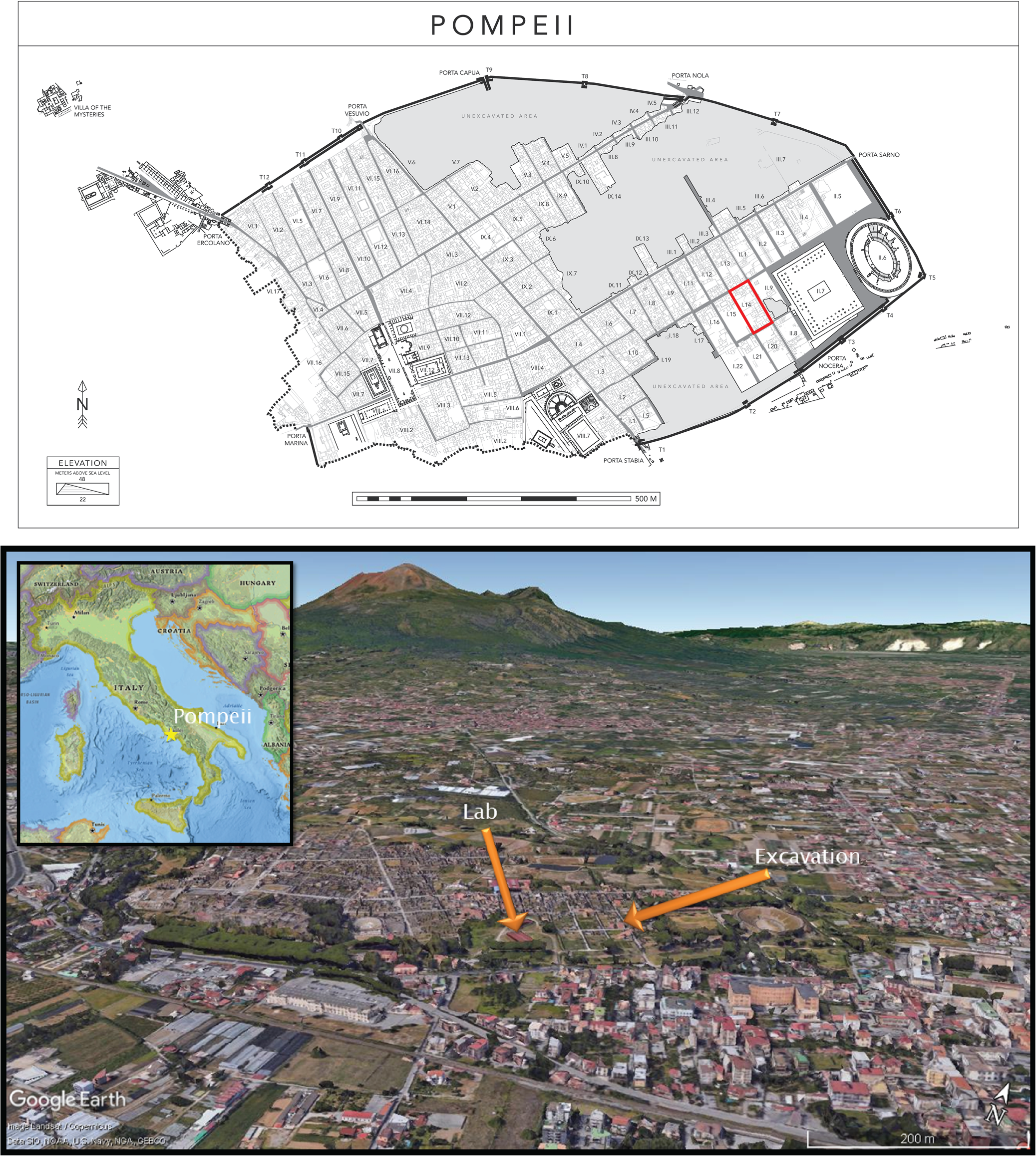
The Pompeii I.14 Project is led by Tulane University and the Parco Archeologico di Pompei, and its 2022 field season was completed in collaboration with Oxford University, Princeton University, Carleton College, Indiana University, and the Geospatial and Virtual Archaeology Laboratory and Studio (GVALS) of Indiana State University. The project's key research questions are focused on the diverse experiences of the nonelite, urban infrastructure, the development of the city of Pompeii, and how that development was influenced by the presence of a major regional port. Together, the team worked in Region I, Insula 14, located in the southeastern part of the site (Figure 1).
Location of Insula I.14 within the site of Pompeii.
The Pompeii I.14 Project is a multiyear project, and our first excavations were carried out from late June through early August of 2022. We used the method of single-context recording in an open area, modified to accommodate the standing architecture of Pompeii. Single-context recording treats each archaeological deposit (or “context”) as an individual stratigraphic unit (SU). Every SU receives a unique number and becomes a container—both literal and figurative—of all information surrounding one event in the past. Under this system, all ceramics, small finds, and environmental materials retrieved from a soil deposit are tied back to their context via SU number. At any given time, three excavations in different areas of the insula were in process simultaneously while archaeological materials were being analyzed.
We decided that we would use a paperless workflow for data collection as had been done over a decade ago at Pompeii's Porta Stabia. In addition, we wanted to implement structure-from-motion (SfM) photogrammetry to document the excavation process. Although each of these methods is established individually in the literature (Magnani et al. Reference Magnani, Douglass, Schroder, Reeves and Braun2020; Wallrodt Reference Wallrodt, Averett, Gordon and Counts2016), less often are the two modes of documentation combined. We planned to use GIS software to unite the data captured in digital form with the 3D models of the excavation. Our goal was to produce a robust geodatabase that included scaled and photorealistic 3D models of the excavations at important points in the process that show each SU and contain all the data collected using our digital forms (i.e., observational and metric data, still photos, and field drawings).
In the months prior to the field season, the digital-data initiatives team of the Pompeii I.14 Project spent time consulting with the project director and other specialists associated with the project, and testing the workflow in mock excavations using the same equipment that we would be used at Pompeii. To ensure smooth implementation of the workflow, the first author even piloted the use of the paperless and 3D workflow on their excavation project in Quiechapa, Oaxaca, Mexico, at the site of Las Mesillas. Evaluating the workflow’s performance on an authentic project helped in building experience from which to draw when troubleshooting later during the excavations at Pompeii. It also allowed project personnel to practice photogrammetric and spatial referencing workflows with the challenges of real-world field conditions.
Developing Digital Forms
The advantages and disadvantages of a paperless workflow using tablet computers has been well documented in the literature (Austin Reference Austin2014; Caraher Reference Caraher, Averett, Gordon and Counts2016; Ellis Reference Ellis, Averett, Gordon and Counts2016; Fee et al. Reference Fee, Pettegrew and Caraher2013; Gordon et al. Reference Gordon, Averett, Counts, Averett, Gordon and Counts2016; Lindsay and Kong Reference Lindsay and Nicole Kong2020; Motz Reference Motz, Averett, Gordon and Counts2016; VanValkenburgh et al. Reference VanValkenburgh, Silva, Repetti-Ludlow, Gardner, Crook and Ballsun-Stanton2018; Wallrodt Reference Wallrodt, Averett, Gordon and Counts2016; Wallrodt et al. Reference Wallrodt, Dicus, Lieberman, Tucker and Traviglia2015). Many have found that recording archaeological data using paperless methods has saved time and resources, improved data quality and integrity, and enabled rapid data availability and access. Paperless workflows and the connectivity advantages of the current generation of tablet computers come with many benefits, both in the field and in analysis. Fieldworkers can immediately enter observations and metrics in the field, generating data that is “born digital” and eliminating the confusion and error that can come from post-field digitizing (Ellis Reference Ellis, Averett, Gordon and Counts2016:55–56; Gordon et al. Reference Gordon, Averett, Counts, Averett, Gordon and Counts2016; Lindsay and Kong Reference Lindsay and Nicole Kong2020; Motz Reference Motz, Averett, Gordon and Counts2016:82–83; VanValkenburgh et al. Reference VanValkenburgh, Silva, Repetti-Ludlow, Gardner, Crook and Ballsun-Stanton2018:344). This “born digital” benefit also saves time. Instead of researchers spending weeks or months inputting field observations into a database, the data arrive in ready-to-analyze condition through the careful use of smart forms that standardize data capture, which not only eliminates data inconsistencies and typos but also helps in avoiding issues of illegible handwriting, limited space for recording comments, or running out of copies of forms in the field (Austin Reference Austin2014:14). Scholars who have compared paperless methods to traditional data collection methods in lab settings have found that digital forms improve efficiency and data quality (Austin Reference Austin2014; VanValkenburgh et al. Reference VanValkenburgh, Silva, Repetti-Ludlow, Gardner, Crook and Ballsun-Stanton2018).
Today, there are options for data collection applications—both proprietary (e.g., Avenza Maps Pro, ArcGIS Field Maps and Survey123, FileMaker Pro, Fulcrum) and open source (e.g., QField, GeoODK)—that will allow the user to develop custom digital forms that are tied to locational (spatial) data. We chose to use ESRI's Survey123 as the backbone of our paperless workflow because we felt that Survey123 was the best fit for our needs and budget. Survey123 is compatible with our choice in tablet—the iPad Pro—and was available to both Tulane University and Indiana State University faculty with no extra cost beyond the subscription that each institution already pays for the regular use of the ESRI software for research and in the classroom. Most importantly, we had planned to use ArcGIS to create and manage our project geodatabase from the outset, and given that Survey123 was part of the same software suite, it would ensure that the data would be easily integrated with other geospatial data from the project (e.g., GPS data, total station data, and 3D models).
Prior to the field season, we developed digital data entry forms using Survey123. Custom forms were made to record data about SUs, to log each of the finds encountered in the SUs, to document architectural features of the insula, and to record data during ceramic and flotation analyses. In consultation with each of the specialists who would be collecting the data associated with each of the planned forms, a first draft of each digital form was developed from the paper forms that have been used on previous projects carried out in Pompeii, or at a comparable site. This first draft became the object of discussion during the meetings with each specialist. We would review each item on the form and discuss the best approach for recording the data digitally. This meant choosing a method to restrict or open possible responses to each question, deciding on the best wording or images to add to the form to guide users during data entry, and deciding on the most appropriate datatype for each question that would facilitate accurate and swift data analysis. Once the form was developed, drafts were sent out for testing. As issues were encountered, a new draft was developed until we settled on a near final form.
The SU form was the principal form given that the SU number became the unique ID to which other data were linked. Each time an SU was excavated, an SU form was completed. This created a record that included all of the data collected for that SU, including observation/descriptive data (e.g., soil properties, descriptions, in-field interpretations, etc.), metric data, excavation photos, and field drawings (see Supplemental Figures 1–15 to preview SU form). Other forms, such as the Finds form and the Pottery form, also created records that were connected (related) to these SU records using the SU number. This enabled us to query not only the data collected per SU but also the data from other forms.
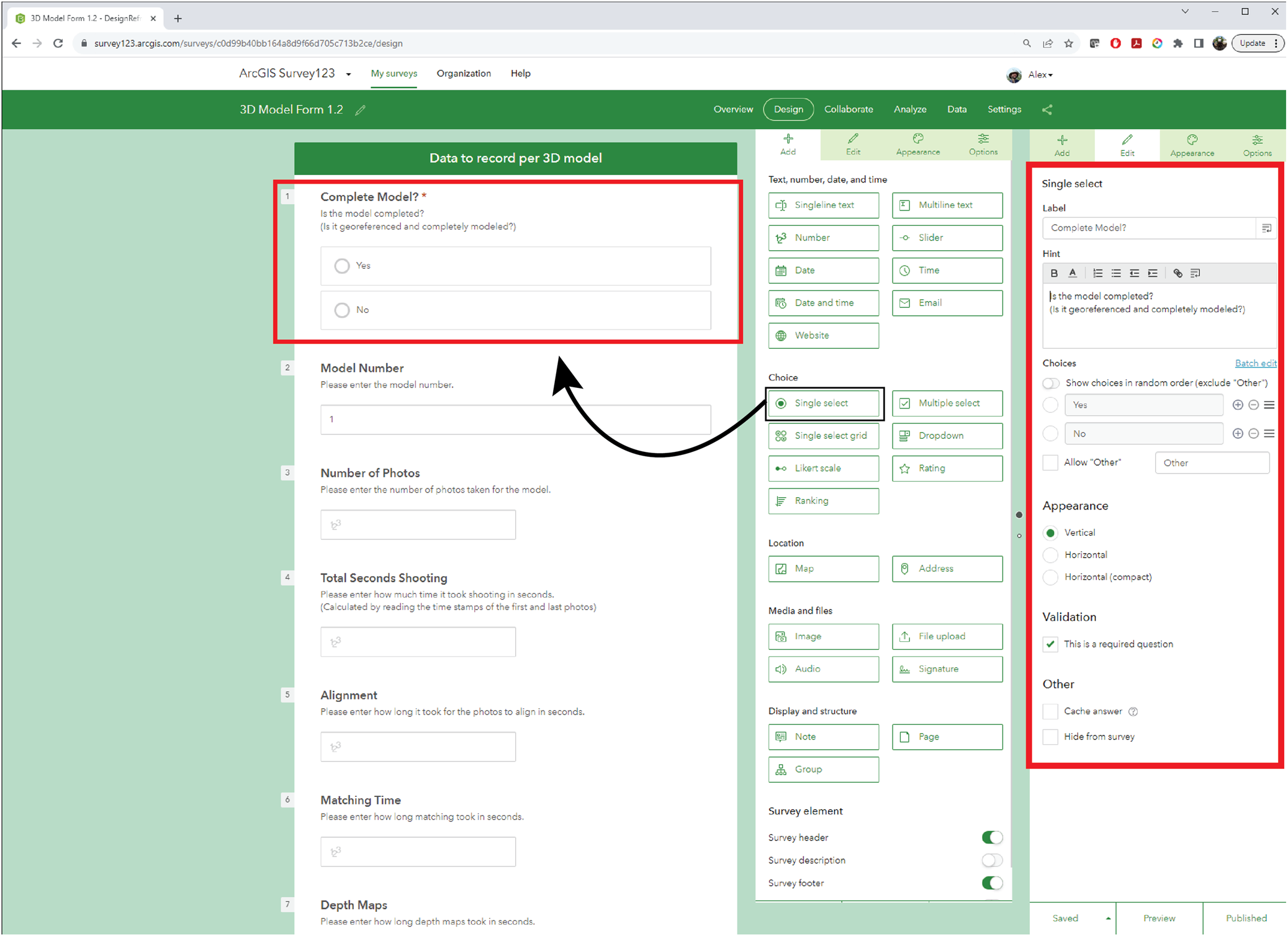
All of the digital forms were initiated using Survey123's web interface (Figure 2). This is an easy-to-use drag-and-drop-style interface that can be learned in about 30 minutes. Simple forms, such as our flotation sample forms, were completed using Survey123's web interface. More complex forms were brought into Survey123 Connect, the desktop version of Survey123, which allowed more customization and the addition of complex questions. For example, programming the form so that a dropdown list response would filter down the choices available in later dropdown lists can only be developed through Survey123 Connect. The interface for developing forms in Survey123 Connect is an Excel spreadsheet, and it is not as straightforward as the web version. Learning the basics of setting up a form using Survey123 Connect requires more time, but ESRI provides many training videos online. Once the user understands how the digital form is structured in the spreadsheets, form development using the *.xlsx file becomes easier to use.
Screen capture of the simple Survey123 web interface. The panel on the left shows the survey form draft. The panel in the center shows the design panel, which has various question types. The panel on the right shows the editor panel. A question from the design panel can be dragged into the survey form draft, and then the edit panel can be opened to customize each question.
When forms are ready to share and test, the form is “published” through Survey123, allowing data to be collected. A link or QR code facilitates the sharing of the digital form. The form can be used within a web browser, or it can be opened in the Survey123 app, which can be downloaded and installed on any mobile device. Once the user has filled out the form, the data can be sent using cellular service or Wi-Fi to the cloud, where the data is stored and brought together. If there is no cellular service or Wi-Fi available in the field, the Survey123 form can still be used, but the user must use the Survey123 app to download the form to the device before they can begin to record data. The user can save locally on the device before sending the data to the cloud once they are in cellular or Wi-Fi range. Once the data are uploaded to the cloud through the Survey123 web interface, users can (1) view, edit, and analyze the data on the cloud server using the web interface tools or another ESRI application (e.g., Dashboards); or (2) download the data in various forms such as *.csv, *.xlsx, *.kml, shapefile, or file geodatabase to be used in other software programs.
Many versions of the forms were developed and tested by our team before the field season. In our rigorous testing, we anticipated most of the issues that arose in the field. Issues that we did not anticipate were all minor and could be fixed with a simple update to a form.
3D Documentation Through Structure-From-Motion
Structure-from-motion (SfM) photogrammetry, an image-based 3D documentation technique, has earned its place as an effective method in archaeological practice to map and record 3D spatial data. By using a digital camera and taking a series of 2D images of real-world phenomena, an archaeologist can create an accurate digital 3D representation of objects, architecture, landscapes, and excavations. These 3D representations—henceforth 3D models—can be assigned scale and spatial reference, and they are wrapped in a photorealistic texture, making them seem like digital replicas of the original. For over a decade, archaeologists have been identifying ways that SfM can be effectively used to enhance documentation in the field. Photogrammetric techniques have proven to be capable and useful in recording excavation (Adam et al. Reference Adam, Adams Matthew, Homsher Robert and Michael2014; Badillo et al. Reference Badillo, Myers and Peterson2020; De Reu et al. Reference De Reu, De Smedt, Herremans, Van Meirvenne, Laloo and De Clercq2014; Doneus et al. Reference Doneus, Verhoeven, Fera, Briese, Kucera and Neubauer2011; Koenig et al. Reference Koenig, Willis and Black2017; Matthew et al. Reference Matthew, Falko and Levy Thomas2014), survey (Bikoulis et al. Reference Bikoulis, Gonzalez-Macqueen, Spence-Morrow, Álvarez, Bautista and Jennings2016; Douglass et al. Reference Douglass, Lin and Chodoronek2015; Sapirstein Reference Sapirstein2016), architecture (Borrero and Stroth Reference Borrero and Stroth2020), artifacts (Porter et al. Reference Porter, Roussel and Soressi2016), skeletal remains (Evin et al. Reference Evin, Souter, Hulme-Beaman, Ameen, Allen, Viacava, Larson, Cucchi and Dobney2016; Morgan et al. Reference Morgan, Ford and Smith2019; Ulguim Reference Ulguim, Errickson and Thompson2017), and petroglyphs (Badillo Reference Badillo2022; Berquist et al. Reference Berquist, Spence-Morrow, Gonzalez-Macqueen, Rizzuto, Álvarez, Bautista and Jennings2018; Estes Reference Estes2022; Roosevelt et al. Reference Roosevelt, Cobb, Moss, Olson and Ünlüsoy2015; Zborover et al. Reference Zborover, Badillo, Lozada, Lozada and Chávez2024), among others.
We used SfM photogrammetry to document the excavation, employing what we call the “base model” approach. Prior to excavation, we created a scaled and georeferenced 3D model of Insula 14. This 3D model acted as the base model with which all subsequent 3D models of the excavation would be aligned. Consequently, highly accurate spatial measurement tools, such as a total station and/or Real-time Kinematic (RTK) GPS, were only needed one time at the beginning of the field season to reference the base model because all other models’ reference information is aligned to that model.
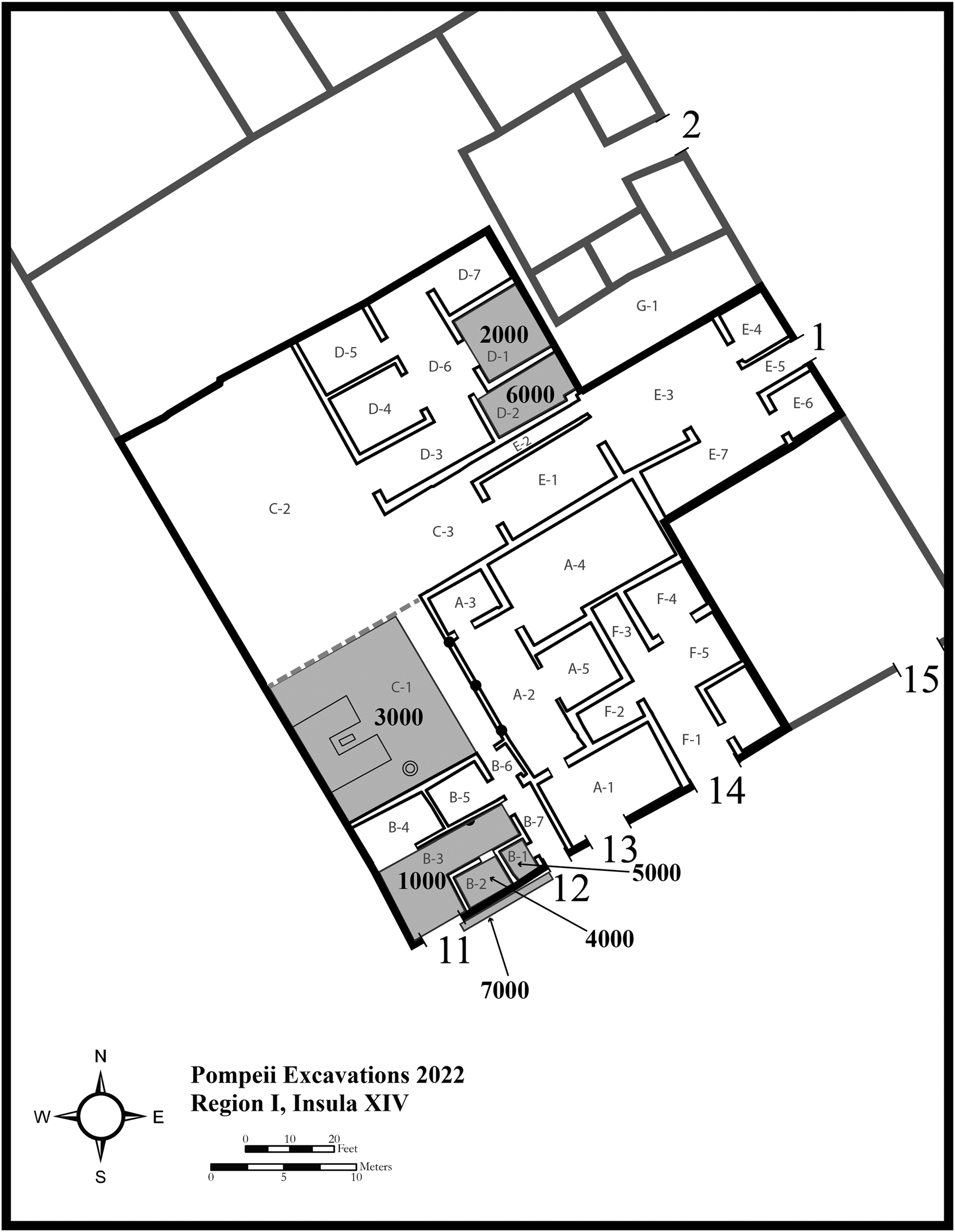
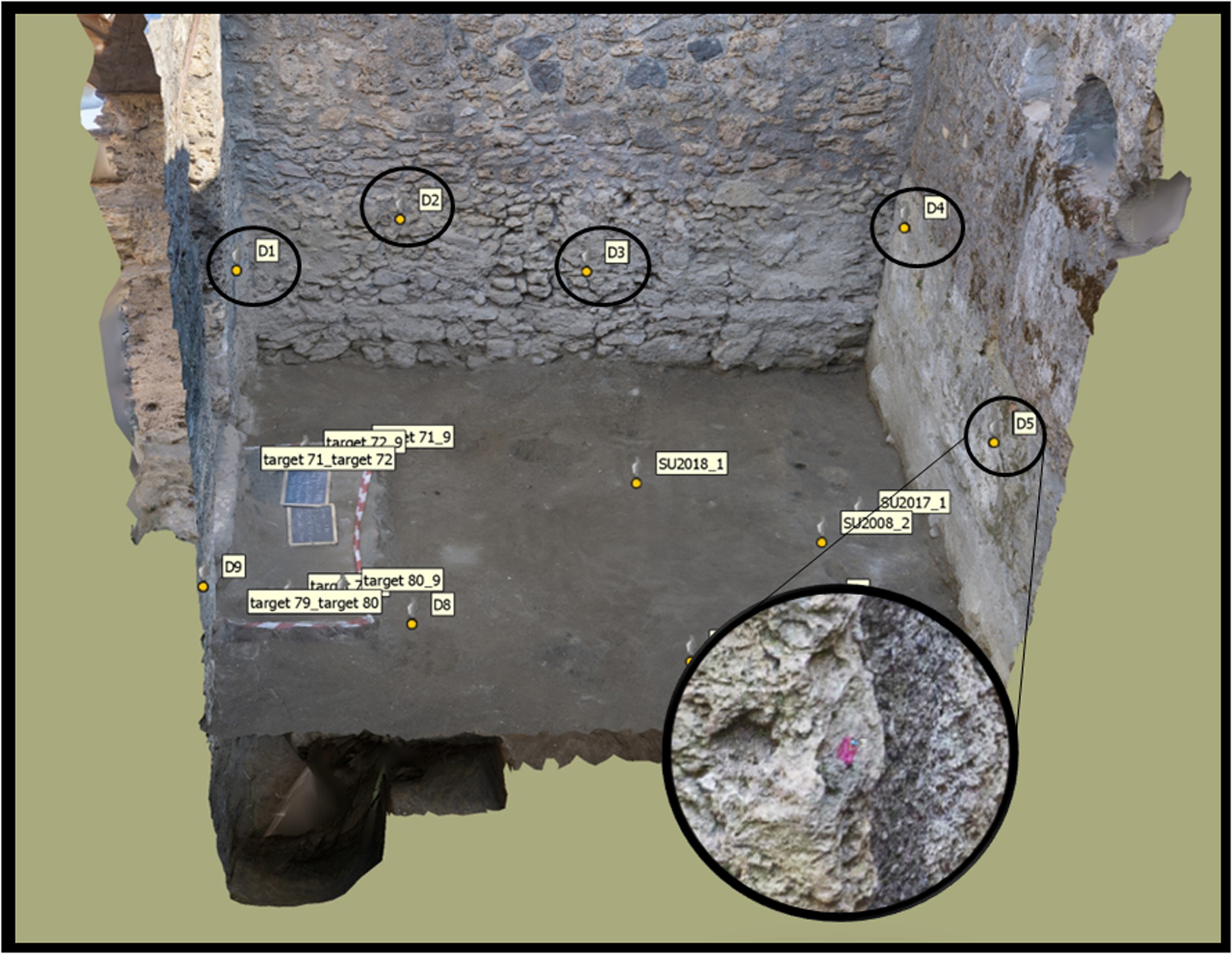
We began by placing alignment points throughout the interior of places within the insula (Pompeian city block) where excavation was planned, which we called Archaeological Areas (Figure 3). These alignment points, which were simply small dots (<0.5 cm in diameter) of highly visible pink paint, acted as registration points to facilitate accurate alignment of all excavation models to the base model (Figure 4). We made sure to place these alignment points evenly throughout each Archaeological Area. After establishing alignment points, ground control points (GCPs), or points visible in the imagery used for georeferencing, were placed in open areas and distributed evenly throughout the insula where possible. These GCPs were recorded using a total station and high-accuracy RTK differential GPS. They georeferenced what would serve as our base model, which included the entire insula, containing both the areas that we planned to excavate and areas that may be excavated in a future field season. RTK GPS provided georeferencing to geographic coordinates, whereas the local grid created by the total station allowed for quick model coregistration. In addition to the alignment points and GCPs, calibrated scale bars with coded targets were placed throughout during each photo capture, which provided internal check points.
Map of Insula I.14 with Archaeological Areas shaded in gray.
An example of one of the Archaeological Areas with alignment points. Screen captures were taken within the Agisoft Metashape software.
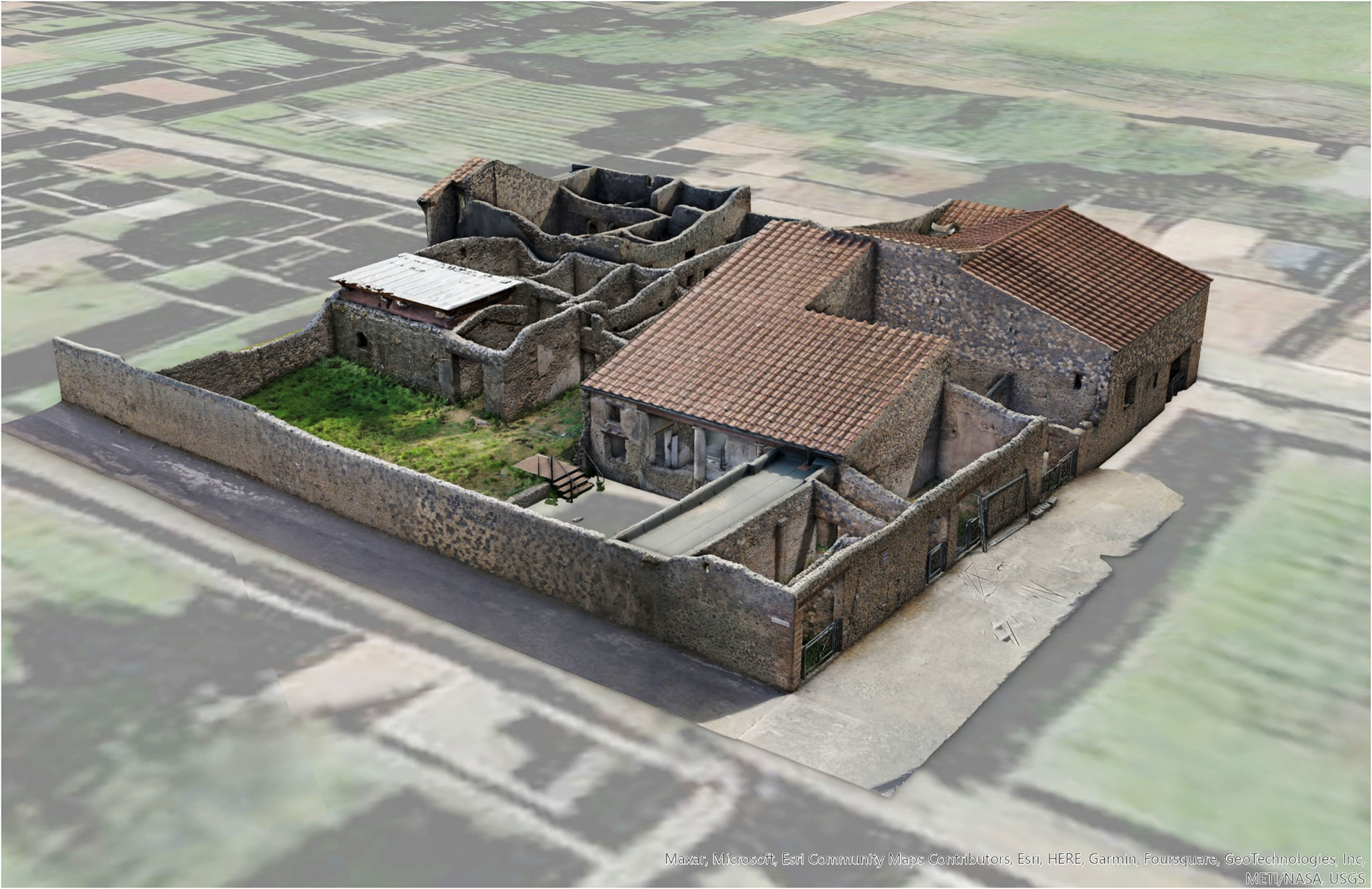
Once all the alignment points, GCPs, and scale bars were placed, photos were taken of the insula using both terrestrial and aerial methods. Terrestrial photos were captured with a Sony a6000 camera, and aerial photographs were captured with the on-board camera of a DJI Mavic 2 drone. In the end, 4,828 photos (886 UAV and 3,942 terrestrial) were taken of Insula I.14, and a 3D model of the insula was generatedFootnote 1 (Figure 5). The insula was then scaled and georeferenced using the total station measurements.Footnote 2 For all 3D reconstruction on this project, we used the software Agisoft Metashape Professional version 1.8.5.
Final base model of Insula I.14. Excavation models produced during the excavation process were aligned to this referenced model.
Documenting the Excavation
The Archaeological Areas designated for excavation were assigned unique numbers in the thousands (i.e., 1000, 2000, 3000, etc.). Given our open-area method, the standing architecture often served to bound Archaeological Areas. As excavators dug, they identified stratigraphic units (SUs) for documentation. At times, one SU comprised the entire Archaeological Area (e.g., topsoil). However, because of the complexity of the urban context, it was more likely that multiple SUs would be exposed within an Archaeological Area at the same time.
Using Digital Forms
As excavators encountered a new SU, they opened a new SU form and assigned a unique three-digit number (i.e., 001, 002, 003, etc.). This number, when combined with the Archaeological Area number, created a four-digit SU number that would indicate both the unique number of the SU and the Archaeological Area in which it was found. For example, SU# 4003 would mean stratigraphic unit 3 from Archaeological Area 4000. As the excavators proceeded with excavation, they used the iPad Pro to fill out the SU form, take notes, and make scientific drawings and sketches.
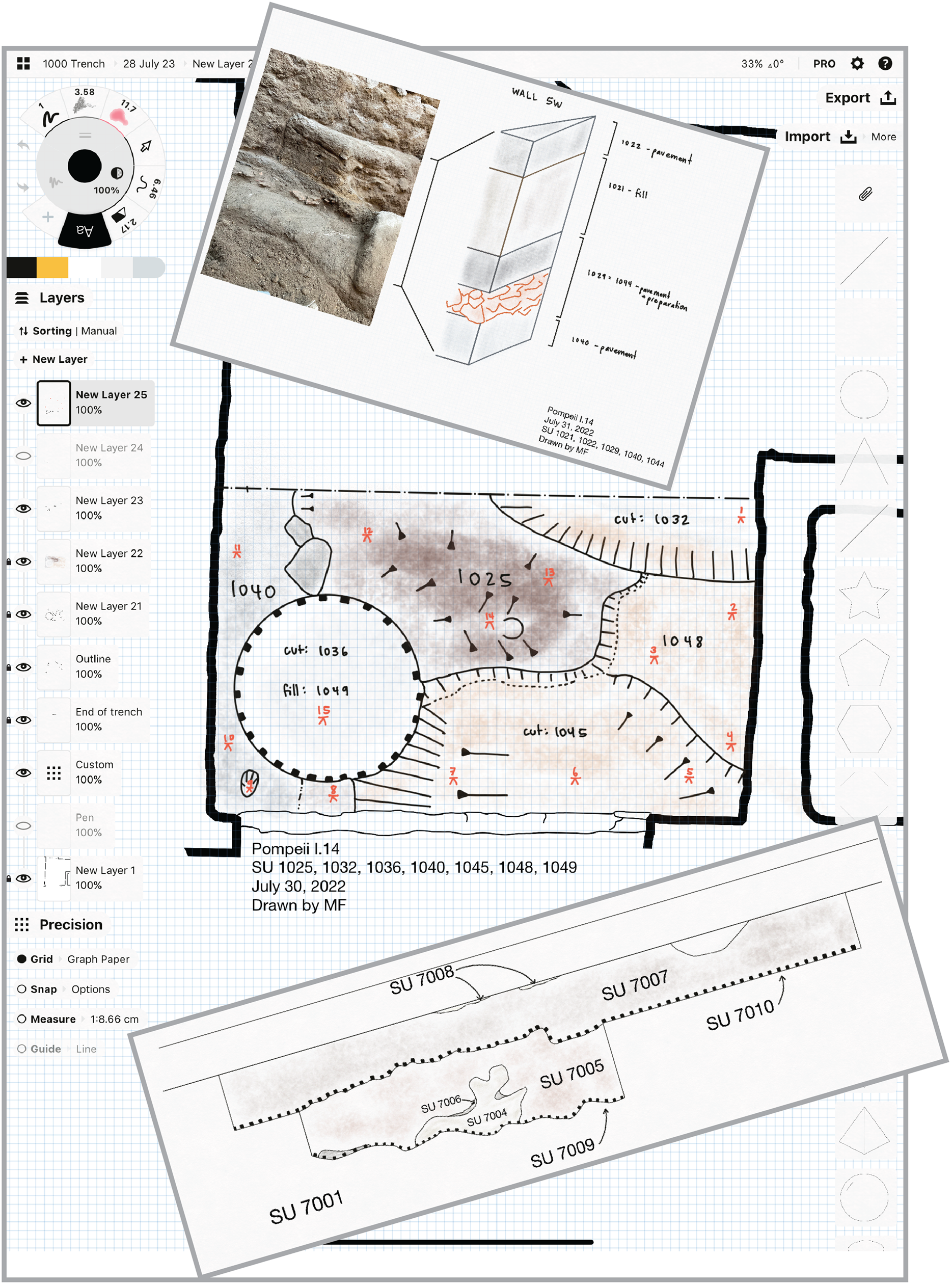
Although most information could be recorded in the SU form (including photos), drawings were completed using a separate application on the iPad Pro. Concepts by TopHatch Inc. was chosen for archaeological drawing due to its ability to handle raster and vector data smoothly, its versatility, and its low latency when drawing with the Apple Pencil 2 (Figure 6). Furthermore, Concepts allows the user to export their drawings as an SVG file, which then imports into other design programs such as Adobe Illustrator with drawing layers still intact. The Concepts application also allows for to-scale drawing and for the use of profiles from our 3D models as a backdrop for sketches.
Concepts application interface with in-process plan view map. The main image is a screen capture that shows the Concepts interface and plan view drawing. The top image is a drawing showing a stratigraphic sequence next to a photo (imported into Concepts) of the actual excavation. The bottom image is a cross-section drawing showing the layering of stratigraphic units (SUs).
As soon as the excavators completed an SU, the form was sent to the cloud. There, it was stored as a record on ArcGIS online, where all SU records could be accessed and edited. If the excavator did not have access to mobile service due to connectivity or other issues, then they saved the SU from locally on the iPad Pro until such a time when mobile or Wi-Fi service was available (in our case, this was always available at our team accommodations at the end of the day).
Recording Spatial and Visual Data
For 3D documentation, we developed a routine workflow. When excavation supervisors identified moments in their excavation that required 3D documentation—such as fully exposing one or multiple SUs or identifying an in situ assemblage—the Archaeological Area was prepared for documentation, and one of the data team members would photograph it in its current state. Prior to photocapture, the data team member would assign a unique photogrammetry ID number (PID) to the photoset and eventual 3D model. This would be communicated to the excavation supervisor for entry in Survey123 for any SUs that would be recorded in the resultant 3D model. In this way, 3D models that contain specific SUs could easily be found through the PID for later reference and consultation. We ensured that all the pink alignment points were also captured in the imagery to facilitate alignment with the base model (the insula).
In the field lab, the images were processed using a standard SfM workflow in Agisoft Metashape. Photos were first aligned on the highest setting, scale bar metrics were entered, and the alignment was optimized. From there, a 3D mesh was created, and image textures were applied. Alignment points were manually identified and marked in each model by one of the Data Team members. Once a model of the excavation was generated, it was aligned in Metashape to the base model. This process was repeated until the excavation was completed in an Archaeological Area. In the end, each Archaeological Area had a set of models that showed the progression of excavation, which contained all geospatial, morphological, and visual data of each SU.
Data Integration, Visualization, and Accessibility
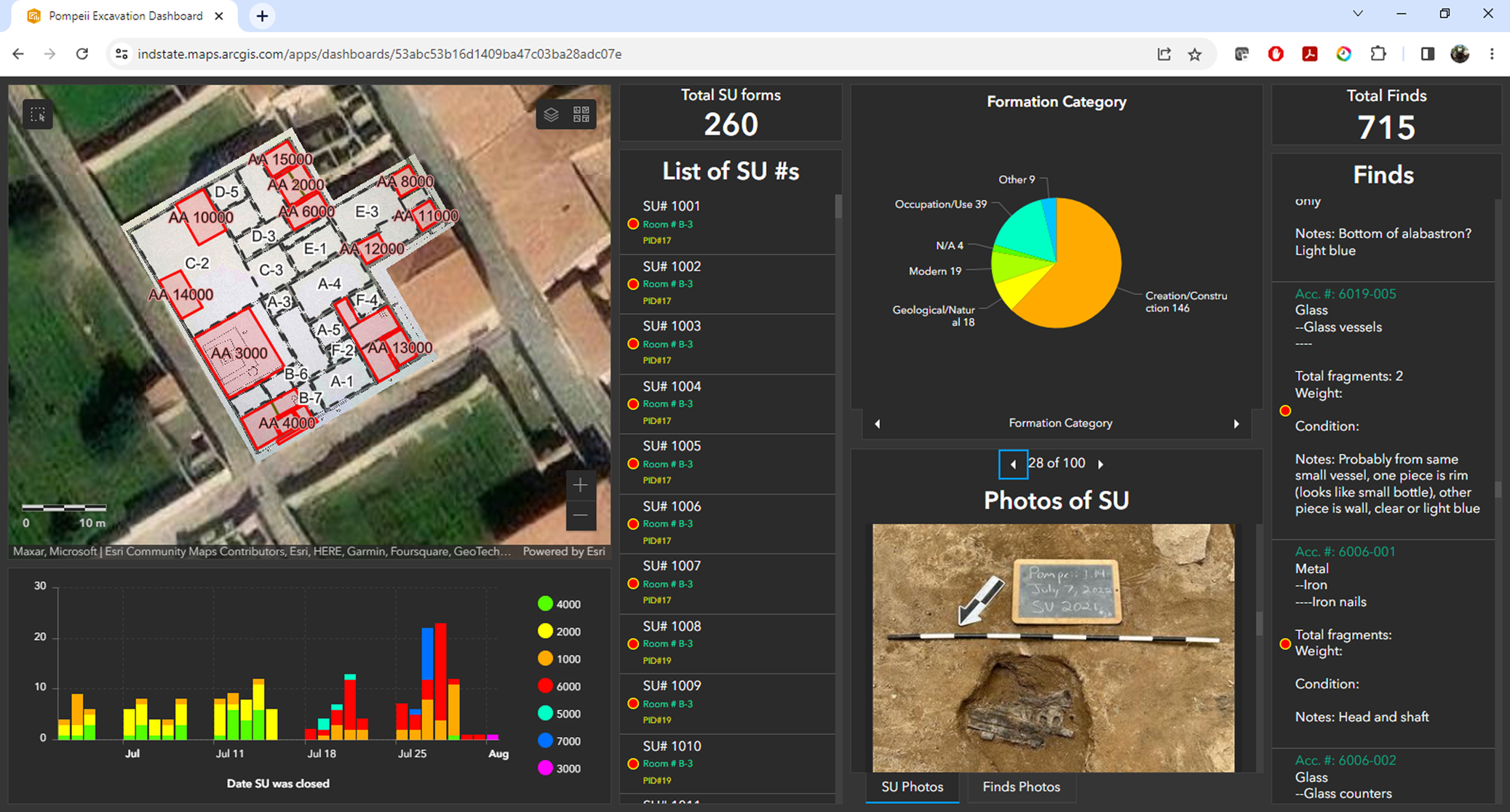
One of the strengths of the paperless workflow is that the data is readily available for review and use as it is digitally born and—in our case—already sent to the cloud in ArcGIS Online (AGOL). To take advantage of this aspect, we created a custom dashboard for the Pompeii excavation through ESRI's ArcGIS Dashboards (Figure 7). A dashboard allowed us to easily display, access, and query spatial and tabular data on an easy-to-use interactive web page. Most importantly, it allowed us to offer these abilities to everyone involved in decision-making on the project and to share accumulated results quickly with excavators and the broader archaeological community at Pompeii. Through the dashboard, the unwieldy amount of data collected during excavation was easy to review, query, and analyze. The use of the dashboard requires internet access because it sources data that is housed on a server and accessed through ArcGIS Online. As the project progressed, project members were able to use the dashboard to gain insights into the excavation because they were able to review excavation forms, photos, and drawings easily (Video 1). The dashboard made patterns apparent and informed in-field decision-making, such as by indicating when certain types of diagnostic artifacts were present (or absent), and it isolated assemblages to prioritize for further analysis during the excavation season. Access to the dashboard also enabled team members to compare certain types of contexts. For example, while excavating a ritual deposit, an excavation supervisor could pull up all data related to similar contexts already encountered in the 2022 season and gain an understanding of how the current example was similar to or different from others. The immediate availability of such data could notify excavators of common aspects of such deposits and even inform collection practices. Additionally, the dashboard is a flexible tool, and we can make frequent changes to the look and the interactive tools for queries based on feedback from the users.
Custom Dashboard made for the Pompeii I.14 excavation.
Importing and Uploading 3D Models to AGOL
We created an Agisoft Metashape project for each Archaeological Area with the referenced base model of the insula. Each 3D model of the excavation was added as a separate chunk within the project where it was processed and aligned with the base model. As a result, all of the 3D models of any given Archaeological Area could be found within the same Agisoft project file aligned and layered together. Then, each model was exported from Metashape as an *.obj file. As each model was exported, we used the local coordinates system that was established with the total station when measuring initial ground control points to which the base model was referenced.Footnote 3 These files were then individually imported into a file geodatabase using ArcGIS Pro 2.9's “Import 3D object” tool. Because the local coordinate system was being used, the models would geolocate near what most GIS users call “zero island,” which is a location in the ocean (there is no island) off the west coast of Africa where the equator and prime meridian intersect (0° latitude, 0° longitude). This can easily be adjusted by creating a custom coordinate system for the Map or Local Scene in ArcGIS Pro, if the desired outcome is to obtain real-world coordinates for all measured points within the excavation. Otherwise, after turning off all default base layers in ArcGIS Pro, the models articulate spatially where they belong in the local coordinate system, and all measured points will produce coordinates within that local coordinate system established with the total station. Once the 3D models are all in ArcGIS Pro, each model can be shared as a web layer to AGOL.
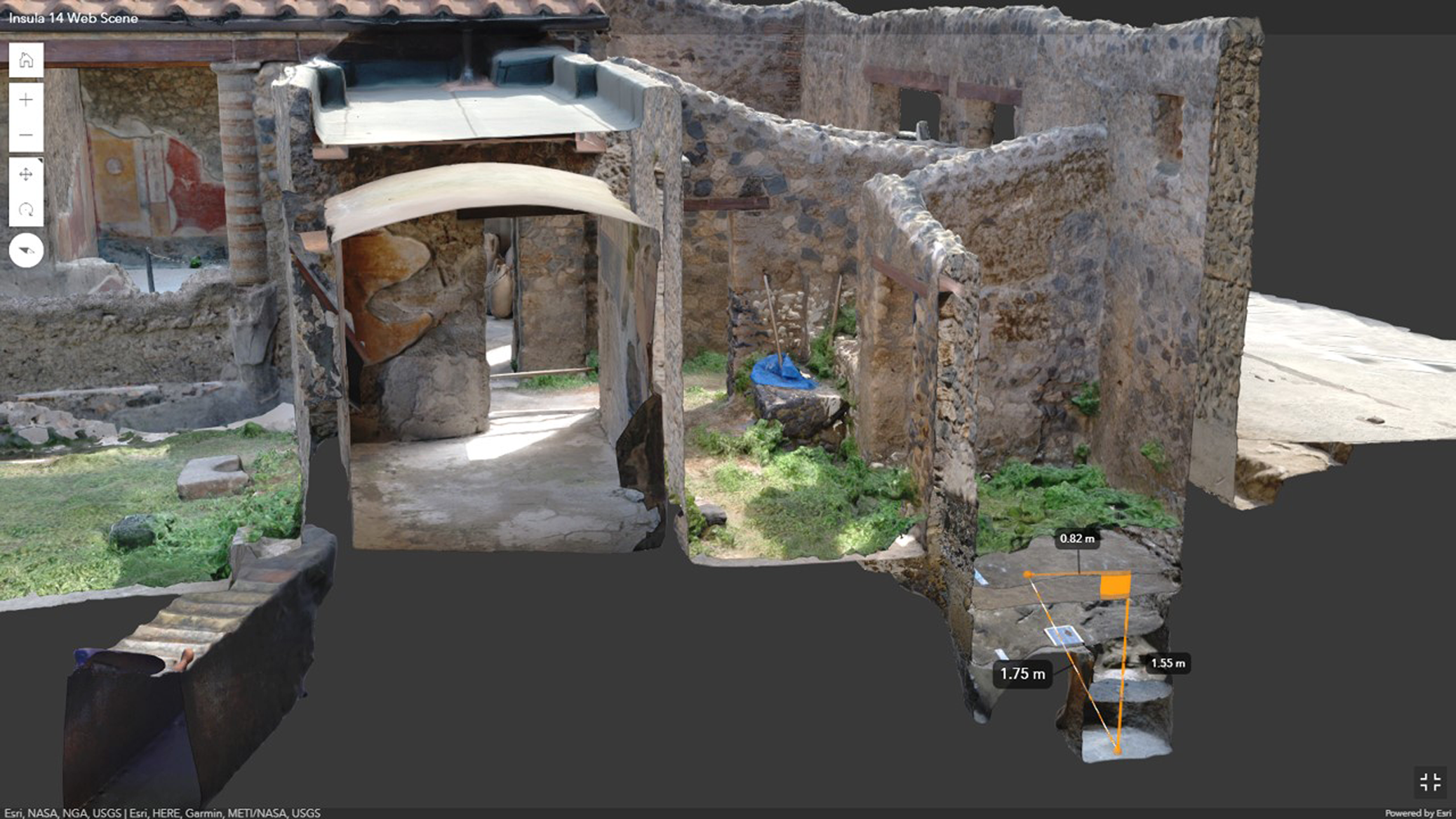
By the close of the excavation, we had uploaded all the 3D models and made them available on ArcGIS online, where team members could access them through an easy-to-navigate web scene. The web scene can be accessed on any computer or tablet via internet. Simple tools, such as “Slice” and “Measure,” are available for users in the web scene interface. The Slice tool allows the user to make a cross section of any 3D model with ease. Essentially, a plane is placed in the scene at a desired orientation, and the 3D model is sliced at that plane on the fly. Additionally, the Measure tool allows for vertical and horizontal measurements, as well as the measurement of area. The Slice and Measure tools can be used in tandem to make measurements from one model to another, providing elevation-change measurements (Figure 8; Video 2) or measurements of features in the scene. These 3D analytical tools are not available in other popular 3D web viewers (e.g., Sketchfab), and Agisoft Metashape requires some technical literacy to make use of similar tools effectively.
3D model of Insula I.14 with aligned excavation models. Note that the Slice and Measure tools are being used to slice the 3D model on a plane and then take measurements.
The week after the close of excavation was dedicated to writing the technical report. The dashboard and the web scene were integral to this process because they granted immediate access to our digital data. While writing, excavation supervisors could quickly access and query all their notes, interpretations, photos, drawings, and other data through a single dashboard with the click of a few buttons. Moreover, they could download data such as tables, photos, and sketches from the dashboard to their local hard drives to insert into the report if needed. Through the 3D web scene, excavation supervisors could “roll back” the excavation to any point in time when they had requested 3D documentation. Screenshots could be made of any model, at any angle and zoom level, to add to the report to support the text visually.
Data integration between the SU forms and the 3D models occurred at a later stage. Once all of the 3D models were imported into the geodatabase, the feature layer (also feature class) associated with the SU forms was also added in ArcGIS Pro. This feature layer of points is tied to the SU forms collected through Survey123, so each record (form submitted) has one point, or “node,” associated with it. We wanted to reposition the points in 3D space so that they were indicating a specific stratigraphic unit. The onboard GPS of the iPad Pro could not record points with high accuracy; furthermore, we chose to use our local coordinate system rather than real-world coordinates for the project. Therefore, we needed to adjust all of our points’ positions so that they would indicate the SUs within our local coordinate system. To place our points accurately, we used the “Move To” tool in consultation with our excavation supervisors, who indicated where the points should be placed on the 3D models of the excavation (Video 3).
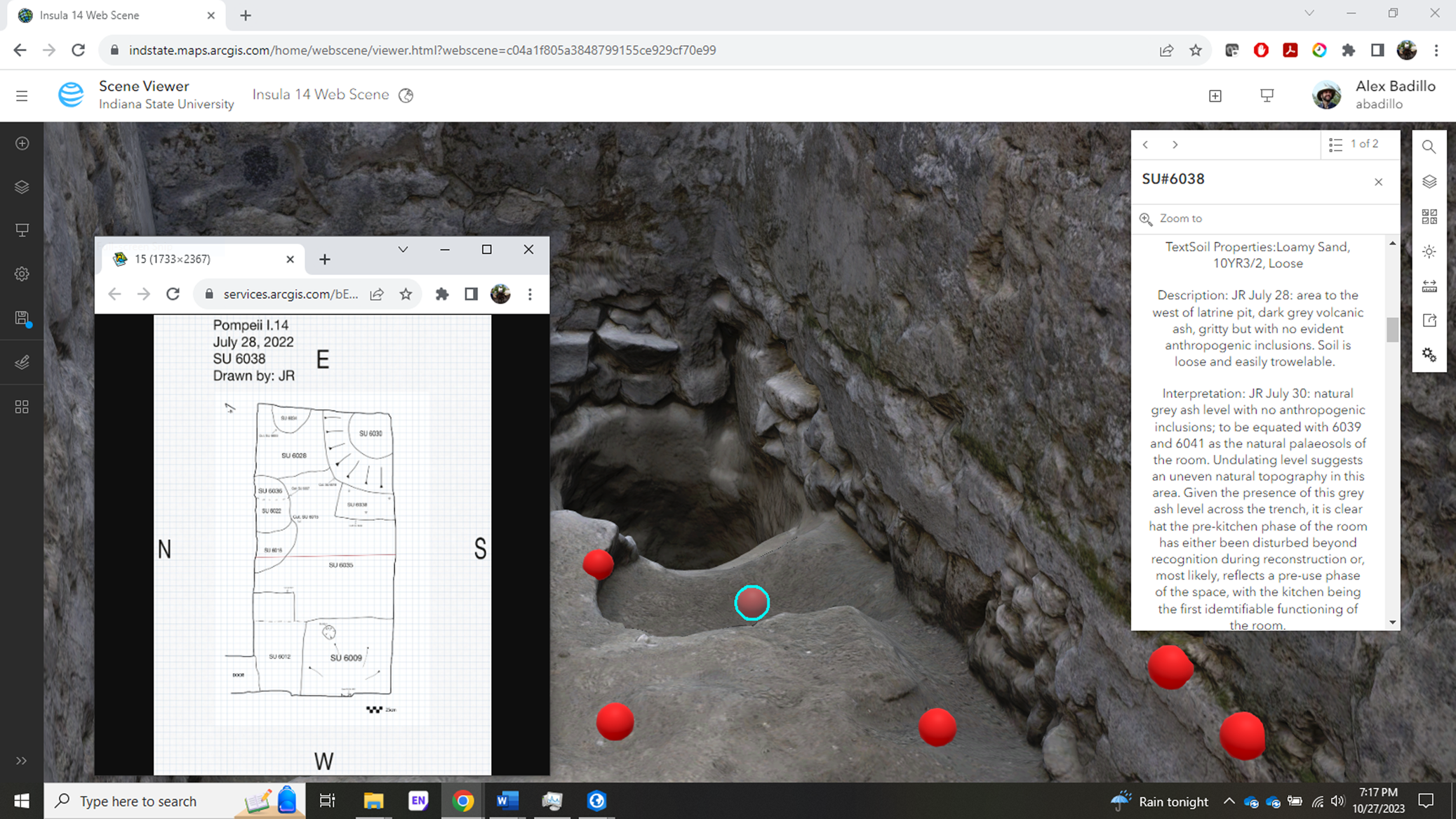
In addition to relocating the 3D points of the feature class that represented the SU forms, we also configured the pop-ups to show relevant information such as SU number, photos, sketches, soil properties, descriptions, and interpretations. In this way, when the 3D points of the “SU Forms” feature layer was clicked, a pop-up would show these data (Figure 9). The feature layer of points was uploaded to AGOL and added to the online web scene. In the end, the database of digital forms could be queried by exploring the 3D web scene online.
ArcGIS Online Scene viewer interface showing 3D model of the excavation with nodes placed on the stratigraphic units that were recorded in the model. Pop-ups show relevant information, photos, and sketches.
LESSONS LEARNED AND PATHS FOR IMPROVEMENT
We learned a great deal from our first field season implementing the paperless and 3D workflow. However, there are some major points that we wanted to include here. Having a digital data team dedicated to and ultimately responsible for supporting all digital forms, photocapture, data organization, data processing, and making data available online was crucial to making this work possible in an overseas field setting. Hrynick and colleagues (Reference Hrynick, Anderson, Moore and Meade2023) also found this to be the case when they experimented with embedding librarians in the field to work alongside archaeologists. Our team consisted of three people during the 2022 field season, and we felt this was a good number to support the three excavation teams that were working simultaneously. The size of our data team allowed flexibility for those moments when one person was troubleshooting a technical issue, which requires time and focus, or taking personal time away, if needed. When the workflow ran smoothly, the team was able to spend time on the 3D data capture of artifacts using turntable photogrammetric methods or other tasks that enriched the project.
We also found that it was truly necessary to plan far in advance and even rehearse the methods that we planned to use before the field season. We consulted with each project specialist prior to the field season to discuss the conversion of their paper forms into digital ones and to gather feedback on draft Survey123 forms. And we rehearsed the SfM photogrammetry workflow (base model approach) twice and used it infield on a smaller excavation project. The time dedicated to frontloading for this project was different in kind but not in effort from other well-planned and prepared projects, such as those using paper forms.
The one major bottleneck during our work was aligning 3D models. Although the method worked well, it required a person to assign alignment points with specific alignment point numbers in Metashape for each model that was processed. A lot of time was spent manually adding alignment points to each model. In the 2023 field season, we tested the use of coded targets (markers) that can be automatically detected by Metashape and assigned unique alignment points numbers. This reduced model-to-model alignment time significantly.
In terms of data storage and long-term curation, we used two 5 TB hard drives during the field season. One of the two hard drives was a dedicated backup. Within the main file directory of each hard drive was a text file that contained an index of the data contained on the hard drive. The hard drives contained thousands of photos from the field season; Metashape project files and their corresponding files; *.obj files with textures of each 3D excavation model (also stored online in AGOL); an ArcGIS Pro project with a corresponding geodatabase with the 2022 feature layers and 3D layers (also known as “multipatch layers” or “3D objects” in ArcGIS); and backups of all digital forms used on the project, including images and attachments. Although the Survey123 forms were already all backed up on AGOL, there is the option to export each form's data in various formats (*.csv, *.xlsx, *.kml, shapefile, or file geodatabase) for use outside of the online environment and backup. It may seem that this kind of project breeds a lot of data, and this is true. The most critical data—namely, the data from the digital forms and the referenced and scaled 3D models—are currently stored online. As we move ahead and make plans for long-term digital curation, we are organizing the data for Tulane University Libraries digital repository. However, we have met with personnel from Open Context (https://opencontext.org/), where we hope to eventually publish the data for broader disciplinary access.
ADAPTABLE ASPECTS OF OUR APPROACH
Our approach to documentation for our project at Pompeii helped us overcome two major challenges: (1) recording a complex urban excavation context and (2) working with a large collaborative team. However, these challenges are not unique to Pompeii. Many archaeologists deal with similar situations in their own field projects and may benefit from certain aspects of our approach, given that they are broadly applicable and can be adapted to other archaeological contexts.
Upon reflection, we found the combination of a data collection app (Survey123) and an interactive data visualization app (Dashboards) to be a gamechanger. The custom Survey123 forms enabled speedy data collection with the added benefit of improving data quality through standard data entry. Internet connectivity afforded immediate access to the data collected each day, which could be accessed through the Survey123 web interface or our custom dashboard. The dashboard permitted viewing and interacting with data through an easy-to-use interface that helped us gain insight into emerging trends and patterns in real time. This assisted with both decision-making and identifying problems in data collection, thereby improving data quality. In addition to increasing the pace of documentation and data quality, the dashboard organizes and collates the data in a way that is immediately ready to be queried and used for analysis. In our case, our excavation supervisors could immediately begin writing their excavation descriptions for the final report after the last day of the field season and include photos and sketches that were downloaded directly from the dashboard. As each team member left the field site to go back to their respective places of work, they continued to have access because the dashboard shares data that reside on a cloud server.
SfM photogrammetry to document the excavation has been adopted at a rapid pace within the discipline of archaeology in the last decade. However, archaeologists continue to explore methods to integrate 3D models with other data and then make the models accessible to other project archaeologists. Using the online web scene platform, we shared the models with other project members in an easy-to-use interface that does not require a high-performance laptop to run. This approach seamlessly integrated with other geospatial data generated for the project. By making the 3D models available through ArcGIS online, we were able to provide project archaeologists with the ability to revisit various points in the process of excavation with the added ability to measure, create profiles and cross sections, and generate imagery from any angle. This helped with interpretation and report writing after the field season ended.
Although Survey123, Dashboards, and the 3D web scene enabled us to overcome the two major challenges listed above, we want to caution readers that these solutions will not work well without regular internet connectivity. Internet service is required to upload data from the digital forms and use the dashboard and web scene. This may deter other archaeologists from making use of these technologies at field sites that are remote and that have limited internet access.
A final aspect of our workflow that may be useful in other archaeological contexts is the “base model” approach to referencing 3D models. In the context of Pompeii, the standing architecture helped to facilitate this approach, given that we were able to place alignment points on nonmoving structures within the scene. Although not every archaeologist has standing architecture at their field site, they can still implement this strategy. When these methods were tested at the field site mentioned previously in Oaxaca, Mexico, we used nonmoving wooden stakes with crosshairs drawn on the top to align the models of our 2 × 2 m test excavations. The stakes were placed at even intervals around the excavation, set back about 40 cm (1.3 ft.) from the edge, and set flush with the surface. Although the logistical details may differ, the concept of the “base model: approach is sound and can work in other contexts, but it may take some creativity to find a solution for each specific environment.
CONCLUSION
Overall, we consider that the 2022 field season was a success in pioneering our paperless and 3D workflow at the site of Pompeii. Our workflow helped us tackle the challenges of documenting the complex stratigraphy of the ancient city block while enabling us to collect and share data as a collaborative team. We found all of the advantages of the paperless workflow described by other scholars to be true and noted the increase in efficiency and data quality. We were immediately able to access and make use of the data using our dashboard because the data were born digital. The dashboard allowed us to access and filter the data easily as it came in, allowing us to not only review data for content, quality, and completeness but guide infield decision-making.
Although SfM photogrammetry has been integrated into other projects in the past, we believe that our “base model” approach is unique. Our approach obviated the use of a total station beyond a single session. Additionally, we found that the dashboard, combined with the 3D models in the online web scene, provided our team of archaeologists—many of whom have limited training in digital techniques and lack access to high-powered computers—with the spatial, visual, and observational data necessary for postseason analysis. Finally, through ArcGIS, we found a way to integrate the data captured in the digital forms with the 3D models in a way that allowed the user to query the database by revisiting the SU and clicking on a 3D point. We hope that by sharing our workflow, we will inspire others to adopt and remix our methodology in ways that fit their own projects’ challenges and unique archaeological contexts.
Acknowledgments
The authors thank the team of the Pompeii I.14 Project, especially the excavation supervisors, Jordan Rogers and Mary-Evelyn Farrier, who were integral to helping us implement and refine the new workflow at Pompeii during our 2022 field season. We would also like to thank the staff of the Parco Archeologico di Pompei—in particular, Giuseppe Scarpati, Stefania Giudice, Alessandro Russo, Valeria Amoretti, and Gabriel Zuchtriegel. We are also grateful for the continuing assistance of Giuseppe di Martino and Pasquale Longobardi. Our work is made possible by the Ministero della Cultura, Direzione Generale Archeologia, Belle Arti, e Paesaggio di Italia. Finally, we would like to thank our anonymous reviewers for their valuable feedback on our original manuscript.
Funding Statement
The development and implementation of the methods described in this article was supported by funds from Indiana State University's College of Arts and Sciences, Office of Sponsored Programs, and the University Research Committee Grant. The equipment and resources used for the Pompeii I.14 Project were provided by the Geospatial and Virtual Archaeology Laboratory and Studio (GVALS). The 2022 excavation season of the Pompeii I.14 Project was supported by Tulane University's Lavin Bernick Faculty Research Grant, School of Liberal Arts Faculty Research Award, COR Research Fellowship, and Mellon Assistant Professor Award, as well as by the Ernest Henry Riedel Fund in the Department of Classical Studies of Tulane University.
Data Availability Statement
No original data are presented in this article.
Competing Interests Statement
The authors declare none.
Supplemental Material
For supplemental material accompanying this article, visit https://doi.org/10.1017/aap.2024.1.
Supplemental Figure 1. Screenshot of page 1 of 15 of the SU form.
Supplemental Figure 2. Screenshot of page 2 of 15 of the SU form.
Supplemental Figure 3. Screenshot of page 3 of 15 of the SU form.
Supplemental Figure 4. Screenshot of page 4 of 15 of the SU form.
Supplemental Figure 5. Screenshot of page 5 of 15 of the SU form.
Supplemental Figure 6. Screenshot of page 6 of 15 of the SU form.
Supplemental Figure 7. Screenshot of page 7 of 15 of the SU form.
Supplemental Figure 8. Screenshot of page 8 of 15 of the SU form.
Supplemental Figure 9. Screenshot of page 9 of 15 of the SU form.
Supplemental Figure 10. Screenshot of page 10 of 15 of the SU form.
Supplemental Figure 11. Screenshot of page 11 of 15 of the SU form.
Supplemental Figure 12. Screenshot of page 12 of 15 of the SU form.
Supplemental Figure 13. Screenshot of page 13 of 15 of the SU form.
Supplemental Figure 14. Screenshot of page 14 of 15 of the SU form.
Supplemental Figure 15. Screenshot of page 15 of 15 of the SU form.


 Open access