


1. Introduction
Drafting, could be defined as the combination of the representation of engineering objects in a drawing while considering the function of the design and is an integral part of the engineering design process (Reference Ullman, Wood and CraigUllman et al., 1990). During the generation of the drawing (DRW), many questions arise that need design decisions to be made. Simplistic questions can be resolved by the drafter while others need detailed engineering analysis. The results of these questions define the design of the engineered object, which in turn, is documented on the engineering DRW. In the generation of a mechanical DRW the drafter needs experience in many areas that could include for example manufacturing, assembly, analysis, tolerancing, quality control, commissioning, operation, and decommissioning. As well, they need to be fluent in the language of drafting (Reference Bertoline, Wiebe, Miller and NasmanBertoline et al., 2002) conforming to local industry (i.e. for NASA, Reference LedezmaLedezma, 2020) and perhaps international standards (i.e. ISO 128) so that the design of the engineering object can be translated through the complete engineering process with proficiency. As such, engineers need to be fluent both in reading and in the generation of an engineering DRW.
Before the age of computer-aided design (CAD), drafting was a profession most often undertaken by individuals with a trade background (Reference FrankFrank, 1917). They would bring to the process their experience, skill and understanding in manufacturing, assembly, maintenance and operation. Training would be undertaken in the form of an internship to complement their knowledge and to develop their skills in the drafting language and this is reflected in the structure of training texts (i.e. Reference FrankFrank, 1917, Reference Bertoline, Wiebe, Miller and NasmanBertoline et al., 2002). Most importantly, the first ∼2 years would focus on developing the hand skills needed to make a drawing using pencil, ink and paper to produce clear lettering and the well-defined formats of the different line types needed for a mechanical DRW. An internship would start with their activities being strictly supervised as the intern copied DRWs, developing their hand skills and increasing their knowledge and experience in the area. Assessment of the resulting drawing would be graphical in nature, with mark-up provided on the DRW. This assessment would necessarily be undertaken by an individual with extensive experience, enabling them to review the drawing with detail, certainty and clarity.
CAD software has changed the landscape of engineering drafting and drawing. An experienced CAD software user is significantly more productive compared to a manual drafter. With the ability to edit and a vast array of specialized functions, the CAD user can quickly generate orthogonal views and place appropriate drawing features such as centrelines, centremarks, dimensions etc. onto a drawing sheet producing the DRW ready for approval of the design, rapidly moving the design process toward manufacturing. Fundamental to this process is the generation of a solid model (SM) from which, information on all features are drawn into the DRW. Assessment and mark-up however, are still essentially the same process. If undertaken manually on a printed drawing or electronically on a PDF, the assessor will go through the same, time proven process to insure the accuracy and certainty of the DRW, even with the greater certainty of CAD that all lines are in their correct place. This introduces a significant problem in that students learning drafting using CAD can quickly generate many drawings which leads to a significant bottleneck when assessing the DRW or in the case of an engineering school, providing feedback and marking.
The literature highlights a number of approaches that have been undertaken with the aim to increase the speed with which assessment and feedback can be provided to students (Reference Shukur, Away and DawariShukur et al., 2004, Reference Ingale, Srinivasan and BairaktarovaIngale et al., 2017). Many have started with a PDF generated from the DRW and have attempted to either extract features directly from the PDF file or interpret the drawing using image analysis (Reference Younes and BairaktarovaYounes & Bairaktarova, 2022). These approaches would therefore be independent of the CAD software used. Both approaches are problematic in that the data collected is only semiquantitative, as it depends on the resolution of the image and the quality of the original PDF. A different approach would be to focus only on the SM generated for which quantitative information such as the mass, volume or surface area of the SM can be used to determine if the student has produced the correct model. This however does not consider how the student built the SM and whether or not individual features within the SM are correct.
An approach is needed that can rapidly assess and provide feedback to students undertaking a course introducing and developing their drawing and drafting skills. This needs to be appropriate for the training of engineers at the university level and deal with large class sizes (∼100 students). Described here is the assessment approach used in the course MEC E 265 Engineering Graphics and CAD taken by students in the Department of Mechanical Engineering at the University of Alberta. An outline of the general approach is provided along with specific details to allow the approach to be user-friendly, be general enough to allow new assignments to be introduced and be intuitive enough that new teaching assistants (TAs) can quickly learn the methodology. A general description of the teaching/learning approach is also provided that allows the assessment approach to be put into context. General assessment of the approach is also discussed in relevance to an industry standard exam in drafting.
2. Assessment concept strategy
The fundamental concept that allows an assessment approach to be generated is based on students developing skills, knowledge and experience in drafting by copying provided DRWs. This allows an assessment approach based on direct comparison between the provided DRW solution and the submitted student DRW. Mapping this time-honoured approach into the CAD world has a different focus. Instead of developing hand skills in lettering and line development, the students will be developing knowledge and skills with using the particular CAD software tool and with a staged set of assignments be developing knowledge and experience in the drafting language.
A general conceptual strategy in developing an assessment approach is outlined in Figure 1. A student submission of a particular assignment will be compared directly with the provided solution from which students have built their SM and DRW. Feedback is best provided by marking up their DRW in a traditional way so that they can interpret both the positive achievements and mistakes relative to the graphical features of the drawing. As CAD is completely electronic, the sharing of files between students both within the class and from previous semesters and years, a plagiarism check is important. Collation of marks needs to be secure and to maintain data integrity. So, manual manipulation should be avoided. Feedback to students also needs to be in an accessible way. If the students are submitting their assignments using the University’s learning management system (LMS), then feedback needs to be provided in a similar flexible way.
The strategy needed to assess student drawings

Some of the other specifications for the assessment approach include that it should be fast. Students will be quickly moving onto the next assignment and assessment and feedback needs to be provided within hours, not days. The knowledge, skill and experience of the individuals providing the assessment, typically the TAs, cannot be relied upon. Bulk assessment therefore needs to be undertaken by the approach with the markers / TAs completing an assessment by determining whether the approach has been successful or, given the nature of electronic data and data corruption, if the process has broken down. Appropriate action can then be taken. The approach needs to be able to allow new assignments to be introduced into the course both through variation of an assignment or the introduction of a completely new assignment. As such, the assessment approach needs to be able to handle different size of assignments that could range from a single sheet part drawing to a multi-sheet assembly drawing that includes part drawings.
3. Description of the approach
3.1. General description of MEC E 265
Engineering drafting is taught in the 2nd year of the mechanical engineering (MEC E) program in the course MEC E 265 Engineering Graphics and CAD. Generally restricted to MEC E it can also be an option for Industrial Engineering Design students from the Faculty of Arts. The students are assumed to have no knowledge of drafting before this course which is taught all three semesters with typically 120 students in the Fall and Winter semesters and ∼60 in the Summer. Student to TA ratio is around 14:1. MEC E 265 is strongly aligned with the companion design course MEC E 260 Mechanical Design I, which together form the backbone for the strong design program in MEC E which has follow-on design courses in 3rd (MEC E 360) and 4th year (MEC E 460) which is the capstone course.
The CAD software tool used in the course is SOLIDWORKS (SW) and was selected due to its graphical nature, it is intuitive for students to learn, it has a strong library of interactive tutorials and is widely used in local industry. The education (EDU) license provided includes many other tools including computer aided manufacturing (CAM) and simulation (FEA, CFD etc.) all at the professional, industrial level and is all within one software portal. Given this flexibility and wide scale of applicability, the software is used widely by student competition teams within the Faculty of Engineering.
In each of the 13 weeks of the course, the students have 2hrs of lecture and a 3hr computer lab. An assignment is undertaken by the students each week and it is planned to take the students at a maximum, no longer than 9hrs to compete (3hrs of lab+5hrs non-contact). For the first 9 assignments (Reference NobesNobes, 2016), students build knowledge and experience undertaking different exercises building parts in cartesian and cylindrical coordinates (revolves), assemblies, sheet metal, builds for 3D printing, tolerancing and GDT. For the 10th assignment the students undertake the Certified SOLIDWORKS Associate Exam (CSWA) providing them with feedback on their skill level (Reference NobesNobes, 2018). The final assignments, 11 and 12 are summative and minimal feedback is provided. The course has no final exam but does include a drawing project of the car/vehicle/robot designed and built in MEC E 260.
The weekly schedule of MEC E 265 follows a similar pattern for the majority of the semester providing consistency of expectations and workload for the students. In the first lecture of the week, the new concept for that week is introduced which is embodied in the provided solution DRW. A discussion of how the construction of the SM could be undertaken is interactively shown in the lecture, highlighting new tools and any particular issues. The lab session begins with the students undertaking a 10-minute quiz to revise terminology and concepts from the previous week. This could include many graphical features (example question: select which view is dimensioned correctly). This is followed by the students completing a custom-built tutorial which is in the same interactive format used by SW (Reference NobesNobes, 2017, available at Reference NobesNobes 2024). These tutorials have been designed not only to introduce new concepts in the software but also to explain the rationale of the concept. The SW tutorials are based on the format of a Microsoft software help file and are essentially an encapsulated website. The layout of the tutorials also allow them to be used as reference material.
On completing the tutorial, the students then need to build a plan either electronically or on paper of how they will construct their SM. This needs to be approved by the TA’s before the end of the 3hr lab session and ensures that students have a workable path for the construction of their SM. They can then move onto constructing their SM in SW and then the DRW. Submission is taken in the form of a PDF. This is a record of the completion of the work at the time of submission and can be used for hand marking if required. The major component of the submission is a ZIP file of their DRW and SM which is best completed using the Pack-and-Go feature within SW as it maintains links between the DRW and SM. With the assignment being set in the first lecture, students have one full week to complete the assignment and need to submit it by midnight of the day before the first lecture.
In the second lecture, the DRW is constructed during the lecture. This is complemented with a discussion of the meaning of each of the individual drawing features. Additional lecture material and discussion is provided to help the students understand the rationale behind particular views that are used in the drawing or particular dimensioning schemes.
3.2. A description of AutoMARK
The actual strategy used for assessing student submissions for MEC E 265 is outlined in the flow chart in Figure 2. The initial work for the software-based solution began in 2015 with initial steps determining what quantitated information could be resolved from the electronic files generated by SW for both the SM and DRW. As with many major pieces of software, an application programming interface (API) is available in SW for developing new functions and features. These can also be called from external programs allowing for a wider range of use and interaction with different data sets and file types. Macros written in Visual Basic (VBA) can be called from MATLAB (MATLAB, The MathWorks Inc) to access all features, custom properties and attributes of the SM and DRW. MATLAB also allows a wide variety of different data types, functional interaction with images and the generation of PDF reports that can all be built into a graphical user interface (GUI) with an extensive set of features for monitoring the complete process. The resulting software code has been dubbed AutoMARK (Reference NobesNobes, 2019).
‘
The marking strategy used by AutoMARK incorporating all aspects needed for an end-to-end assessment-marking-reporting solution

For each assignment the same basic steps are taken as outlined in Figure 2. The initial step is to build a specific assignment marking template. Data from the original solution files from which the assignment solution DRW is provided to the students is extracted using the VBA Macro SOLUTION. The data comes in two forms: quantitated data of each of the custom properties, features and annotations of the DRW that are stored in a structured way in an Excel spreadsheet and high-resolution images that are generated for each DRW sheet. The spreadsheet was useful in developing the software as a provided easy access to interpret the data returned by the VBA macro. To provide feedback to the students on their submitted solution, a strong commitment was made to do this in the traditional way using a marked-up drawing. MATLAB allows text and other drawing features to be added to an image in bitmap format. High-resolution images therefore became the basis for any feedback. To build the spreadsheet of data the macro would loop through all sheets, loop through all views and then search for dimensions, datums, centrelines, centre marks, section lines etc. and included collecting detailed information for example on the location, numerical values and arrow directions of all dimensions. This looping approach allowed a complete collection of all custom properties, features and annotations within all drawing sheets.
A general report template is also developed along with the specific marking template. This template is constructed using MATLAB functions that allow the construction of the report provided to the students using LATEX. A front-page for the report is populated with information regarding the class, date, and assignment information etc. It also includes a second page that outlines a legend describing the colour coding and mark-up used. The front-page also documents the assigned grade from AutoMARK.
The data collected is then moved to the next process where a specific marking template for that assignment is constructed. A GUI was developed that allowed the assessor to go through all features on a particular sheet and select which components and to what degree they would be part of the assessment, in an interactive way. This included applying a tolerance zone around the location of such features as the position of a dimension. The assessor is provided with immediate feedback showing the tolerance zone as a box overlaying the particular feature in the GUI. This positive feedback ensures that all parameters in the assessment were correct. As the template was being constructed, marks are totalled for a particular view and sheet providing the assessor with feedback of how this particular view or sheet would weight towards the overall mark of the assignment. With the template built, test cases for that particular assignment can then be tested against the template to determine how particular errors introduced to the DRW would be assessed. This ensured that the particular focus of the assignment could be assessed in a way to match the original intent of the assignment.
To begin marking a particular assignment, the student submissions are downloaded from the LMS. This will be in the form of a large single ZIP file containing individual ZIP files for each student. Importantly, this file/folder structure needs to be maintained so that feedback on the marked solutions could be returned correctly to individual students. Separate MATLAB functions were developed to bulk handle all of these operations. At the same time, a folder structure would be constructed for each student in preparation for the output and marking of the solution.
Data collection from each of the individual student solutions is undertaking using VBA Macro STUDENT that loops (Loop #1) through the complete class as shown in Figure 2. This macro collects all the same data as the VBA Macro SOLUTION, however it incorporates error checks that address corrupted student files, allowing it to loop through the complete class. Data is also collected into a separate Excel file that is used for plagiarism checks.
The assessment of each individual student submission is undertaken in Loop #2. Here, the Excel spreadsheet of the solution is looped through and individual custom properties, features and annotations are identified within the student solution. This approach requires that students submit their solution in a single DRW that follows the same drawing sheet order as the solution. For each view within the student solution, all features i.e. dimensions, centrelines etc. should be found but will be potentially in a different order as their order in the spreadsheet will be based on the order in which they were constructed. To help provide uniqueness, especially with dimensions, part and assembly features are developed within the assignments so that they have unique numerical values. From the total number of marks available, marks are removed for student variances from the provided solution as defined in the marking template. Items that are quantitated in nature are compared directly, such as the numerical values of the dimension. Other more qualitative features such as the location of the dimension have a provided tolerance range of acceptance. It is important that this is relative to the view because the view itself may not be in exactly the same position as the view on the solution. Grades are summed for each view and then for each sheet to build a total for the whole submission.

The student report is constructed based on the general template. After the title page and legend page each individual sheet of the assignment is added to the board as a full page in the order of 1) the solution, 2) the student submission without mark-up and 3) the student submission with mark-up provided by AutoMARK. With the report presented in full screen mode on a computer, this approach allows the students to flip between the provided solution, their submission, and the marked up AutoMARK DRW to help identify variances from the solution. (Note: this approach is provided here in Figures 3, 4 and 5).
On completion of assessing the complete class, AutoMARK provides an Excel spreadsheet with a comparison of features that have been collected to identify potential plagiarism. These are typically the creation date of files, the last saved date and the name of the computer on which the assignment was undertaken. These should all be unique for an original set of student SMs and DRWs. If evidence of plagiarism is found, data is collected into a report that is submitted to the College for review, following university procedures. AutoMARK also packs the report into the same file/folder ZIP format to allow the student reports to be uploaded to the LMS. The solutions are also reviewed by the class TAs to check if there were any issues such as corrupted files with individual student solutions that led to AutoMARK overlooking the student submission. This would prompt the TA to mark the student’s submitted PDF manually. Main assessing work of the TAs is therefore in reviewing the mark to ensure the accuracy of the process. An individual TA therefore needs minimal experience with DRW assessment and mark-up.
With the student submitting their assignments typically by midnight on Monday, evaluation and mark-up provided by AutoMARK can usually be returned to the students by midday on Tuesday. The time to do the assessment and mark-up is dependent on the number of students in the class (∼100) and the number of DRW sheets within the particular assignment. The first full assignment that students undertake has one single DRW sheet of a single component and marking a complete class takes <1hr. A later assignment in the semester has 7 DRW sheets that is a mixture of assembly and component drawings. This takes AutoMARK on the order of 4 hrs to complete the assessment. Initial feedback to the students on their most recent assignment is therefore on the order of hours, not on the order of days.
An image of an example student solution for the drafting assignment with typical errors

4. Discussion: an example student assessment
To highlight the graphical nature of the drawing mark-up and feedback to students for an assignment, a discussion is given here of an example student assessment. A complete student report will include the title page and legend page with the individual drawings for each individual sheet provided in order. The example discussed here is the first component assignment undertaken by the class of an arbitrary bracket part. This has been designed to have unique numerical dimensioned features to provide certainty for the assessment by AutoMARK. The solution provided to the students at the beginning of the class is shown in Figure 3 and as highlighted by AutoMARK in red text just above the title block. All the features that include the views, datums, centrelines, centremarks, dimensions and text are all similar in nature and complexity to those that the students have experienced in the custom tutorials that they have completed for this assignment.
A ‘mock’ student solution is shown in Figure 4. This has a number of contrived errors introduced into it for the purposes of showing the mark-up provided by AutoMARK and is only a small subset of potential errors that can be addressed. The mark-up solution provided by AutoMARK is shown in Figure 5. Colour coding used is customizable and can be selected during the development of the marking template. Features that students have correctly introduced to the drawing compared to the solution are marked with green checkmarks or with green text. For each of the views there is included green text at the bottom of the view to identify if the view has the correct tangent line style, correct scale and correct display style (i.e. outline only or with hidden detail). Each of the views also has a label where the naming convention follows that provided in SW. In this example, the front view is labelled Drawing View 1 indicating that this was the first view placed into the drawing sheet of the solution.
Errors identified and feedback information provided by AutoMARK are as follows:
Errors in the FRONT View
-
-The 35mm vertical dimension is missing, highlighted by the drawn dimension line with arrows and numerical value in red
-
-Datum B is missing, highlighted by the drawn datum in red
-
-Centrelines for the counter-sunk holes are missing, highlighted by the vertical red lines
-
-Arrows for the Ø15mm are on the wrong side of the circle they are pointing at compared to the solution, highlighted by the blue circles
-
-The =22 dimension is in the wrong position compared to the solution, highlighted by the blue arrow showing the correct position
The marked-up example student submission highlighting the errors compared to the provided solution

Errors in the TOP VIEW
-
The text for the hole call-out for the stepped hole is incorrect, highlighted by the red text
-
Arrows for the stepped hole are on the wrong side of the circle, highlighted by the blue circles
-
The tangent line style for the view is incorrect, as highlighted by the black text at the bottom of the view.
-
The ×4 stepped holes act as a single group and this is communicated by a connected group of ×4 centerlines, forming ×4 centermarks. While the student solution does have ×4 centermarks, they are not connected as a single feature and is highlighted by the drawn ×4 red lines. This is only distinguishable by evaluating the quantitative data from the DRW.
Errors in the RIGHT-SIDE SECTION VIEW
-
The text is incorrect for the R3 dimension, highlighted by the red text
-
The centreline has not been extended to the extent of the view, highlighted by the blue arrowed lines.
-
The 12mm horizontal dimension is highlighted as incorrect text as the student solution has this text typed into the dimension box rather than being dynamically linked to the SM. An important error that would not be detectable to a TA marking the student solution manually with just a PDF.
5. Impact of the approach
The direct impact of this approach of using AutoMARK to provide rapid feedback to students on their performance in the class is challenging to determine. This is because there are a number of other features in the learning/teaching approach that the class has, that could also have significant impact. The introduction of customised tutorials (Reference NobesNobes, 2017) that allow individual learning and review and the use of a rigourous process that requires students to develop a plan to building their SM before leaving the lab session (Reference NobesNobes, 2016) could also be identified as being significant learning/teaching tools that will impact on student performance. These tools were previously developed before the introduction of AutoMARK in its first forms in 2017 and only used in the Winter semesters. The most complete form of AutoMARK began use in the Win 2019, 12 months before the onset of COVID 19.
One metric that is consistent across the different semesters taught by different instructors is the performance of the class in the Certified SOLIDWORKS Associate Exam (CSWA). This exam was developed by a side agency from SW and provides professionals with a certificate of proof of their skills and knowledge with using SW. This is a three hour exam which has multiple components that include the construction of a SM part and an assembly as well as multiple-choice questions related to drafting and the use of the software. In the SW community, this is an industry standard exam. The majority of students taking the class are also in the COOP program which requires them to take a work term in industry. Success in the CSWA is something that they can add to their CV, enhancing the opportunities in attaining a design COOP position.
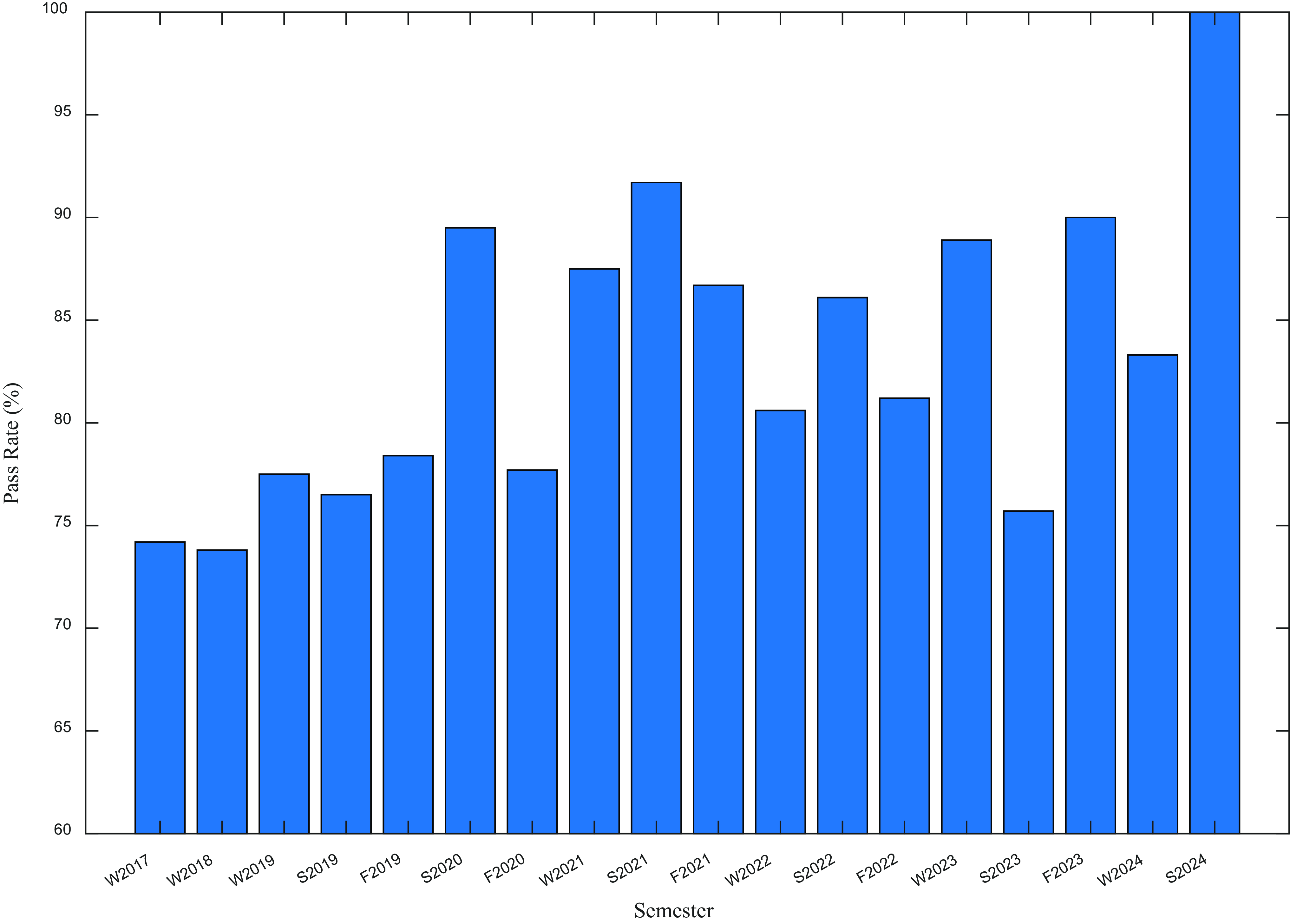
The class success rates for the CSWA are shown in Figure 6 since the first use of AutoMARK in Win 2017. Initial results of the class pass rate being in the 75-80% range were seen as being very positive compared to those found in the literature that were < 60% (Webster & Ottway 2018, Reference Mederos, Daigler and GreenMederos et al., 2023). This is perhaps evidence of the effect of the custom tutorials and the rigourous use of the planning approach in the success of students in the CSWA. There is a noticeable increase from 2020 onwards where AutoMARK was being implemented in all three semesters. Perhaps this is evidence of the success of the complete teaching approach for Mec E 265 which has been standardised across the three semesters. Fast, insightful feedback to the students however cannot be overlooked as perhaps highlighted by the continuing trend of improvement.
Results of the number of students attempting and their success at the Certified SOLIDWORKS Associate Exams (CSWA) for the semesters the exam was administered

6. Conclusions
A strategic approach has been outlined here that uses software to automate the assessment and marking process for engineering DRWs in the 2nd year mechanical engineering course, MEC E 265 Engineering Graphics and CAD. A detailed outline of the process and the features within the software are discussed to highlight important nuances in developing a strategy for assessing engineering drawings. The approach described uses quantitated data from the original student submissions from their SM and DRW files, allowing for review and assessment of the DRW in detail, providing certainty and clarity.
Some of the major benefits of this approach include that there is consistency of marking of individual student files across the complete class. The approach is time efficient, providing feedback within hours rather than days. The approach also significantly reduces the marking workload undertaken by TAs allowing their time to be better spent interacting with students during the lab and office hours. Assessment is also not as reliant on the skill and knowledge of the markers. The workload for the TAs moves from assessing individual student submissions to reviewing the assessment by the software to ensure conformity of the process. The benefits of undertaking such an approach can only be realised if the teaching and learning strategy of the class can be realigned to allow this type of assessment approach to be undertaken. While other features of the learning/teaching strategy of the class that include customised tutorials and a planning strategy for the students to build their SM could also provide a significant impact, there is clear evidence that the introduction of this approach to assessment has led to an improvement in the performance of the students taking the class overall.
Acknowledgement
The author acknowledges the input and support of the teaching assistants that have worked in MEC E 265 as well as other instructors of the course, Dr. Kajsa Duke and Dr. Ahmed Qureshi. The development of AutoMARK, as well as the custom tutorials was undertaken by COOP students supervised by the author and was financially supported by the Faculty of Engineering.



 Open access