


1. Introduction
Providing effective assistive technologies (ATs) remains a persistent challenge, as high rates of abandonment have been documented for more than three decades (Reference Phillips and ZhaoPhillips & Zhao, 1993) and continue to be reported in recent research (Reference ConstantineConstantine, 2022). These outcomes are largely attributed to a lack of fit between AT design and the preferences, experiences, expectations, and contextual realities of end-users with disabilities (Reference Barnett, Murphy and Cezar da CruzBarnett et al., 2024; Reference Gitlin, Schemm, Landsberg and BurghGitlin et al., 1996; Reference Tedesco Triccas, McLening, Hendrie and PeryerTedesco Triccas et al., 2019), highlighting the critical need for adaptation and customization to ensure ATs effectively address users’ functional requirements, environmental demands, and personal goals. Occupational therapists (OTs) are uniquely positioned at the intersection of clinical knowledge, user-centered care, and solution-oriented expertise, making them central to the prescription, adaptation, and hands-on creation of personalized ATs (Reference Aflatoony and KolarićAflatoony & Kolarić, 2022; Reference Aflatoony and LeeAflatoony & Lee, 2020; Reference Aflatoony and ShenaiAflatoony & Shenai, 2021). By engaging directly in the hands-on design, fabrication, and modification of ATs, OTs can ensure devices are both functionally effective and tailored to individual users.
In response to these challenges, consumer-grade digital fabrication technologies, such as 3D printing and laser cutting, have expanded the possibilities for producing assistive devices that are efficient, precise, and durable. However, effective use of these tools often requires technical expertise in CAD and digital fabrication workflows, posing barriers for novices and non-expert makers, including OTs (Reference McDonald, Comrie, Buehler, Carter, Dubin, Gordes, McCombe-Waller and HurstMcDonald et al., 2016). As a result, OTs frequently rely on accessible materials such as foam tubing, cardboard, and thermoplastics to develop personalized device modifications. Despite these challenges, research shows that functional and usable DIY-ATs can be successfully developed by non-experts, and that engaging in hands-on fabrication fosters learning, empowerment, and creative problem-solving for both OTs and end-users (Reference Buehler, Branham, Ali, Chang, Hofmann, Hurst and KaneBuehler et al., 2015; Reference Higgins, Easley, Gordes, Hurst and HamidiHiggins et al., 2022; Reference LadnerLadner, 2015).
OTs also face challenges in recommending commercially available devices because the process relies heavily on tacit, experience-based knowledge. The interdisciplinary and fragmented nature of the AT marketplace makes it difficult for providers to identify suitable options (Reference Danemayer, Holloway, Cho, Berthouze, Singh, Bhot, Dixon, Grobelnik and Shawe-TaylorDanemayer et al., 2023), and communication about potential ATs is often limited to ad-hoc demonstrations, paper printouts, or images from online vendors and databases. As a result, OTs may struggle to determine best-fit solutions, while people with disabilities often find it difficult to envision how these technologies will integrate into their homes (Reference Aoyama and AflatoonyAoyama & Aflatoony, 2021).
Although computational design tools show promise in helping OTs visualize, create, and prescribe technologies in real-world contexts, their impact remains constrained by broader systemic challenges. Moreover, there is no clear guidance on how to design these tools effectively to support OTs in creating, adapting, and providing assistive devices. This paper examines key design considerations for developing tools that empower OTs in AT design, fabrication, and prescription. We draw on four design-based research projects, treating each as a case study of computational design tools that we developed, implemented, and evaluated with OTs. From these cases, we propose a framework that synthesizes practical lessons and provides actionable guidance for developing OT-focused tools that integrate clinical knowledge, user needs, and fabrication capabilities.
2. Related work
2.1. Digital fabrication tools for DIY-AT making
The advent of DIY fabrication methods, particularly 3D printing, has transformed the creation of customized AT devices. Various digital tools now offer intuitive interfaces suitable for beginners and students with disabilities, supporting structured adaptation workflows that enable users to modify AT without extensive CAD knowledge. Rapid prototyping tools allow non-experts to create customized components, demonstrating how digital fabrication can facilitate AT customization in both clinical and maker-space settings (Reference Buehler, Hurst and HofmannBuehler et al., 2014; Reference Chen, Kim, Mankoff, Grossman, Coros and HudsonChen et al., 2016; Reference Higgins, Oliver and HamidiHiggins et al., 2023; Reference Hofmann, Hann, Hudson and MankoffHofmann et al., 2018).
Online platforms serve as repositories for pre-existing 3D models, allowing users to download and print assistive devices without advanced design skills (Reference Buehler, Branham, Ali, Chang, Hofmann, Hurst and KaneBuehler et al., 2015). However, low reuse rates have been reported, likely due to the advanced 3D modeling skills required for modifications (Reference Hofmann, Hann, Hudson and MankoffHofmann et al., 2018). To address this, parametric modeling tools allow users to graphically specify design intent and more easily create or modify 3D models without programming expertise (Reference Hofmann, Hann, Hudson and MankoffHofmann et al., 2018). For instance, parametric software enables OTs to modify pre-designed models of ATs, such as utensil grips, based on individual assessments, enhancing personalization for individuals with hand impairments (Reference Li and AflatoonyLi & Aflatoony, 2023, Reference Li and Aflatoony2025).
Advanced DIY-AT approaches, such as 4D printing, enable novices to create self-adapting attachments for everyday objects without precise measurements or complex CAD modeling, increasing accessibility and customization options (Reference Sun, Yang, Chen, Li, Luo, Liu, Yao, Tao and WangSun et al., 2021). 3D scanning and physical modeling techniques offer accessible alternatives to complex CAD software for AT design. These methods convert physical models (e.g., playdough) into digital files for 3D printing, supporting rapid customization of devices such as ergonomic crutch grips and walker handles (Reference McDonald, Comrie, Buehler, Carter, Dubin, Gordes, McCombe-Waller and HurstMcDonald et al., 2016). Simplified modeling tools that allow 2D object scanning and extrusion further reduce reliance on complex CAD, supporting the combination of physical objects and hand-drawn sketches for customization (Reference Carrington, Hosmer, Yeh, Hurst and KaneCarrington et al., 2015).
2.2. Computational tools for AT prescription and provision
OTs play a central role in assessing, recommending, and implementing ATs to support individuals with disabilities. Recommending appropriate ATs is a complex process involving research, selection, and acquisition of devices that align with users’ needs and contexts of use. These challenges are compounded by the need to balance clinical reasoning, user preferences, and environmental constraints (Reference Aoyama and AflatoonyAoyama & Aflatoony, 2021). To address these issues, various initiatives have been developed to improve access to AT information and support prescription processes, including AT service mapping applications (Reference Visagie, Matter, Kayange, Chiwaula, Harniss and KahondeVisagie et al., 2019), centralized information-sharing platforms (Reference Gower, Andrich, Agnoletto, Winkelmann, Lyhne, Rozis, Thurmair, Miesenberger, Karshmer, Penaz and ZaglerGower et al., 2012a), and recommender systems (Reference Heumader, Murillo-Morales, Miesenberger, Miesenberger, Kouroupetroglou, Mavrou, Manduchi, Covarrubias Rodriguez and PenázHeumader et al., 2022). AT provision is inherently collaborative, requiring end-user participation to ensure personalization and engagement (Reference SchererScherer, 1996). However, OTs often face barriers such as limited access to AT resources and reliance on static, 2D representations when communicating device options (Reference Aoyama and AflatoonyAoyama & Aflatoony, 2021; Reference Lannin, Clemson, McCluskey, Lin, Cameron and BarrasLannin et al., 2007).
Digital platforms have emerged as valuable tools for consolidating and organizing AT information. For instance, the EASTIN network offers global access to AT information that is searchable by product name, manufacturer, ISO code, or insertion date (Reference Gower, Andrich, Agnoletto, Winkelmann, Lyhne, Rozis, Thurmair, Miesenberger, Karshmer, Penaz and ZaglerGower et al., 2012b). Mobile-based Augmented Reality (AR) tools further support AT selection and provision by allowing users and practitioners to visualize devices in realistic, interactive contexts (Reference Garrett, Anthony and JacksonGarrett et al., 2018). Mixed Reality environments support OTs in assessing clients’ functional abilities (Reference Qamar, Khan, Husain, Rahman and BaslamahQamar et al., 2015), while Virtual Reality applications simulate home environments to facilitate collaboration and shared decision-making during pre-discharge planning, thus helping clients prepare for independent living (Reference Atwal, Money and HarveyAtwal et al., 2014).
3. Case studies
This section presents four case studies focused on the design and evaluation of computational design tools developed to support OTs in creating, adapting, and prescribing AT. Each case involved iterative design and usability evaluations with practicing OTs to explore how these tools can better align with clinical workflows and maker-oriented practices. All studies were approved by our university’s Institutional Review Board (IRB) prior to initiation. Across the studies, between 12 and 15 OTs participated in remote or in-person workshops lasting 35–75 minutes. During these sessions, participants used detailed client or hypothetical user profiles, including demographics, medical history, and functional assessments, to design or recommend AT solutions.
To support data collection, we employed a think-aloud protocol during each session to capture real-time insights into participants’ thought processes and interactions with the interface. Following the design activities, we conducted semi-structured interviews to further explore participants’ experiences with the GenAI tool, focusing on usability, functionality, and perceived usefulness. In the AI and parametric software studies, additional follow-up phases lasting 15–20 minutes involved evaluating design recommendations, fabricated outputs, and device placement. Upon completion of both phases, the qualitative data collected from the OTs were transcribed and analyzed using thematic analysis to extract insights into the tools’ usability, integration within clinical workflows, perceived impact on design decision-making, and the opportunities and challenges associated with integrating generative and parametric tools into occupational therapy practice.
Overview of computational design tools supporting OTs (from left to right): a) AT design and fabrication tool: create and 3D-print customized devices; b) parametric tool for AT customization: modify dimensions and features based on individual measurements; c) AT prescription tool: guide selection of appropriate AT for client needs; d) AR tool for AT provision: visualize devices in context to support client engagement

Figure 1 Long description
Panel A: The screenshot displays a design and fabrication tool interface for creating and 3D-printing customized assistive devices. It includes fields for entering prompts, selecting keywords, specifying product types, and generating images of the designed devices. Panel B: The screenshot shows a parametric tool for customizing assistive technology. It features different grip types with adjustable dimensions and features based on individual measurements. Panel C: The screenshot presents an assistive technology prescription tool. It categorizes devices by meal preparation activities and provides options for viewing and selecting appropriate assistive technologies. Panel D: The screenshot illustrates an augmented reality tool for assistive technology provision. It visualizes devices in context to support client engagement and includes an item summary with product details and options to add to cart or compare with similar items.
3.1. AT design and fabrication tool
The GenAI Interface was developed to help OTs design customized ATs that address individual functional needs (Reference Aflatoony, Li, Zhang, Jacob, Xu, Tang and GrossbergAflatoony et al., 2025; Reference Zhang, Aflatoony and LiZhang et al., 2025). Traditional DIY-AT workflows often require specialized technical skills and extensive time to translate clinical insights into design outputs. By integrating generative AI capabilities, this web-based tool streamlines concept generation, visualization, and 3D modeling, enabling OTs to more easily prototype and adapt AT devices for specific users. Built using HTML, CSS, and JavaScript, the interface combines text-to-image generation via MidJourney’s API with image-to-3D modeling through Meshy AI. It features a pre-curated prompt library and keyword selection system aligned with activities of daily living (ADLs) and instrumental activities of daily living (IADLs), allowing users to build prompts that reflect functional needs, product types, and materials (Figure 1a). A preview area, editable prompt fields, and export functions support efficient iteration and integration with 3D printing workflows. The design process followed iterative testing cycles to refine keyword effectiveness, optimize AI interpretation, and ensure the generation of manufacturable models.
Findings showed strong enthusiasm for GenAI’s potential to enhance creativity, reduce technical barriers, and facilitate real-time collaboration with clients. OTs described the tool as a creative catalyst that inspired new ideas and expanded design thinking. As one participant noted, “AI could generate some ideas of where to start from, that would be incredibly helpful.” Another reflected, “I could see how it could spark more creativity or more innovation… outside of what I normally think about.” The interface also helped bridge gaps between ideation and fabrication, particularly for users without CAD expertise. As one OT explained, “It kind of takes the hard work out of it, for people who don’t have CAD skills, if the AI is generating that 3D model.” Participants appreciated how GenAI supported client engagement, enabling real-time collaboration and visualization during design discussions.
Despite its promise, OTs identified challenges including limited control over dimensions, inconsistent AI accuracy, and barriers such as 3D printer access and material costs. While most found the interface intuitive, participants requested more flexible input options (e.g., starting from reference images or scans) and clearer guidance for prompt design. Importantly, they emphasized the need for safety validation before clinical use, ensuring AI-generated models are reviewed for ergonomic fit, mechanical stability, and material suitability.
3.2. Parametric tool for AT customization
This parametric design tool supports OTs in creating personalized AT solutions for individuals with hand impairments (Reference Li and AflatoonyLi & Aflatoony, 2023, Reference Li and Aflatoony2025). The system enables OTs to adapt existing three-dimensional handgrip models by incorporating individual hand measurements and anthropometric data, thereby generating customized grips for activities of daily living that account for hand size, strength, and functional requirements. The prototype was developed using Grasshopper, a visual parametric modeling environment, in conjunction with Human UI, which enables customization of the Grasshopper interface to support clinician interaction (Figure 1b).
The tool provides 48 distinct grip templates with adjustable parameters, including overall dimensions, weight, surface texture, and material selection. Users can modify external dimensions (e.g., diameter and height) as well as internal channel dimensions to accommodate specific assistive devices. For textured grips, additional parameters, such as number of teeth, tooth length, and chamfer angle, are configurable. The interface enables OTs to select grip geometry, surface texture, color, and optional features (e.g., hooks), after which the finalized model can be generated and exported for 3D printing. Design recommendations are informed by anthropometric reference tables and incorporate considerations of users’ range of motion and strength norms. OTs with limited technical expertise may collaborate with technical personnel or outsource fabrication to specialized 3D printing facilities.
Overall, the OTs reported that the tool was intuitive and easy to use. One participant noted the simplicity of data entry, stating, “It seems like it would be easy to use if you had the dimensions just to input,” while another commented, “I liked that I was able to turn it like in all 3D shapes… I just need to slide the slider.” Real-time visualization, drag-and-zoom functionality, and precise input methods were identified as key features supporting rapid and accurate customization. The tool was considered highly valuable in clinical practice, enabling OTs to create grips tailored to individual needs, capabilities not achievable with standard commercial products. As one OT observed, “I think customization really differentiates your products from others, and that makes it unique on the market.”
Parametric input facilitated ergonomic fit, and follow-up assessments of the printed grips confirmed their suitability for users. OTs emphasized the importance of safety features, including material selection and adjustable dimensions, to minimize the risk of discomfort or improper use. The integration of 3D printing technology was also recognized for its cost-effectiveness and efficiency. As one OT explained, “It costs $15 to $20 for just one spoon […] 3D printing could reduce the cost.” Additionally, participants considered the average printing time of approximately six hours acceptable within typical clinical workflows.
3.3. AT prescription tool
This decision-support tool is designed to assist novice OTs in recommending AT for individuals with functional limitations (Reference Shenai and AflatoonyShenai & Aflatoony, 2024). The system enables OTs to explore device options, account for individual functional needs, and verify recommendations, thereby supporting independent clinical reasoning and informed decision-making. Its primary objective is to enhance practitioner confidence, improve recommendation accuracy, and promote patient-centered care by guiding OTs through device selection and fitting processes.
The prototype provides structured guidance on AT options for common ADLs through task-specific prompts and AR visual previews. OTs can select devices tailored to specific tasks and impairment types, review recommended usage scenarios, compare alternative solutions, consider individualized adaptations, and document their clinical rationale (Figure 1c).
Overall, OTs reported that the tool was intuitive and easy to use, supporting patient-centered practice while integrating smoothly into existing clinical workflows. One participant noted, “It made me feel more confident in making recommendations for equipment that I’m not familiar with,” while another stated, “I liked that I could go step by step without worrying I’d miss something important.” Real-time guidance, AR visualization, and task-based prompts were identified as key features facilitating accurate, efficient, and patient-centered recommendations.
Safety was also emphasized: one OT explained, “Being able to see how the device fits and moves reduces the risk of errors,” and another added, “It’s reassuring that I can double-check dimensions and use scenarios before giving it to a patient.” The tool was perceived as highly valuable in clinical practice, enabling OTs to systematically evaluate options, anticipate potential barriers, and communicate their rationale to clients. Participants highlighted that the ability to review alternatives and visualize device fit enhanced both safety and effectiveness: “I feel safer recommending something because I can see exactly how it works for the person.”
OTs additionally reported reduced cognitive load and decreased decision uncertainty, making the tool a practical complement to traditional supervision. The integration of structured decision support with interactive visualization technology improved efficiency and clinical reasoning. Features such as the centralized device repository, clear explanations of rationale, and interactive previews minimized time spent searching for devices and increased confidence in recommendations.
3.4. AR tool for AT provision
This project developed a decision-support tool to assist OTs in selecting appropriate AT and visualizing devices within clients’ home environments (Reference Aoyama and AflatoonyAoyama & Aflatoony, 2020, Reference Aoyama and Aflatoony2021). The system enables OTs to scan spaces, place virtual devices, and demonstrate options to clients, supporting independent clinical reasoning and informed decision-making. Its primary objective is to enhance practitioner confidence, recommendation accuracy, and patient-centered care by guiding OTs through device selection, fitting, and demonstration in real-world contexts.
The prototyping process for this project was iterative. The first prototype focused on scanning home environments and placing basic AT devices, allowing OTs to explore placement options, manipulate devices, and simulate usage scenarios. The second prototype expanded functionality with enhanced AR visualization, device rotation, and AT comparison features, enabling OTs to evaluate multiple options, assess fit in context, and demonstrate alternatives to clients. The interface also allows documentation of clinical rationale and access to guidance prompts while preserving practitioner autonomy in decision-making (Figure 1d).
OTs reported that AR visualization facilitated collaboration with clients and complemented existing clinical workflows. Displaying devices in context helped clients understand options, express preferences, and provide feedback. One participant observed, “A client could point out where they would want it, and we could adjust right away,” while another noted, “Seeing the device in the room can help a client feel more involved in the decision.” Visualizing multiple options side by side was particularly valued, allowing both OTs and clients to compare fit, function, and spatial considerations before making final recommendations. Participants emphasized that the tool reduced uncertainty, increased confidence, and promoted patient-centered decision-making. AR demonstrations supported shared decision-making, enabling clients to actively participate in selecting AT appropriate for their needs and home environment. OTs also highlighted the efficiency gained from visual previews, which reduced the need for repeated in-person fittings or adjustments. The integration of structured guidance and AR visualization was recognized as enhancing clinical reasoning and client collaboration. Participants further appreciated the centralized device repository, interactive previews, and documentation features, which facilitated informed and collaborative recommendations.
4. Design guidelines for OT tools
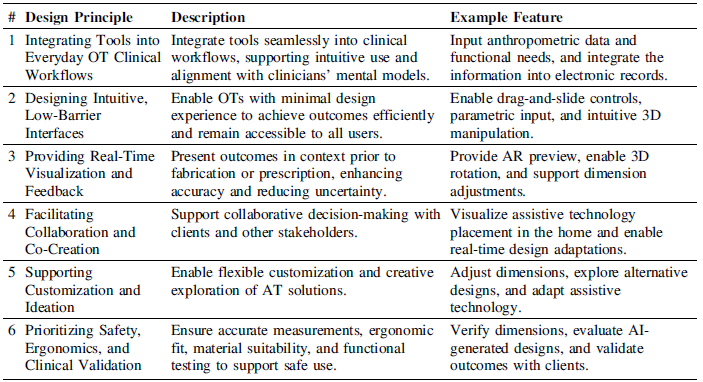
This section provides a cross-case analysis of four studies investigating computational design tools to support OTs in designing, prescribing, and visualizing AT. By synthesizing findings across these cases, we identify key considerations that reflect common insights, challenges, and best practices, aiming to inform the development of practical, client-centered, and safe AT tools for clinical use. Table 1 summarizes these key design considerations, each supported by a representative quote from the case studies for tools that assist OTs in designing, customizing, or prescribing AT.
Key design considerations for computational design tools supporting OTs

Integrating Tools into Everyday OT Workflows. Tools are most effective when embedded within everyday OT workflows, aligning with assessment, documentation, and client-centered goals. Integration ensures that OTs can use the tool naturally during practice, rather than treating it as an additional or separate task. For example, in the first case study, GenAI demonstrated promise in supporting DIY-AT workflows, particularly during early-stage ideation. Participants viewed GenAI as a tool to customize solutions when off-the-shelf options were inadequate, often incorporating it into their existing clinical routines and emphasizing its potential for on-the-spot customization. In the second case study, participants reported that tools allowing the direct input of patient dimensions and functional needs saved time and made assistive technology adaptation more systematic. Although tool integration was a guiding principle during design, initiated by first understanding OT workflows, these studies further confirmed its importance, as reflected in participants’ feedback.
Designing Intuitive, Low-Barrier Interfaces: Interfaces should be easy to navigate and require minimal training, ensuring accessibility for users with limited experience with technology. This design approach enables OTs to achieve meaningful outcomes quickly, an important consideration given the time constraints, limited resources, and variable support present in many clinical settings. Features such as drag-and-slide controls, parametric input, and simple 3D manipulation supported rapid customization without requiring CAD expertise, addressing the fact that most OTs have little or no design background. One OT noted, “I liked that I was able to turn it like in all 3D shapes… I just need to slide the slider,” highlighting the minimal barriers to engagement and the interface’s ease of use.
Providing Real-Time Visualization and Feedback. Real-time visualization and feedback were critical for both OTs and clients. Features such as AR previews, 3D rotation, and dimension adjustments allowed users to view devices and modifications in context prior to fabrication or prescription, supporting accurate and efficient decision-making while reducing uncertainty. For example, in the third and fourth studies, OTs reported that seeing AT devices in the real environment helped them anticipate fit, function, and potential barriers, enhancing both safety and usability. One participant noted, “Being able to see how the device fits and moves [in the real environment] reduces the risk of errors,” highlighting the value of visualization for informed decision-making.
Facilitating Collaboration and Co-Creation. Collaboration and co-creation were supported when tools enabled shared decision-making with clients and, where relevant, engineers or fabricators. AR visualizations allowed clients to express preferences, suggest adjustments, and actively participate in the co-design of ATs. For example, OTs in the fourth study reported, “The client could point out where they would want it, and we could adjust right away,” while another added, “Seeing the device in the room helped the client feel more involved in the decision,” highlighting the value of interactive tools that promote client engagement and enhance product attachment and ownership. An OT from the second study further reflected, “This tool exceeded my expectations… as it was designed by you and your therapist. That is very valuable,” highlighting how embedding tools in real-world clinical processes can facilitate meaningful co-creation with their clients.
Supporting Customization and Ideation. Customization and ideation were highly valued by OTs. Tools that allowed flexible modification of AT designs, such as adjusting dimensions, adding components, or exploring alternative solutions, encouraged creativity and client-centered outcomes. For example, in the third study, one OT noted, “Even if I don’t have a particular client in mind, I can scroll through the tool and gather AT ideas for potential devices,” while another added, “I appreciate that because sometimes we get stuck suggesting the same things. It’s helpful to have alternative suggestions and be able to present them through the tool as well.” Similarly, an OT from the first study emphasized the usefulness of the GenAI interface for ideation: “I could see how it could spark more creativity or innovation… outside of what I normally think about,” highlighting its ability to generate client-specific solutions, such as a no-grip handle: “That’s actually a really good idea too… having that handle could also be helpful so that she doesn’t have to grip.” Collectively, these findings suggest that tools supporting customization, alternative exploration, and parametric adjustments foster creative problem-solving, enable DIY adaptations, and may increase the likelihood of assistive technology acceptance and sustained use.
Prioritizing Safety, Ergonomics, and Clinical Validation. Accurate measurements, ergonomic fit, material suitability, and functional testing were consistently identified across all four studies as essential to ensuring safe and effective AT use. OTs emphasized the importance of reviewing device fit within the real context of use, validating digitally designed solutions, and considering safety alongside usability. As one OT from the second study reflected, “It’s reassuring that I can double-check dimensions before giving it to a patient,” underscoring the importance of careful clinical oversight in AT design. Participants highlighted the need for professional judgment, validation of device functionality, and monitoring for potential risks prior to prescription or implementation. Overall, OTs emphasized that such tools should support rather than replace clinical expertise, ensuring that devices meet safety and functional requirements through appropriate professional oversight and assessment.
5. Discussion and implications
In this paper, we examined four computational design tools developed over the past six years to support OTs in the design, customization, and prescription of ATs. Across these studies, six key design considerations emerged: seamless integration into clinical workflows, intuitive and accessible interfaces, real-time visualization and feedback, support for collaboration and co-creation, flexible customization and ideation, and prioritization of safety, ergonomics, and clinical validation. These considerations reflect recurring needs and challenges OTs encounter when working with clients and provide a framework for designing practical, client-centered AT tools.
OTs rely on a variety of tools in their daily practice to assess, customize, and provide ATs. These include measurement instruments (e.g., goniometers, dynamometers, pinch gauges, and simple methods such as hand tracing on paper), client assessment forms (e.g., the Disability of the Arm, Shoulder, and Hand form, used alongside measurement instruments to comprehensively evaluate upper-limb mobility), and a range of physical AT devices, often carried as part of a “toolbox” to support client-centered care. While traditional OT tools (e.g., measurement instruments and assessment forms) are widely used, they are not without limitations. Prior research highlights time constraints, workload, and workflow integration as significant barriers to their comprehensive use (Reference Ransby, Jacobsen and HansenRansby et al., 2024). Furthermore, these tools often rely on subjective observation, which can introduce bias and inconsistency (Reference Kokkotis, Kansizoglou, Stampoulis, Giannakou, Siaperas, Kallidis, Koutra, Koutra, Beneka and BebetsosKokkotis et al., 2025). Concerns also exist around measurement validity and flexibility, as some assessments remain unvalidated for certain client populations and are informally adapted in practice (Reference Wales, Clemson, Lannin and CameronWales et al., 2016). Additionally, many tools require specialized training or experience to use effectively and often lack features such as real-time visualization, client collaboration, or systematic documentation, which can increase cognitive load and decision uncertainty for OTs (Reference Shenai and AflatoonyShenai & Aflatoony, 2024).
Collectively, these challenges underscore the need for more integrated, objective, and adaptive computational design tools in OT practice, which offer a promising alternative or complement to traditional resources, especially given the accessibility, portability, and flexibility limitations of conventional tools. If designed well, these tools offer enhanced capabilities for AT design, customization, prescription, and visualization. By integrating multiple functions, such as AI-driven automation, parametric adjustments, AR-based visualization, and structured decision support, either within a single platform or across interoperable tools, computational design solutions can streamline OT workflows, reduce cognitive load, and support more systematic, evidence-based practice. AI can further support OTs by automatically generating personalized AT designs from client measurements and functional profiles, suggesting device modifications based on prior cases, predicting optimal fit and functionality, and providing decision support through automated assessments and recommendation scoring. These capabilities allow OTs to rapidly prototype solutions, validate design options, and efficiently plan AT interventions (Reference Aflatoony and KolarićAflatoony & Kolarić, 2022; Reference Zhang, Aflatoony and LiZhang et al., 2025). OT involvement is crucial for ensuring computational design tools achieve their full potential, as clinical oversight is necessary to protect end-users, even when tools are integrated, objective, and adaptive. Guided by a “do-no-harm” ethos (Reference Hofmann, Williams, Kaplan, Valencia, Hann, Hudson, Mankoff and CarringtonHofmann et al., 2019), OTs play a vital role in validating device safety and efficacy, balancing rapid prototyping with medical liability protections (Reference Lakshmi, Hofmann, Valencia, Wilcox, Mankoff and ArriagaLakshmi et al., 2019). Their engagement also helps uphold ethical practices and promotes resilience in high-risk contexts, such as the design and deployment of AT solutions in clinical settings (Reference Lakshmi, Hofmann, Mack, Hudson, Mankoff and ArriagaLakshmi et al., 2021). By participating throughout the design and implementation process, OTs ensure that design tools are not only efficient and user-centered but also safe, practical, and aligned with real-world clinical workflows. This combination of technological innovation and professional expertise is essential for creating tools that truly support both clinicians and their clients.


 Open access