

In the last 20 years, mobile GIS applications have emerged as increasingly valuable tools within archaeological research (Chyla and Buławka Reference Chyla and Buławka2020). But what precisely is meant by “mobile GIS”? The term refers to software developed for the collection, editing, analysis, and visualization of geospatial data directly on mobile devices while ensuring seamless synchronization and interoperability with desktop GIS platforms.
The evolution of mobile GIS has closely followed advancements in global navigation satellite system (GNSS) technologies. The first generation of mobile GIS applications were developed in the early 2000s (Chyla and Buławka Reference Chyla and Buławka2020:102; Fábrega-Álvarez and Lynch Reference Fábrega-Álvarez and Lynch2022:215–216). These early tools were predominantly proprietary software—such as Esri’s ArcPaD—and required extensive GIS expertise to operate effectively (Tripcevich Reference Tripcevich2004). GPS technology has since become fully accessible to the general public and has been integrated into everyday devices, such as smartphones and tablets.Footnote 1 The widespread adoption of modern smartphones equipped with internal GNSS receivers has significantly boosted the development of free and open-source mobile GIS applications in the so-called second generation of mobile GIS applications (Fábrega-Álvarez and Lynch Reference Fábrega-Álvarez and Lynch2022:216). A major advantage of these new applications is their user-friendly design, which has substantially lowered the technical barrier for their use; they are now accessible to a broader community of archaeologists (Chyla and Buławka Reference Chyla and Buławka2020).
Thanks to these innovations, open-source mobile GIS applications are playing an increasingly central role in archaeological practice, providing powerful solutions for improving field practices. They are particularly valuable in archaeological surveys, where teams frequently operate across wide areas and need to gather diverse types of information. In this context, mobile GIS enables faster and more flexible documentation directly on-site, often supporting real-time and multiuser data collection (Farinetti, Rossi, and Bottoni Reference Farinetti, Rossi, Bottoni, Moullou and Farinetti2026). By streamlining workflows and improving both precision and collaboration, mobile GIS is transforming how archaeological surveys are conducted, from topographic to artifact surface surveys (Fábrega-Álvarez and Lynch Reference Fábrega-Álvarez and Lynch2022; Farinetti, Bottoni, et al. Reference Farinetti, Bottoni, Rossi, Fasson, Scoz, Putzolu, Cavalazzi and Johnson2026; Lindsay and Kong Reference Lindsay and Kong2020; Sgouropoulos et al. Reference Sgouropoulos, Urem-Kotsou and Chrysafakoglou2024).
However, their use in archaeological excavations has been much more limited. Although desktop-based managing systems for archaeological excavations do exist (see the Italian QGIS plug-in Pyarchinit; Cocca and Mandolesi Reference Cocca and Mandolesi2013), there is a noticeable gap in the use of off-the-shelf free and open-source (F/OSS) mobile GIS tools for real-time excavation management (Psarros et al. Reference Psarros, Stamatopoulos and Anagnostopoulos2022).
A primary limitation lies in the positioning accuracy of standard mobile devices, such as smartphones or tablets. This accuracy often varies between 2 and 12 m, depending on factors such as the connection to a data network (an assisted global positioning system; A-GPS) and the number of satellites in the visible sky (position dilution of precision; PDOP; Tomastik et al. Reference Tomastik, Tomastik Sr, Simon and Rastislav2016). Archaeological excavations are frequently conducted in areas with limited network connectivity or in environments characterized by dense vegetation cover. These conditions significantly impair the performance of built-in GNSS receivers in mobile devices. Although the resulting positional accuracy may be adequate for tasks such as artifact surface surveys, stratigraphic excavations demand substantially higher precision to produce reliable and detailed spatial documentation (Farinetti, Rossi, and Bottoni Reference Farinetti, Rossi, Bottoni, Moullou and Farinetti2026).
This need for precision has driven archaeologists toward more complex and specialized solutions. Systems that integrate mobile recording devices with high-precision instruments such as total stations or DGNSS receivers are often combined with web-based database platforms (see ArchField: Smith and Levy Reference Smith and Levy2014; OpenDig: Vincent et al. Reference Vincent, Kuester and Levy2014; FAIMS mobile: Ballsun-Stanton et al. Reference Ballsun-Stanton, Ross, Sobotkova and Crook2018), proprietary applications (see ArcPad: Tripcevich and Wernke Reference Tripcevich and Wernke2010), or customized IT solutions (see IDIG: Psarros et al. Reference Psarros, Stamatopoulos and Anagnostopoulos2022; Dhaskalio excavation: Boyd et al. Reference Boyd, Campbell, Doonan, Douglas, Gavalas, Gkouma and Halley2021).
Typically developed by IT specialists, these tailored solutions are frequently designed to meet specific research goals. Although their specialized nature can be beneficial, this also means that they often lack flexibility, offer limited customization options, and demand substantial technical expertise (Uildriks Reference Uildriks2016). Consequently, these tools become challenging for the average field archaeologist to adopt and use effectively. These advanced systems may also require constant maintenance and updates, which may not be sustainable given the limited financial resources that characterize many research and academic excavation projects.
Today, the second generation of mobile GIS applications can be easily connected to high-precision instruments, solving the positioning issue and further enhancing their potential for archaeological practice. Yet, in contrast to the rapid evolution and the increasing availability of ready-to-use and user-friendly applications, their adoption in excavation projects has remained surprisingly limited, in favor of using proprietary software and expensive tailored solutions. A detailed comparison of the various free mobile GIS tools currently available on the market lies beyond the scope of this article. Instead, its aim is to address this gap in the use of these applications by presenting one practical workflow for the comprehensive digital management of excavation data. The proposed solution is built around QField, one of the most widely adopted F/OSS mobile GIS platforms, which is freely available for both Android and iOS devices. By describing an integrated workflow that combines high-precision GNSS technology with open-source GIS tools, this article demonstrates the effective application of F/OSS mobile GIS for the digital management of archaeological excavations. The proposed approach seeks to overcome common challenges by balancing user-friendliness, financial constraints, and the high level of precision required for accurate stratigraphic excavation documentation.
Tools and Methods
The QField Application
Developed by core contributors to the QGIS project, QField leverages shared QGIS core libraries to ensure the best integration between desktop and mobile environments. This interoperability is further enhanced by a dedicated QGIS plug-in that facilitates data synchronization and transfer, enabling efficient workflows across devices (more information can be found at https://docs.qfield.org/get-started/).
A particularly innovative feature of QField is its native Bluetooth integration with third-party high-precision GNSS receivers. This functionality is essential in excavation contexts, where centimetric positional accuracy is required for the reliable documentation of stratigraphic units and archaeological features. To connect to a GNSS receiver, QField supports the NMEA 0183 protocol via Bluetooth (Android only) or via TCP/UDP over Wi-Fi (Android and iOS). Within the app’s positioning settings, users can enable logging of key NMEA sentences (GGA, GSA, GSV, RMC, etc.) to a separate text file, thereby providing detailed information on the status of the GNSS receiver. Additional metadata, such as fix status and dilutions of precision (DOPs) can be also stored directly in entity attribute tables by activating default value expressions in QGIS (for more details, see https://qfield.org/docs/prepare/gnss.html). QField’s positioning settings also support the use of accuracy thresholds, antenna height compensation, and averaged positioning functionality. In addition, altitude conversion can be managed directly within the app using a vertical grid shift file. Compared with alternative F/OSS solutions currently available on the market, Qfield’s capabilities provide a higher degree of control over the positional constraints required in an archaeological excavation. Another key advantage of QField is its high degree of customization. The application allows for extensive tailoring of spatial and nonspatial entities, as well as the attribute forms, enabling archaeologists to adapt the system to the documentation needs of each excavation project.
QField also benefits from its intuitive and user-friendly interface. Its capacity to import QGIS project configurations—including custom widgets and database relations—simplifies data entry and minimizes the user’s learning curve. This makes the tool accessible not only to experienced GIS professionals but also to archaeologists with limited technical expertise. Moreover, QField supports connections to PostgreSQL/PostGIS systems, allowing users to manage excavation data in more robust and complex database environments.
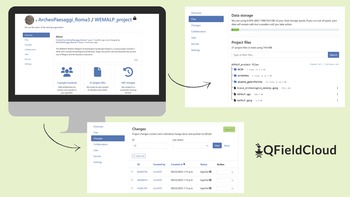
A significant development within the QField ecosystem is the introduction of QFieldCloud, a cloud-based service designed to easily synchronize projects between QGIS and QField. QFieldCloud eliminates the need for manual file transfers by enabling seamless, remote updates and access to project data. Archaeological teams can upload, share, and collaboratively manage datasets from the field or office, thereby supporting multiuser cooperation and even crowd-sourced data collection workflows. Each user’s changes are tracked, allowing for the correction of errors and the restoration of previous dataset versions when needed. The system also includes conflict resolution mechanisms (collision mitigation), which can operate in a “last-write-wins” mode or allow for the manual review of conflicting edits. This version control mechanism ensures data integrity and provides a reliable safeguard during both fieldwork and postprocessing phases (see Figure 1). Although QFieldCloud offers a free community user account—with 100 MB of cloud storage and access to public project collaboration—advanced features such as expanded cloud capacity and multiuser collaboration on private projects require a subscription plan.Footnote 2
Screenshot of the QfieldCloud browser interface, where it is possible to manage the project files and each user’s changes at the project.

Figure 1 Long description
The image contains three screenshots of the QFieldCloud interface. The first screenshot displays the project overview section, including project details and user information. The second screenshot shows the data storage section, listing project files and their sizes. The third screenshot presents the changes section, detailing recent modifications with timestamps and user names. The QFieldCloud logo is visible in the bottom right corner.
Overall, QField provides a flexible and accessible framework that integrates high-precision positioning tools and advanced GIS functionality with collaborative cloud services, offering an effective solution for the digital documentation and management of archaeological excavations.
Building a Relational Geodatabase in QGIS
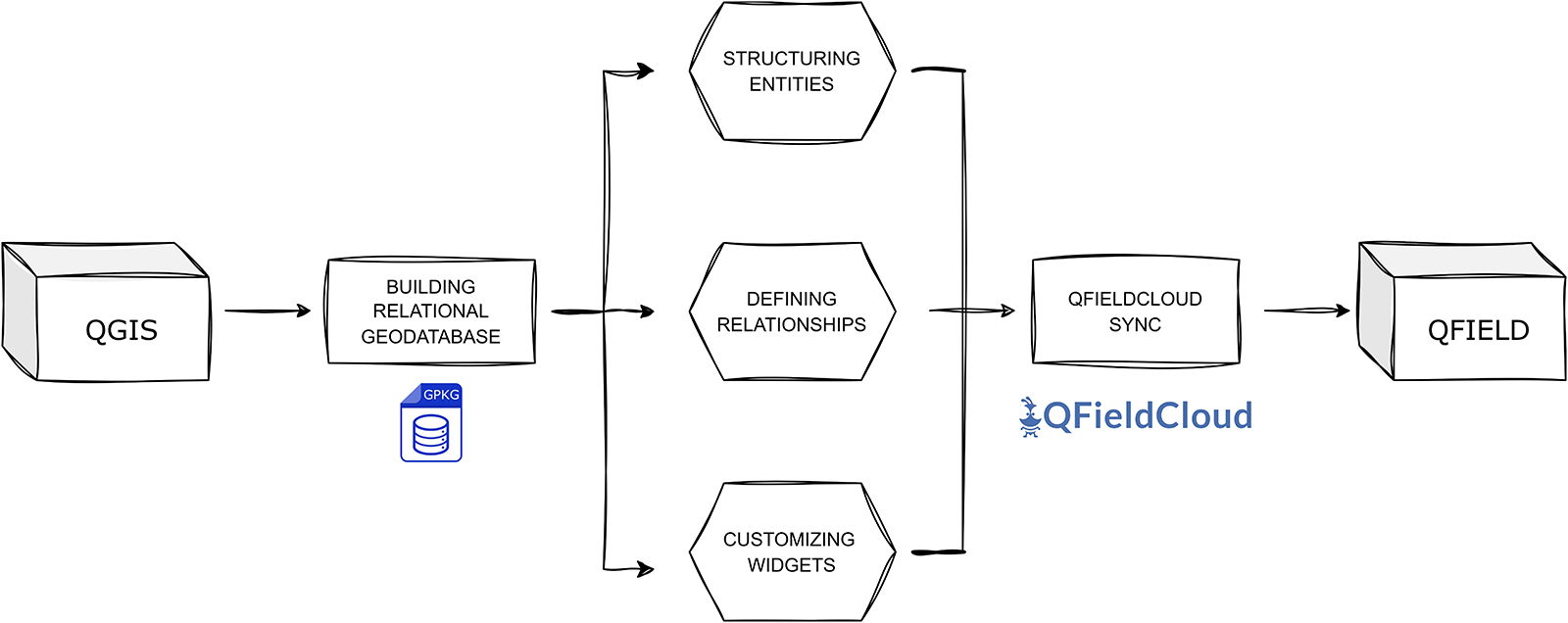
In this section, I present an example of a workflow for the real-time management of archaeological excavations. Taking advantage of all the capabilities of the QField app, the proposed approach starts with the project’s configuration in QGIS and the preparation of a relational geodatabase (Figure 2). From its initial design, this database was created to adhere to the FAIR (Findable, Accessible, Interoperable, Reusable) principles (Wilkinson et al. Reference Wilkinson, Dumontier, Aalbersberg, Appleton, Axton, Baak and Blomberg2016), with a special focus on interoperability and reusability. The system is also integrated into the SHAReLAND project, a Roma Tre University initiative for the open dissemination of archaeological data (Bottoni et al. Reference Bottoni, Bellini and Farinetti2024).
Diagram of the construction phases of the relational geodatabase in QGIS.

Figure 2 Long description
The diagram shows a workflow starting with QGIS, leading to building a relational geodatabase. This process involves structuring entities, defining relationships and customizing widgets. These components connect to QFieldCloud, which then syncs with QField.
The entire geodatabase was developed within a single GeoPackage (GPKG) file format that was chosen for three main reasons: (1) its efficient compatibility with QField and QFieldCloud, allowing centralized storage of all spatial and nonspatial data in a single file; (2) its ability to support diverse data types—including raster (basemap and georeferenced orthophotos), vector, and tabular datasets—that are ideal for the varied nature of archaeological documentation; and (3) its support for SQL, facilitating advanced querying and manipulation of excavation data. The GPKG open format also aligns with the FAIR principles, ensuring the interoperability and reusability of the resulting dataset.
Data Structure: Excavation Workflow Entities
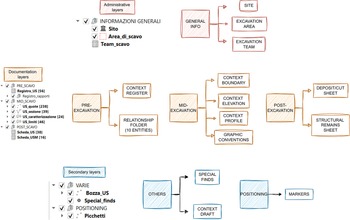
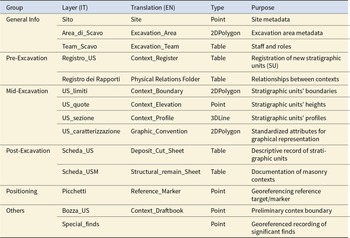
The excavation geodatabase is organized into six thematic layer groups that reflect the operational phases of the stratigraphic excavation and its documentation data (Figure 3): General Info, Pre-Excavation, Mid-Excavation, Post-Excavation, Positioning, and Others (Montagnetti and Guarino Reference Montagnetti and Guarino2021). These groups represent the core of the stratigraphic excavation workflow, covering all stages from initial context registration, through its spatial documentation, to the completion of context sheets after its physical removal (Table 1).
The geodatabase entities, split into six thematic layer groups reflecting the excavation workflow.

Figure 3 Long description
The main categories are: General Info, Pre-Excavation, Mid-Excavation, Post-Excavation, Positioning and Others. General Info includes Site, Excavation Area and Excavation Team. Pre-Excavation covers Context Register and Relationship Folder. Mid-Excavation includes Context Boundary, Context Elevation, Context Profile and Graphic Conventions. Post-Excavation has Deposit/Cut Sheet and Structural Remain Sheet. Positioning features Markers. Others include Special Finds and Context Draft. Administrative layers are shown as Sito, Areadiscavo and Teamscavo. Secondary layers are VARE, BozzaUS, Special_finds and Picchetti.
Summary Table of Database Entities.

Table 1 Long description
The table inventories database entities by group (General Info, Pre-Excavation, Mid-Excavation, Post-Excavation, Positioning, Others), giving each layer’s Italian name, English translation, data type, and purpose. General Info includes Site (Point), Excavation_Area (2DPolygon), and Excavation_Team (Table) for metadata and staffing. Pre-Excavation has two Tables: Context_Register for new stratigraphic unit registration and Physical Relations Folder for relationships between contexts. Mid-Excavation contains four spatial layers: Context_Boundary (2DPolygon), Context_Elevation (Point), Context_Profile (3DLine), and Graphic_Convention (2DPolygon) for standardized graphical attributes. Post-Excavation adds two Tables: Deposit_Cut_Sheet and Structural_remain_Sheet for descriptive and masonry documentation. Positioning includes Reference_Marker (Point) for georeferencing targets. Others includes Context_Draftbook (Point) for preliminary boundaries and Special_finds (Point) for georeferenced significant finds, but Special_finds has no English translation provided. Overall, the dataset mixes spatial geometries and tabular records, with mid-excavation emphasizing mapped context features while pre/post phases emphasize documentation tables.
The General Information group contains two higher-level administrative layers. The Site (Sito) layer is a point dataset representing individual excavation sites, containing attributes such as the site’s name and a brief description of it. The Excavation_area (Area_di_Scavo) layer, structured as polygons, outlines the boundaries of specific excavation zones and includes metadata such as the year of excavation and a reference to the associated site. These two spatial entities provide the geographical and contextual framework within which individual contexts are registered and documented. Included in this group is the Excavation_Team (Team_Scavo) table, a nonspatial entity that stores information on excavation team members, including their names, institutional affiliations, and designated roles within the project.
The Pre-Excavation group comprises two primary entities that correspond to the essential documentation steps undertaken before the physical removal of a stratigraphic unit: the registration of the new context and the recording of its physical relationships. The initial phase is managed through the Context_Register (Registro_US), a no-geometry layer characterized by six key attributes:
1. Context_number (US_numero): a unique numerical identifier assigned to each context
2. Excavation_area (Area_di_Scavo): designation of the excavation area
3. Site (Sito): name of the archaeological site
4. Definition (Definizione): a brief textual description of the context
5. Recorder (Compilatore): name of the individual responsible for data entry
6. Date (Data): date on which the context was registered
The second documentation step is managed within the Physical Relations Folder (Registro dei Rapporti), which stores all physical relationships between stratigraphic contexts. Each type of relationship—for example, covers/covered by, cuts/cut by, et cetera—is represented by a dedicated table structured with two primary attributes: (1) Context_n (US_n): the context subject of the relationship and (2) Context_relationship (US_rapporto): the context object of the relationship.
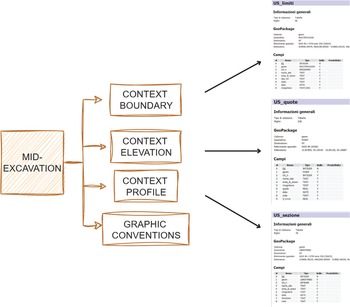
The Mid-Excavation group comprises four spatial entities that support the spatial documentation process conducted immediately before the physical removal of a context. The primary entity, Context_Boundary (US_limiti), is a 2D-multi-polygon layer used to delineate the top surface boundaries of each context (Figure 4). In this way, the top surface of an underlying context automatically serves as the bottom surface of the immediately overlying one. Its associated attribute table records the context’s unique numeric identifier along with several key data attributes, including topographic information (site name and excavation area), context type (deposit, cut, structural remain), excavation status (completed or ongoing), and recording metadata (name of the recorder and date of documentation).
The mid-excavation entities and their defined attributes used for the spatial documentation of contexts.

Figure 4 Long description
A hatched box labeled MID-EXCAVATION connects to four stacked boxes labeled CONTEXT BOUNDARY, CONTEXT ELEVATION, CONTEXT PROFILE and GRAPHIC CONVENTIONS. Three arrowed connections lead to three table screenshots on the right. The top screenshot is titled USlimiti and includes the headings Informazioni generali, GeoPackage and Campi. The middle screenshot is titled USquota and includes the headings Informazioni generali, GeoPackage and Campi. The bottom screenshot is titled US_sondino and includes the headings Informazioni generali, GeoPackage and Campi. The arrow from CONTEXT BOUNDARY points to USlimiti. The arrow from CONTEXT ELEVATION points to USquota. The arrow from CONTEXT PROFILE points to US_sondino.
Associated with Context_Boundary are three additional spatial layers:
1. Context_elevation (US_quote): a point layer used to register elevation data, with key attributes including ellipsoidal height (Quota) and geodetic height (Quota s.l.m.)
2. Context_profile (US_sezione): a 3D-line layer used to draw context profiles, which are stored as 3D lines and used as a backup to desktop-based photogrammetric documentation
3. Graphic_conventions (US_caratterizzazione): a 2D-polygon layer used to document specific internal characterizations of the context, such as the presence of big inclusions as stones or blocks
The Post-Excavation group encompasses nonspatial entities associated with the written documentation phase of an archaeological excavation—specifically, the completion of context sheets. Typically, once the spatial documentation has been completed and the context physically removed, the final step is to compile the relevant context sheet. In our excavations, we used two distinct types of sheets: one for deposits and cuts (scheda_US) and the other for structural remains (scheda_USM).
The structure of our context sheets is based on the official Italian model provided by the Central Institute for Cataloguing and Documentation (ICCD; Anichini et al. Reference Anichini, Fabiani, Gattiglia and Gualandi2012:9–11). However, users are free to adapt and customize the format to meet the specific needs of their project. Although a detailed examination of each attribute is beyond the scope of this discussion, the use of the Italian language in context sheet attributes and throughout the entire database structuring reflects my choice to produce data that can be immediately submitted to the Italian Ministry of Cultural Heritage without requiring further postprocessing and translation work. Doing so contributed to the production of analysis-ready data, not only enhancing the immediate efficiency of excavation recording but also ensuring that datasets would remain reusable in future research contexts, in line with the FAIR principles.
The secondary entities within the QGIS-based excavation database are organized into two main categories: Positioning and Others. In the Positioning group can be found the Reference_Marker (Picchetti) layer, which consists of point features marking the physical reference markers placed on-site, each with associated positioning data. In the Others group, the point-based Context_draftbook (Bozza_US) layer functions as a digital draft book used for the preliminary spatial documentation of contexts during fieldwork, and the Special_finds layer is a point layer used to record significant artifacts, providing detailed attributes such as context reference, object type, and precise spatial coordinates.
Defining Relationships: From Flat Tables to a Relational System
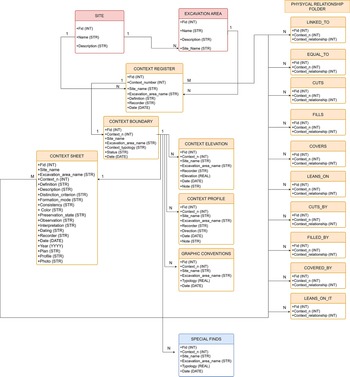
The relational structure of the excavation geodatabase was systematically formalized within QGIS through the definition of 32 distinct relationships, primarily based on the classic local key / foreign key model, with the unique context number serving as the central linking attribute (Figure 5). Although QGIS natively supports only one-to-many (1:N) relationships, these form the backbone of the database architecture and ensure logical consistency and full interoperability between spatial and nonspatial data.
Relational architecture of the excavation geodatabase showing links between spatial and nonspatial entities via the unique context number.

Figure 5 Long description
The diagram is an entity-relationship illustration of an excavation geodatabase schema. It features colored table boxes and connector lines. The central element is the Context Register, with Site and Excavation Area tables positioned above it. Below, context-related tables such as Context Boundary, Context Elevation, Context Profile and Context Sheet branch out. The Physical Relationship tables, including Linked To, Cuts, Fills and others, are grouped on the right. Special Finds is located at the bottom. Each table includes fields like id and contextid, emphasizing the relational structure. The diagram highlights the connections and cardinality between tables, focusing on the unique context number as a linking attribute.
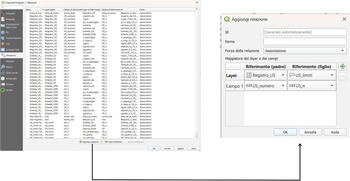
All the relationships are defined in the project property panel under the section “Relations” (Figure 6). Once the relationships are settled, they are continuously stored within the QGIS project file (.QGS), ready to be synchronized through the QFieldCloud plug-in in QField.
QGIS project property panel showing the configuration of geodatabase relationships.

Figure 6 Long description
Insufficient visual information to describe this element accurately.
As illustrated in Figure 5, the recording system is centered on the Context_Register, which functions as the main entity for linking all documentation related to each individual stratigraphic unit. This core entity is directly connected through the context’s unique numeric identifier to spatial layers such as Context_Boundary, Context_Elevation, Context_Profile, and Graphic_Conventions, as well as to nonspatial entities like the Context Sheets.
Going beyond simple 1:N relationships, more complex relational patterns such as one-to-one (1:1) and many-to-many (M:N) can be modeled through the strategic use of intermediate tables and QGIS project widgets, thereby enhancing the system’s expressiveness and adaptability to diverse excavation workflows. Two notable examples illustrate this complexity:
1. Many-to-many (M:N) relationships exist between the Context_Register, Context Sheets, and the Physical Relations tables. These are implemented through dedicated join tables, enabling each context to participate in multiple stratigraphic relationships. This is especially effective for modeling complex stratigraphic sequences.
2. One-to-one (1:1) relationships link each stratigraphic unit in the register to a single polygon in Context_Boundary; in addition, each Context_Boundary polygon records a single finalized Context Sheet. This ensures that each stratigraphic unit is uniquely mapped and documented, preserving consistency between geometric representation and descriptive data.
Finally, the Site and the Excavation_Area layers are also directly linked to the Context_Register and the Physical Relations folder. These relationships allow for efficient post-excavation filtering and postdocumentation GIS visualization of the recorded data.
Widget and Forms Customization: Optimizing the Qfield User Interface
The final stage in the customization of the excavation geodatabase involves the configuration in QGIS, through the layer properties panel, of all the widgets, input forms, and display labels. This phase is crucial to enhancing both the reliability of the data and the accessibility of the system, making it easier for archaeologists with varying levels of GIS expertise to work effectively with the QField application.
Using the attribute form panel, it is possible to select the different widgets for all the entities in the geodatabase. Four types of widgets were strategically employed to support and optimize the documentation process:
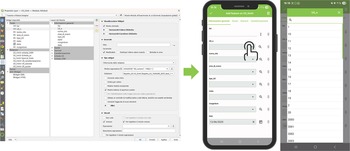
1. Relation Reference: This widget allows users to populate attribute fields in a child table by selecting values from a parent table, as defined in the project’s relationship settings. It is particularly useful for managing the hierarchy between Context_Register and Context Boundary, guiding users through the documentation workflow in QField. This ensures that no geometry can be created unless a corresponding context number has first been registered in the context register (Figure 7).
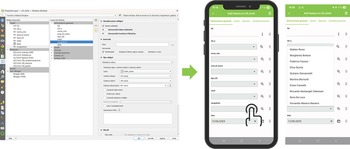
2. Value Relation: This widget allows users to populate attribute fields by selecting values from an external reference table without requiring a formal relationship definition. It is particularly useful for fields that recur across multiple entities, such as the recorder’s name, thereby promoting consistency and reducing the use of redundant project relationships (Figure 8).
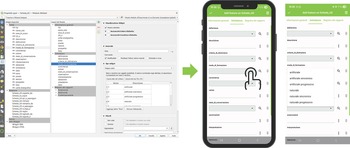
3. Value Map: This widget provides predefined dropdown menus populated with fixed lists of options. It is especially effective in supporting the standardization of data entry and vocabulary for context sheets. Attributes such as layer consistency, color, and other qualitative characteristics can be rapidly entered via user-friendly selection menus, enhancing the efficiency and accuracy of field documentation (Figure 9).
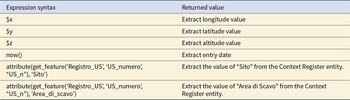
4. Default Value: This widget is used to automatically populate fields using QGIS default or customized expressions (Table 2). It is particularly important for the automatic extraction of spatial coordinates and the entry date on geometry creation. Additionally, default values are used to reduce repetitive data entry by automatically retrieving information from parent records. For example, when populating layers such as Context_Boundary, Context_Elevation, or Graphic_Conventions, attributes such as Site and Excavation Area are automatically inherited from the Context_Register, ensuring consistency and reducing the cognitive load on the user.
Left: Setting the Relation Reference widget for the US_n attribute in the US_limiti layer in QGIS; right: QField interface showing the widget used to link geometry creation to registered stratigraphic contexts.

Figure 7 Long description
The image shows two main sections. On the left, a QGIS interface displays settings for configuring a Relation Reference widget, with options for setting up attribute fields and relationships. On the right, two screens of a mobile device running the QField app are visible. The first screen shows a form with fields for data entry, including 'stratum', 'structure' and 'diagnosis', with a save button at the bottom. The second screen displays a list view with entries labeled numerically from one to ten.
Left: Setting the Value Relation widget for the recorder attribute in the US_limiti layer in QGIS; right: Use of the widget in QField to select values from the excavation team reference table.

Figure 8 Long description
The left screenshot displays the QGIS interface with a project window and settings for configuring the Value Relation widget. It includes fields for setting up attribute relations and selecting external reference tables. The right screenshot shows a mobile app interface with a list of selectable values from a reference table. The app screen includes fields for data entry and a button for selection, illustrating the use of the widget in a mobile context.
Left: Setting the Value Map widget in the Scheda_US layer in QGIS with predefined options; right: dropdown menu in QField enabling standardized attribute selection during context sheet completion.

Figure 9 Long description
The image on the left displays a QGIS interface with various settings and options for configuring a layer. It includes fields for setting attributes and predefined options. The image on the right shows two mobile phone screens displaying a data entry app with dropdown menus for attributes like reference, location and description. The app interface is designed for efficient data entry with standardized options.
Examples of QGIS Expressions Used in the Default Value Widget.
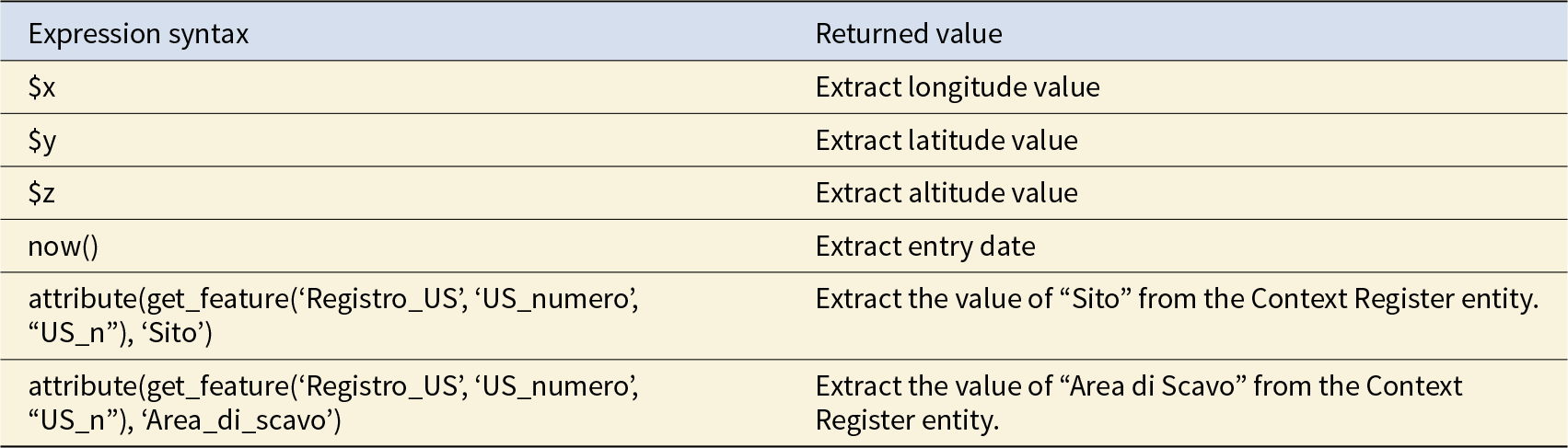
Table 2 Long description
The table lists QGIS expression syntax used for default values and the type of value each expression returns. Three variables return coordinate components: $x gives longitude, $y gives latitude, and $z gives altitude. The function now() returns the entry date at the time the expression is evaluated. Two longer expressions use get_feature on the “Registro_US” layer keyed by “US_numero” matching “US_n”, then attribute() to return a specific field. One returns the “Sito” value and the other returns “Area_di_scavo” (Area di Scavo) from the related Context Register record. Results depend on the referenced layer and fields existing and on “US_n” matching a valid feature; otherwise the attribute lookup may return null or an unexpected value.
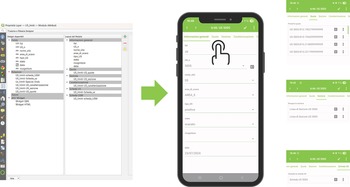
Once the widget customization is completed, the next step is to configure the input forms using QGIS’s drag-and-drop designer. This phase allows for the customization of the form’s layout, thereby streamlining the data entry process and enhancing the user experience within the QField application. QGIS enables the creation of intuitive forms using custom labels and nested subfolders that are designed to help and guide the user in the data entry process. For example, I structured the Context_Boundary input form into six subfolders (Figure 10):
1. General Info (Informazioni Generali)
2. Elevations (Quote)
3. Profiles (Sezione)
4. Graphic Conventions (Caratterizzazione)
5. Deposit/Cut Sheet (Scheda_US)
6. Structural Remains Sheet (Scheda_USM)
Custom layout of the US_limiti input form in QGIS, structured into nested subfolders to enhance usability.

Figure 10 Long description
The image consists of three parts. The first part shows a computer screen displaying a QGIS layout with various folders and subfolders, including 'ContextBoundary' and 'SchedaUSM'. The second part features a mobile phone interface with a form titled 'Informazioni generali', containing fields like 'Sito', 'Area di scavo' and 'Data'. The third part includes three mobile screenshots, each showing form fields with labels such as 'US_numero', 'Sito' and 'Area di scavo', along with input boxes and dropdown menus. An arrow points from the computer screen to the mobile interface, indicating a transition or connection between the two platforms.
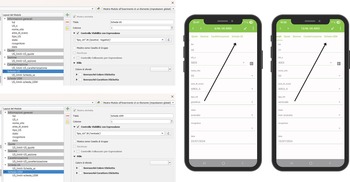
The General Info subfolder contains all the core attributes of the Context_Boundary entity. The subfolders Elevations, Profiles, and Graphic Conventions manage the relationships with the child tables Context_Elevation, Context_Profile, and Graphic_Conventions, respectively. These allow users to directly access and edit these related child tables from within the Context_Boundary parent form. Similarly, the context sheet relationships are handled through the subfolders Deposit/cut Sheet and Structural Remains Sheet. However, in this case, the visibility of each subfolder is controlled by expressions based on the value of the field Context_type (tipo_US) (deposit/positiva; cut/negativa; structural remain/verticale), which is part of the Context_Boundary attribute table:
• “tipo_US” IN (“positive,” “negative”) → displays the Deposit/Cut Sheet subfolder.
• “tipo_US” IN (“vertical”) → displays the Structural Remains Sheet subfolder.
This logic ensures that only the relevant documentation subfolders appear in the form (Figure 11).
Conditional display of context sheet subfolders based on the context type (deposit, cut, or structural feature).

Figure 11 Long description
The image shows two screenshots of a software interface on the left and two mobile app screens on the right. The software interface screenshots display a list of folders and options related to 'Conditional display of context sheet subfolders based on the context type (deposit, cut, or structural feature).' Various options and settings are visible, including checkboxes and dropdown menus. The mobile app screens show a form with fields labeled 'Name,' 'Type,' 'Date,' and other details. Both screens have a green header with the text 'Sales Order.' Arrows point from the software interface to the mobile app screens, indicating a connection or transfer of information between the two platforms.
This configuration forms the backbone of the system, establishing a self-guided workflow in which spatial and nonspatial data are contextually linked through the unique context number as the primary reference key. It supports a coherent and logical documentation process by allowing users to seamlessly navigate between interconnected layers, ensuring consistency and completeness during data collection in the field.
Once the project configuration is done, it is finally possible to upload the project file (.QGZ/.QGS) and the GeoPackage file (.GPKG) in QField using the QFieldCloud plug-in (for more detailed information about project synchronization, visit https://docs.qfield.org/it/get-started/tutorials/get-started-qfc/).
Field Testing of the Qfield Documentation System
Research Contexts, Hardware, and Software Setup
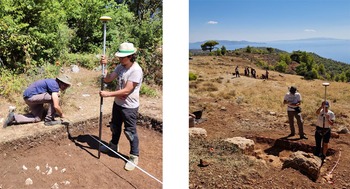
The QField recording system was tested in two archaeological excavations during 2024 (Figure 12). The first took place in Italy in July 2024 as part of the MoLuLaP Project conducted by Roma Tre University at the medieval site of Montefalco Castle (Bernardi and Farinetti Reference Bernardi, Farinetti, Bernardi, Farinetti and Valenzani2024). The second test occurred in Greece in October 2024 during the excavation of the Marmara Sanctuary under the auspices of the WeMALP Project, a collaborative effort led by Roma Tre University, Scuola Archeologica Italiana Di Atene (SAIA), and the Greek Ephorate of Antiquities (Farinetti and Avgerinou Reference Farinetti and Avgerinou2023).
The two field testing locations of the QField system: on the left, Montefalco (Italy) and on the right, Marmara (Greece).

Figure 12 Long description
The image on the left shows two individuals engaged in archaeological fieldwork in a wooded area. One person is crouching near the ground, while the other stands holding a surveying pole. The image on the right depicts three individuals working in an open field. Two of them are standing with surveying equipment and the third is in the background near an excavation site. The landscape is open with distant hills and a clear sky.
During the MoLuLaP campaign, QField version 3.3.5 “Darien” was used. For the WeMALP excavation, version 3.4.2 “Ebo” was deployed. The application was installed on two Samsung S9+ tablets, each connected via Bluetooth to an E-Survey E300 PRO DGNSS receiver. This configuration enabled simultaneous data collection across multiple excavation areas. When necessary, QField was also operated by personal smartphones, offering additional flexibility in the field. The excavations were conducted under different connectivity conditions: the MoLuLaP campaign took place in an area with no phone signal, whereas the WeMALP campaign was carried out in a location with mobile data coverage. Nevertheless, in both cases, data synchronization with QfieldCloud was intentionally postponed until the end of the working day, when a strong and reliable internet connection was available. This approach took advantage of QField’s capability to operate fully offline using the tablets’ internal memory and was adopted to minimize the risk of data loss and ensure the integrity of the recorded information.
Qfield On-Field Recording Workflow
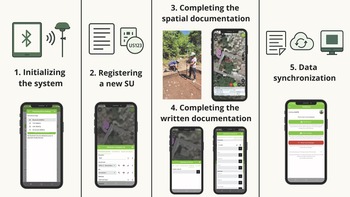
Once the QGIS project is fully synchronized with the QField app, the system is ready for use in the field. A GitHub repository with a demo project has been created to allow everyone to test this system and its recording workflow (https://doi.org/10.5281/zenodo.17492524). It can be summarized in five key steps (Figure 13).
The on-field QField recording workflow.

Figure 13 Long description
The diagram illustrates the QField recording workflow in five steps. 1. Initializing the system: A smartphone screen displays a setup interface with Bluetooth and GPS icons. 2. Registering a new SU: A smartphone screen shows a form for entering details. 3. Completing the spatial documentation: A smartphone screen displays a map with a person working in the field. 4. Completing the written documentation: A smartphone screen shows a list of entries for documentation. 5. Data synchronization: Icons represent cloud storage and computer synchronization, with a smartphone screen showing synchronization options.
(1) Initializing the system. The field documentation process begins by launching the GIS project on the mobile device and establishing a Bluetooth connection with the high-precision GNSS receiver. This setup will turn your GNSS pole into a georeferenced drawing tool. To set up an external antenna in the QField app, first pair your mobile device with the GNSS receiver via Bluetooth. This step enables the app to detect other Bluetooth connections. Then, open the QField app settings, navigate to the Positioning section, and tap the green button to select the external receiver from the list of available Bluetooth devices.
(2) Register a new stratigraphic unit. A new stratigraphic context is initiated by creating a new record within the Context_Register layer. Through the attribute table, it is possible to assign the context a unique identifier and a brief descriptive definition. Using the table banner, it is also possible to access the Physical Relationship Folder directly from this table, allowing the operator to immediately record the context’s physical relationships.
(3) Complete the spatial documentation. Using the Context_Boundary layer, the operator draws the context’s boundaries by physically moving the GNSS pole along its perimeter. Once the geometry is captured and the related attribute form is completed, through the parent table Context_Boundary users can easily access all other documentation layers (Context_Elevation, Context_Profile, Graphic_Conventions) for completing the context spatial documentation.
(4) Complete the written documentation. After acquiring spatial data, written documentation is finalized using the Deposit/Cut sheet layer, which is still accessible from the Context_Boundary parent table. From the context sheet layer, the user can also return to the Physical Relationships folder, enabling the documentation of intercontext stratigraphic relationships via the dedicated modules.
(5) Synchronize data. At the end of each fieldwork session, the new records are synchronized with the QFieldCloud platform. This enables immediate access from a desktop GIS environment and eliminates the need for manual data transfer or postprocessing.
Conclusions
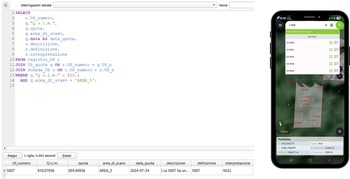
The adoption of QField as a mobile GIS solution for archaeological excavation management has significant potential for improving both the efficiency and accuracy of field documentation while keeping the user learning curve and the funding required low. Its ability to support the integrated collection of stratigraphic and planimetric data directly on-site reduced the risk of mapping errors and minimized the need for post-excavation data processing. Moreover, its offline functionality ensured reliability even in remote research contexts. The intuitive interface, the customizable widgets, and its support for both simple and advanced queries made the application accessible to users with varying levels of technical expertise. Throughout the excavation process, recorded data could be reviewed and queried directly within QField using its built-in search and filter tools—a useful feature for quick, on-site context research. However, its real advantage emerged in the post-fieldwork phase, when more advanced queries could be performed within the desktop GIS environment using SQL language (Figure 14). This capability was crucial during the interpretation stage when the relational structure of the database allowed for powerful, targeted data interrogation.
Example of QField’s built-in search and filter tools (right) and advanced SQL query execution in QGIS desktop for post-excavation data interpretation.

Figure 14 Long description
The left side shows an SQL query being executed in the QGIS desktop environment. The query selects various columns from a table named 'UStumore' and includes conditions for filtering data. Below the query, a table displays columns like 'idtumore', 'id_campione', 'quota' and others with corresponding data entries. The right side shows a smartphone displaying the QField mobile GIS interface. The screen shows a map with labeled areas and a list of items with checkboxes, indicating selectable layers or features. The interface includes navigation and selection tools at the bottom.
However, several limitations of QField were identified: its optimal use requires a large-screen device, and battery life, mainly when using the device’s internal GNSS receiver, can be restrictive during extended field sessions. Furthermore, multiuser collaboration on shared projects relies on QFieldCloud, which requires a paid subscription for full functionality. Looking ahead, areas for future development—enhancing the relational database by simplifying relationships, improving widgets, and including Z-dimension data in the 2D-layer Context_Boundary—will be prioritized. These improvements aim to lay the groundwork for a future 3D GIS excavation ecosystem that will be capable of integrating stratigraphic records with photogrammetric models for even more comprehensive documentation.
Acknowledgments
I thank Margherita Bottoni for her wholehearted support and her valuable feedback on the strengths and weaknesses of the developed system. I also express my sincere gratitude to the WeMALP project director Emeri Farinetti and to the MoLuLaP project directors, Martina Bernardi, Emeri Farinetti, and Riccardo Santangeli Valenzani, for allowing me to use and test the Qfield recording system during their fieldwork. Special thanks go to Fernando Moreno Navarro for assisting with the translation of the abstract into Spanish. Finally, let me emphasize that no specific permits were required for the completion of this work. The fieldwork for the WeMALP project was conducted with permit no. 92YA46NKOT-EH3 (2019, renewed in 2025) issued by the Hellenic Ministry of Culture. The fieldwork for the MoLuLaP project was conducted with permit no. 246 (12/03/2024) issued by the Italian Ministry of Culture. All the images are mine.
Funding Statement
This work was supported by the University of Rome “Tor Vergata” under Grant PNRR DM 118/2023. The research also forms part of the ongoing MoLuLaP and WeMALP projects of Roma Tre University.
Data Availability Statement
The digital data supporting the paper, consisting of a demo of the Qfield recording system, are available in the GitHub repository at https://doi.org/10.5281/zenodo.17492524.
Competing Interests
The author declares none.

 Open access